web
You’re offline. This is a read only version of the page.
close
Skip to main content

Announcements

No record found.

News and Announcements icon
Community site session details

Community site session details

Session Id :
Microsoft Dynamics NAV (Archived)

Group Layout in NAV 2016 web client

(0) ShareShare
ReportReport
Posted on by 574

I am trying to get a web client page with following structure:
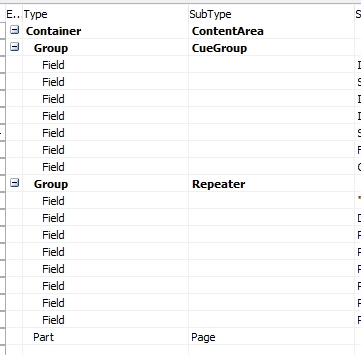
screenshot_5F00_20160919_5F00_194513.jpg

Page is based on REPEATER table

CUEGROUP is not based in any table (just variables I create)

The subpage at the very end is a List-Page repeater based on its own table, but depends on Repeater1 values (lets think Repeater 1 is sales invoice header in table mode and Repeater 2 is sales invoice lines in table mode.

When I access to this page with web client I get REPEATER 1 side by side the subpage instead of one above the other as in the diagram.

However, if I access via NAV Client, it looks fine: Cue group on the top, REPEATER1 at the middle, and under it, the subpage.

I would like to maintain same vertical structure as in NAV Client

Any clues on group/grouplayout/fixedlayout ? I have tried many combinations that work in NAV client but not in web client

*This post is locked for comments

I have the same question (0)
  • Suggested answer
    Alexander Ermakov Profile Picture
    28,096 on at

    This might be a feature limitation of web client. Please check here: msdn.microsoft.com/.../hh168959(v=nav.90).aspx

    Refer to Page Properties - "Columns will be indented but they will not be expandable or collapsible." (if I understood your requirement correctly)

  • Suggested answer
    Amol Salvi Profile Picture
    18,698 on at

    Hi

    It is better if possible paste screenshot from windows and web client which will help to give you answer

  • Verified answer
    AntonioTorre Profile Picture
    574 on at

    I found the solution by using this structure and in the properties of gridlayout, group and repeater set property layout to Columns. Now, in web client page it is all in one column and not side by side.

    screenshot_5F00_20160920_5F00_070845.jpg 

Under review

Thank you for your reply! To ensure a great experience for everyone, your content is awaiting approval by our Community Managers. Please check back later.

Helpful resources

Quick Links

Introducing the 2026 Season 1 community Super Users

Congratulations to our 2026 Super Stars!

Meet the Microsoft Dynamics 365 Contact Center Champions

We are thrilled to have these Champions in our Community!

Congratulations to the March Top 10 Community Leaders

These are the community rock stars!

Leaderboard > 🔒一 Microsoft Dynamics NAV (Archived)

#1
TAHER_El_Mehdi Profile Picture

TAHER_El_Mehdi 2

#1
sliderxb Profile Picture

sliderxb 2

#1
broberts Profile Picture

broberts 2

Last 30 days Overall leaderboard

Featured topics

Product updates

Dynamics 365 release plans
