Hi Renato,
We can do this using a workflow.
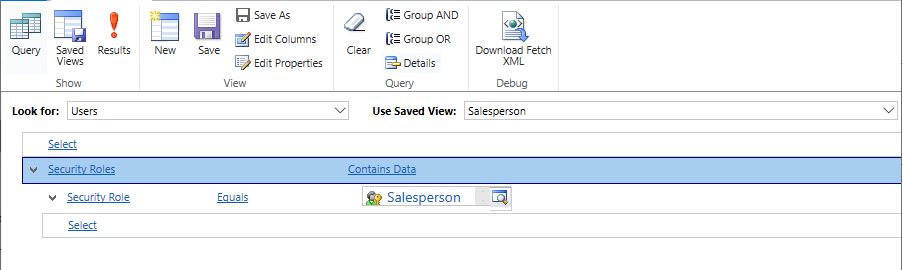
1. First, create a Salesperson view. (If this view already exists in your environment, then this step can be omitted.)
Open Advanced Find and set the filter criteria as shown in the picture:
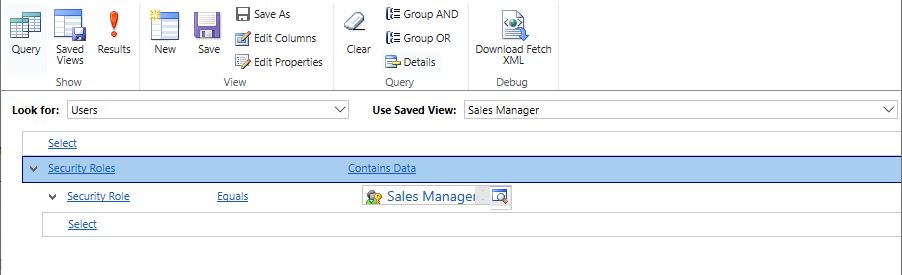
2. Create a Sales Manager view. (If there is only one sales manager, then this step can be omitted.)
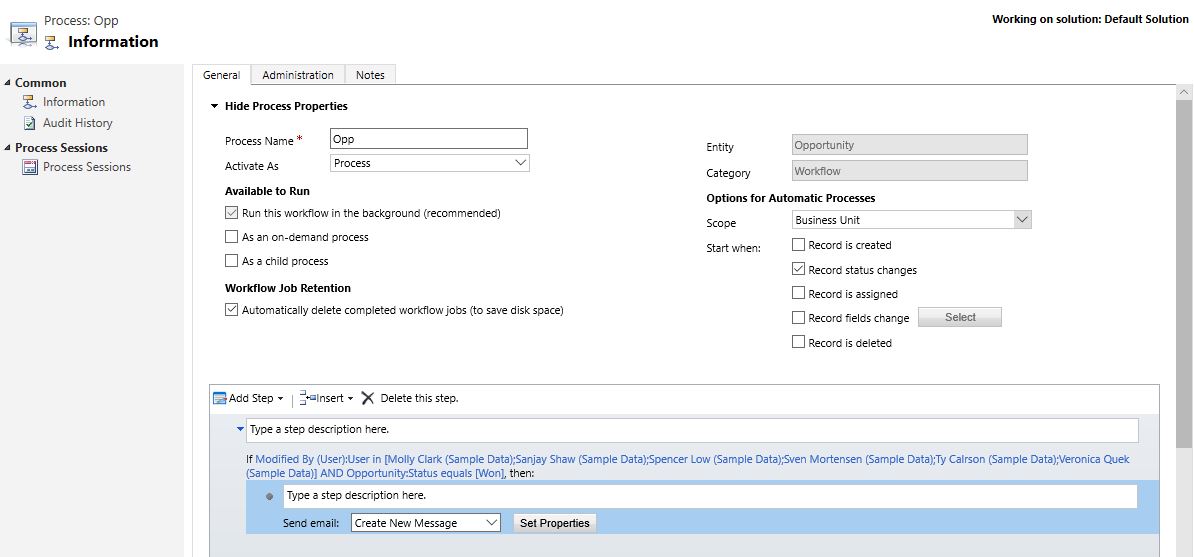
3. Create a workflow for the Opportunity entity.
1) Create a Conditional Branch step and set it as shown: (Select Salesperson in Look in and select all of them.)


2) Click "Select this row and click Add Step." and add a Send Email step. Set the properties as follows: (In the To field, select Sales Manage in Look in and select all of them. If there is only one Sales Manager, choose him/her directly.)


3) Finally click Save and Activate.
Please refer to this article to learn how to use the workflow:
[View:https://docs.microsoft.com/en-us/dynamics365/customer-engagement/customize/workflow-processes:320:50]
Please refer to this article to learn how to use Advanced Find:
[View:https://docs.microsoft.com/en-us/dynamics365/customer-engagement/basics/save-advanced-find-search:320:50]
I tested it in my environment and successfully received the email.
If you have any doubts about any of the steps, please feel free to post here.
If my answer is helpful, please mark it as verified. This will help other users with the same theme.
Hope this helps.
Best Regards,
Lu Hao





