web
You’re offline. This is a read only version of the page.
close
Skip to main content

Announcements

News and Announcements icon
Community site session details

Community site session details

Session Id :
Customer experience | Sales, Customer Insights,...
Answered

Deactivate Block Email by duplicate recipient address

(0) ShareShare
ReportReport
Posted on by

Hi there,

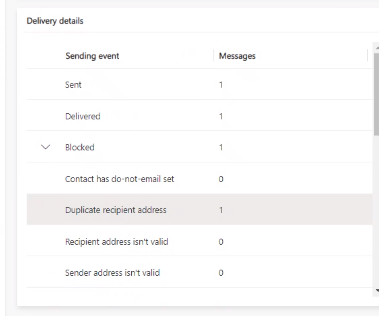
I have a transactional email which should send out by an order (created by workflow after form submission). The Problem is right now, that people who already received this email where blocked automatically by marketing application. If someone submitted the form twice, he does not get the email right now.

Is it possible to change somehow? Or is there a workaround possible?
pastedimage1625137483588v1.png

I have the same question (0)
  • Verified answer
    Nya Profile Picture
    29,064 on at

    Hi,

    The “Duplicate recipient address” category is caused by different contacts with the same email address. It can be found in Analyze marketing results and gain insights (Dynamics 365 Marketing) | Microsoft Docs.

     pastedimage1625195895606v1.png

    According to your description, it is the same contact submitting a form multiple times to update the information. The contact will only be processed once even if there are several submissions in the form insights.

     pastedimage1625195902536v2.png


    You can try to set the audience as the following screenshot, which allows to trigger the journey when a new order is created for the contact.

     pastedimage1625195908521v3.png

    Or please refer to the following similar issue:

    (+) Customer journey - Send mail to marketing - Microsoft Dynamics CRM Forum Community Forum

    If this helped you, I'd appreciate it if you'd mark this as a Verified Answer, which may in turn help others as well.

    Best Regards,

    Nya

  • Community Member Profile Picture
    on at

    Hi Nya,

    sorry for my late reply. I have further issues in this case. First of all, after creating the order via workflow I want to deliver those Contacts informations about it with marketing Email. So I have a Form and I tried to implement your suggested answer with the order in segment but it wont work for me right now.
    The order is created but the contact is not in the customer journey right now. Contact ID ist set in order and on cantict by default.

    Here is the customer Journey as in your example

    pastedimage1627994644370v1.png

    Here is an order with a contact as customer

    pastedimage1627994706099v2.png

    After creating these order, the contact will not enter the customer Journey.

    Can you please tell me how i can implement this. I need to send Emails after form submissions (and there should not be any test for duplicating Email Adresses)

    Thank you!

    Regards,

    Ferdinand 

  • Nya Profile Picture
    29,064 on at

    Hi Ferdinand,

    It is recommended to create a new post to avoid confusion.

Under review

Thank you for your reply! To ensure a great experience for everyone, your content is awaiting approval by our Community Managers. Please check back later.

Helpful resources

Quick Links

Season of Sharing Community Challenge Winners!

Congratulations to our community stars!

Women in Power Builds Momentum

Expanding mentorship, skilling, and AI innovation

Congratulations to the June Top 10 Community Leaders

These are the community rock stars!

Leaderboard > Customer experience | Sales, Customer Insights, CRM

#1
Manoj - ManoVerse Profile Picture

Manoj - ManoVerse 77 Super User 2026 Season 1

#2
11manish Profile Picture

11manish 43

#3
Chris1968 Profile Picture

Chris1968 20

Last 30 days Overall leaderboard

Product updates

Dynamics 365 release plans
