web
You’re offline. This is a read only version of the page.
close
Skip to main content

Notifications

Announcements

No record found.

Community site session details

Community site session details

Session Id :
Finance | Project Operations, Human Resources, ...
Answered

Filter Workspace

(0) ShareShare
ReportReport
Posted on by

Hi All,

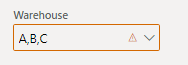
I have to filter my new created workspace with warehouse  as in  "Outbound work monitoring".

But I want to filter with  multiple warehouse. 

For example : 
 pastedimage1578326836101v1.png

The following code only filters for one warehouse;

SysFilterFactory::createSingleRecordFilter(.......);

but I couldn't find a method that takes a list, container, map, etc.

Please help me,

Thanks and Best Regards.

I have the same question (0)
  • André Arnaud de Calavon Profile Picture
    301,025 Super User 2025 Season 2 on at

    Hi STunc,

    Can you tell where you have this field? Is it a global filter for the complete workspace with all elements? Is it a filter from the quickfilter control targeting a grid? Please elaborate and provide some more details related to your workspace.

  • WillWU Profile Picture
    22,361 on at

    Hi Stunc,

    The Standard query filter allows that. (If you separate multiple values, comma-separated):

    https://docs.microsoft.com/en-us/dynamics365/fin-ops-core/fin-ops/get-started/advanced-filtering-query-options

    You can press Ctrl + F3 and in the query window, you can use multiple values with comma Separation.

    If you want to create Query in code, you can use QueryBuildDataSource class.

    Please read the following blogs:

    https://rahulmsdax.blogspot.com/2018/12/how-to-create-query-in-ax-2012-d365-f.html

  • Secil Tunc Profile Picture
    on at

    Hi ,

    Thank you for reply.@André Arnaud de Calavon Yes it is a global filter .I want to filter my workspace's all elements.

    First of all i created new workspace named "Warehouse management workspace".I attached a screenshot.

    I want to filter all tiles and parts in the workspace with more than one warehouse selected.

    Exemplarily some standard workspaces are filtered in this way, but not multiple selection.

    pastedimage1578407874225v2.png

  • Verified answer
    Community Member Profile Picture
    on at

    Hi,

    Selecting multiple values in a work space filter is not supported. You should consider designing a grid in the work space which can be filtered as per the requirement.

Under review

Thank you for your reply! To ensure a great experience for everyone, your content is awaiting approval by our Community Managers. Please check back later.

Helpful resources

Quick Links

Responsible AI policies

As AI tools become more common, we’re introducing a Responsible AI Use…

Neeraj Kumar – Community Spotlight

We are honored to recognize Neeraj Kumar as our Community Spotlight honoree for…

Leaderboard > Finance | Project Operations, Human Resources, AX, GP, SL

#1
Martin Dráb Profile Picture

Martin Dráb 611 Most Valuable Professional

#2
André Arnaud de Calavon Profile Picture

André Arnaud de Cal... 529 Super User 2025 Season 2

#3
Sohaib Cheema Profile Picture

Sohaib Cheema 285 User Group Leader

Last 30 days Overall leaderboard

Product updates

Dynamics 365 release plans



