web
You’re offline. This is a read only version of the page.
close
Skip to main content

Notifications

Announcements

No record found.

Community site session details

Community site session details

Session Id :
Microsoft Dynamics AX (Archived)

CountryRegionCodes property for the form controls

(0) ShareShare
ReportReport
Posted on by 735

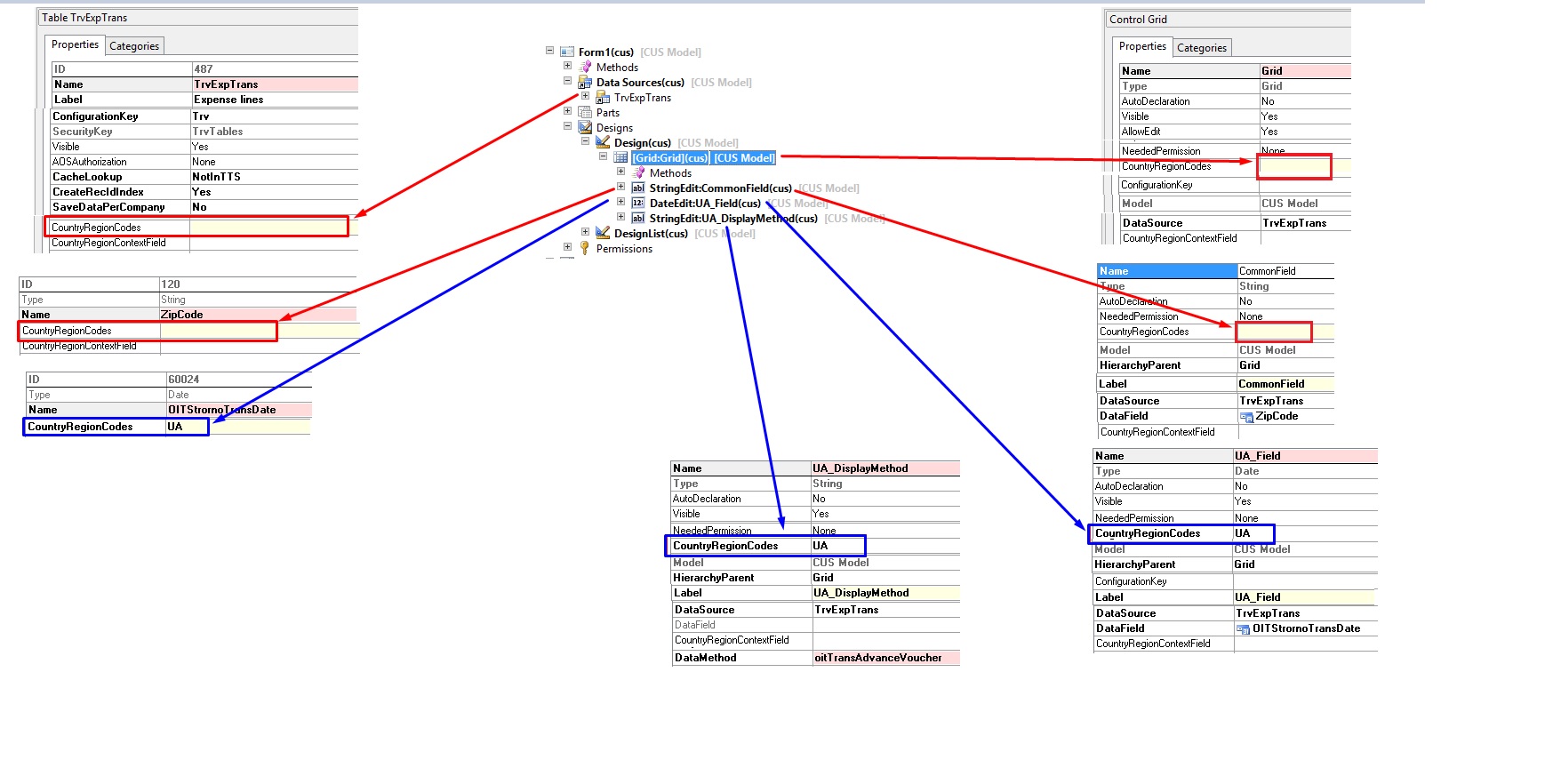
I have a Form1 with Grid and three fields in it with the following properties:

Form control name

DataSource

Field

Display method

CountryRegionCodes property specified on form control

CountryRegionCodes property specified on Table field

Grid

TrvExpTrans


CommonField

TrvExpTrans

ZipCode


UA_Field

TrvExpTrans

OITStrornoTransDate


UA

UA

UA_DisplayMethod

TrvExpTrans


oitTransAdvanceVoucher

UA


101816.1.jpg

In legal entity settings, the UKR is specified as a country/region, and UA as ISO Code.

37048.2.jpg

I expect, that my “UA_Field” and “UA_DisplayMethod” fields will be visible in UA company ONLY.

At the same time, when I open this form in let’s say DK company – I can still see the “UA_Field” and “UA_DisplayMethod”.
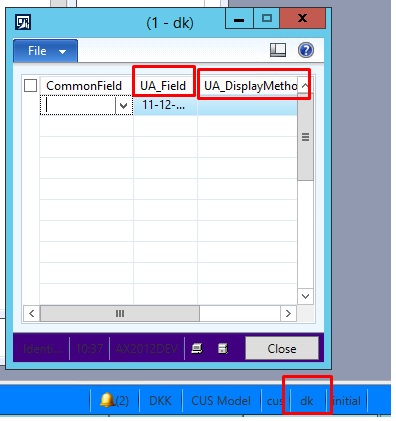
3566.3.jpg

The situation changes if I specify CountryRegionCodes property for the Grid control: ALL field become invisible.

Form control name

DataSource

Field

Display method

CountryRegionCodes property specified on form control

CountryRegionCodes property specified on Table field

Grid

TrvExpTrans


UA (changed)


CommonField

TrvExpTrans

ZipCode


UA_Field

TrvExpTrans

OITStrornoTransDate


UA

UA

UA_DisplayMethod

TrvExpTrans


oitTransAdvanceVoucher

UA


But if I change the DK to UA, the “UA_Field” and “UA_DisplayMethod” fields become visible again.

8715.4.jpg

QUESTOIN: 

How to hide field and/or controls other controls on form, which CountryRegionCodes, property is not blank. I know that it’s possible to do this by code and modifying some security settings, but maybe there another way of how to do this by modifying some settings (not security)?

*This post is locked for comments

I have the same question (0)
  • Ragoza Oleksandr Profile Picture
    735 on at

    Dear Experts, maybe my question is quite obvious and there are a lot of examples/solutions for such type of problems, but unfortunately I found more or less closest solution in this post ( daxmusings.codecrib.com/.../creating-country-specific-features-in.html ) but it doesn’t help me, so your opinion is highly appreciated

  • Verified answer
    André Arnaud de Calavon Profile Picture
    300,928 Super User 2025 Season 2 on at

    Hi Oleksandr,

    Usually, it should work. In this case, you have chosen a Global table (SaveDataPerCompany set to No). In that case, the legal entity for storing the data is DAT. Do you need to have the country region codes on exact this table or can you do some testing on another table?

  • Ragoza Oleksandr Profile Picture
    735 on at

    Hi Andre

    Thank you, you absolutely right, for those tables, which property SaveDataPerCompany=No, this property (CountryRegionCode) doesn't work.

Under review

Thank you for your reply! To ensure a great experience for everyone, your content is awaiting approval by our Community Managers. Please check back later.

Helpful resources

Quick Links

Responsible AI policies

As AI tools become more common, we’re introducing a Responsible AI Use…

Neeraj Kumar – Community Spotlight

We are honored to recognize Neeraj Kumar as our Community Spotlight honoree for…

Leaderboard > 🔒一 Microsoft Dynamics AX (Archived)

#1
Priya_K Profile Picture

Priya_K 4

#1
Martin Dráb Profile Picture

Martin Dráb 4 Most Valuable Professional

#3
Scott_itD Profile Picture

Scott_itD 2 Community Manager

Last 30 days Overall leaderboard

Featured topics

Product updates

Dynamics 365 release plans