web
You’re offline. This is a read only version of the page.
close
Skip to main content

Announcements

No record found.

News and Announcements icon
Community site session details

Community site session details

Session Id :
Finance | Project Operations, Human Resources, ...
Answered

Calculate column & showing their values to another tab field..

(0) ShareShare
ReportReport
Posted on by 115

Accounts receivable/Common/Free text invoices/All free text invoices   > select & open any free text invoice

i have created One button (MovieCinema) in below form.
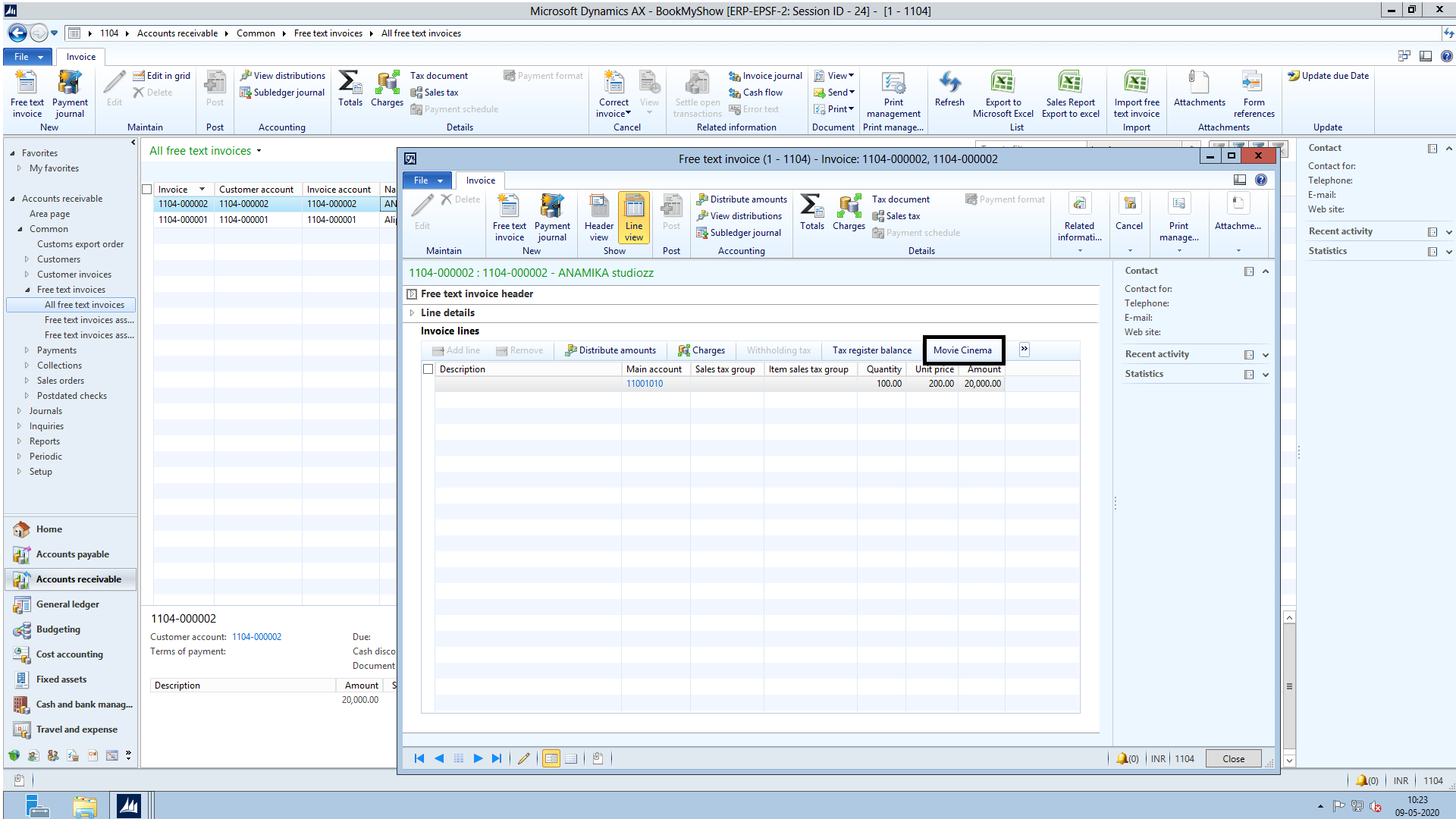
2248.png

when the MovieCinema form is open 

I just want  Collection Column total , in Below Line Collection Total Field..

for this I have Created Two Table  MovieCinemaLine & MovieCinema Header.

Please suggest How to achieve this, what is code & what is method for this.

I have the same question (0)
  • Verified answer
    Sergei Minozhenko Profile Picture
    23,095 on at

    Hi Praveen,

    You have a couple of options here:

    1. Create a display method on the header table to sum up values from lines docs.microsoft.com/.../using-the-display-method-modifier

    2. Create a real field on the header table and update it by the sum of lines when a record is inserted\updated\deleted on the line level.

  • PK mishra Profile Picture
    115 on at

    in option 1 st what is the exact code of display method for this.  

  • Suggested answer
    Sergei Minozhenko Profile Picture
    23,095 on at

    Hi Praveen,

    I don't know how you designed your tables, but you need to add a method like below (and adjust it) to the header table and on the form control you need to specify DataSource property as a header data source and DataMethod as the name of the method.

    display Amount totalCollections()
    {
    	RM_MovieCinemaLine RM_MovieCinemaLine;
    	;
        select sum(Collections) from RM_MovieCinemaLine
    	    where RM_MovieCinemaLine.HeaderRecId = this.RecId;
    		
    	return RM_MovieCinemaLine.Collections;
    }

    Looks like you also have an issue with relations, you can't do relations like Header.RecId = Line.RecId, because RecId is generated by the system each time when record inserted for each table separately and values will be different. You may need to add RefRecId field to the line and fill it with Header.RecId value when you save the record and use it in the relation instead of Line.RecId

Under review

Thank you for your reply! To ensure a great experience for everyone, your content is awaiting approval by our Community Managers. Please check back later.

Helpful resources

Quick Links

Introducing the 2026 Season 1 community Super Users

Congratulations to our 2026 Super Stars!

Meet the Microsoft Dynamics 365 Contact Center Champions

We are thrilled to have these Champions in our Community!

Congratulations to the April Top 10 Community Leaders

These are the community rock stars!

Leaderboard > Finance | Project Operations, Human Resources, AX, GP, SL

#1
Giorgio Bonacorsi Profile Picture

Giorgio Bonacorsi 608

#2
André Arnaud de Calavon Profile Picture

André Arnaud de Cal... 591 Super User 2026 Season 1

#3
CP04-islander Profile Picture

CP04-islander 430

Last 30 days Overall leaderboard

Product updates

Dynamics 365 release plans
