web
You’re offline. This is a read only version of the page.
close
Skip to main content

Notifications

Announcements

No record found.

Community site session details

Community site session details

Session Id :
Customer experience | Sales, Customer Insights,...
Suggested Answer

Splitting Won Opportunity revenue between two users on a team. Is this possible?

(0) ShareShare
ReportReport
Posted on by 205

Hi All,

I've got a situation where I have two salespeople working on one Opportunity together and they are requesting a way to show their revenue split of that Opportunity in a way that will attach to their monthly goal.  Currently whoever closes the Opportunity receives all the revenue credit towards their goal and the other person sees nothing in goal progress or in our dashboards.  

This used to happen maybe once every few months so a quick workaround was to just create an additional financials tab on the billing section of the Opportunity.  The user would select that additional details were needed and then a name and amount field would populate.  Easy peasy...  Now it's happening A LOT and our users are are looking for a better way to track this against their individual revenue goals.  

Before I go down the customization rabbit hole... I wanted if it's even possible to split Revenue between two Users in a way that creates a Relationship between them, the revenue, and the Opportunity.

Thanks!

I have the same question (0)
  • LuHao Profile Picture
    40,892 on at

    Hi partner,

    There is no OOB way to achieve it.

    So I would recommend sharing this idea with Microsoft first.

    https://experience.dynamics.com/ideas

    An alternative solution I can think of is to use child goal and child opportunity to represent the goal progress of a single salesperson separately.

    Here I demonstrate an opportunity have two salespeople, User 1 and User 2. User 1 is the main salesperson.

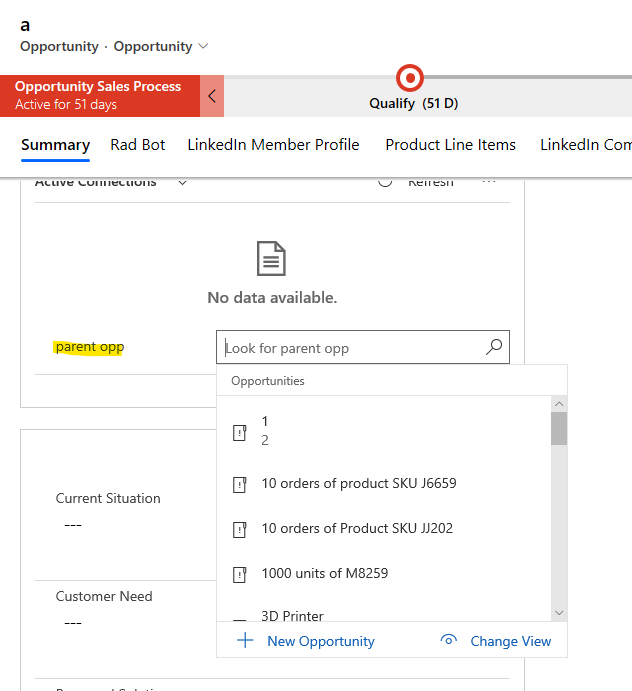
    Create 1:N relationship between Opportunity and Opportunity. This creates a parent Opportunity and multiple child Opportunities.

    pastedimage1575534762796v1.png    pastedimage1575535827669v2.png

    User 1 is the owner of the parent Opportunity, User 2 is the owner of the child Opportunity.

    The Opportunity products they each win are added to their respective Opportunity.

    Create individual goals for each sales person. The owner of Goal A is User 1, the owner of Goal B is User 2.

    Goal A and Goal B are both child Goals, then create Goal C as the parent Goal, its owner is User 1.

    pastedimage1575536026695v3.png

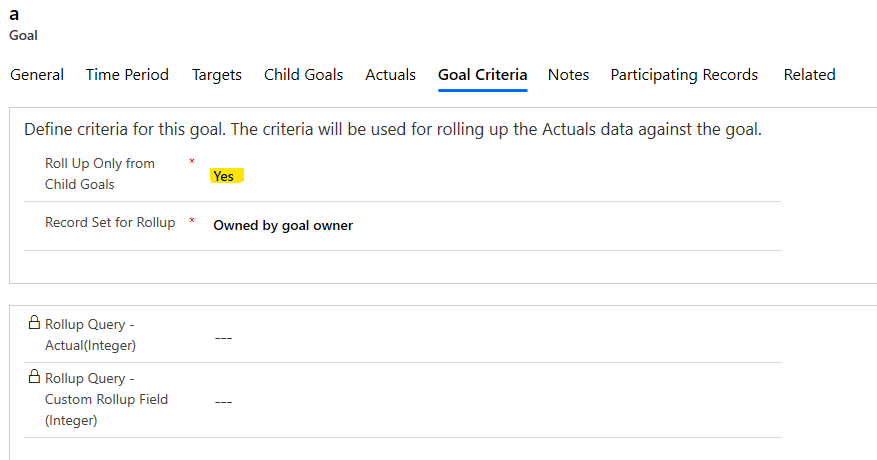
    In the Goal, under 'Goal Criteria' tab, set 'Roll Up Only from Child Goals' as Yes.
    pastedimage1575536125384v4.png

    In this case, we can see the goal progess of the entire opportunity through Goal C, and see the goal progess of the User 1 (parent Opportunity) through Goal A, and see the goal progess of the User 2 (child Opportunity) through Goal B.

    However, this solution has a disadvantage that the opportunity products won by two salespeople cannot be superimposed. That is, some large discounts cannot be applied (the number of products is separated into the opportunity of each salesperson).

    So overall, we expect Microsoft to develop the OOB feature.

  • LuHao Profile Picture
    40,892 on at

    Hi partner,

    Did my answer help you?

    Do you have any other questions?

  • Suggested answer
    PS Profile Picture
    23,577 on at

    Hi There

    As you said you have already created billing and financial related fields, it would be better if you create Salespersons goals via that financial field and not Est. Revenue or Actual revenue.

    You can add a real time workflow which can stop the 'close as won' process if these financial fields are not filled by users.

  • clw Profile Picture
    205 on at

    Hi Hao,

    Just seeing this...thank you for the reply.  I'm going to take a look and see if it's something I can put together for our users.

    Thanks!

  • clw Profile Picture
    205 on at

    Thank you for the suggestion Prashant.  I'm going to take a look at both options and see what works best for us.

    Thanks!

Under review

Thank you for your reply! To ensure a great experience for everyone, your content is awaiting approval by our Community Managers. Please check back later.

Helpful resources

Quick Links

Responsible AI policies

As AI tools become more common, we’re introducing a Responsible AI Use…

Neeraj Kumar – Community Spotlight

We are honored to recognize Neeraj Kumar as our Community Spotlight honoree for…

Leaderboard > Customer experience | Sales, Customer Insights, CRM

#1
Tom_Gioielli Profile Picture

Tom_Gioielli 83 Super User 2025 Season 2

#2
Gerardo Rentería García Profile Picture

Gerardo Rentería Ga... 49 Most Valuable Professional

#3
#ManoVerse Profile Picture

#ManoVerse 40

Last 30 days Overall leaderboard

Product updates

Dynamics 365 release plans