web
You’re offline. This is a read only version of the page.
close
Skip to main content

Notifications

Announcements

No record found.

Community site session details

Community site session details

Session Id :
Microsoft Dynamics AX (Archived)
Answered

Get the summation of a column group by another in a View

(0) ShareShare
ReportReport
Posted on by

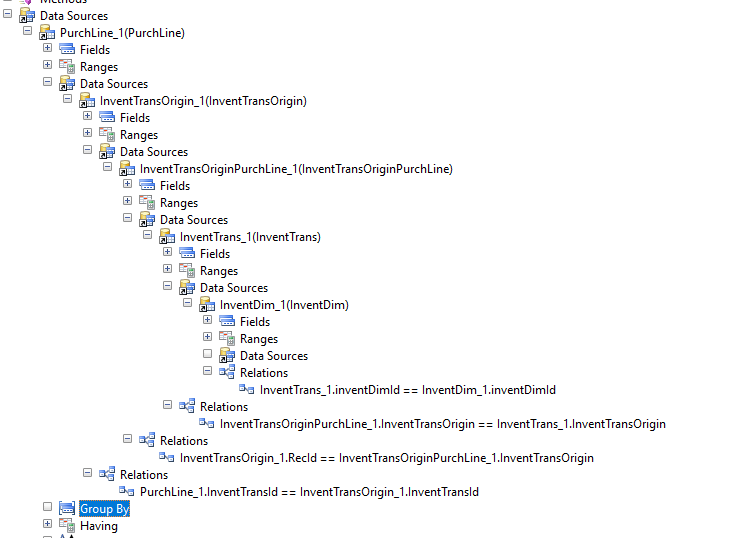
I have created the following view based on the joins you can see in the screenshots.
PurchlineView.PNG

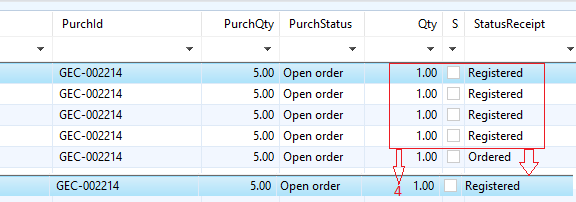
And the result is shown here:

What I want is to sum the Qty based on StatusReceipt. So instead of 4 lines of Registered I want a single line with the Qty of 4
PurchlineViewResult.PNG

*This post is locked for comments

I have the same question (0)
  • Martin Dráb Profile Picture
    237,855 Most Valuable Professional on at

    What's the problem?

  • Community Member Profile Picture
    on at

    The problem is I don't know how to do it ;)

    I know how to group the StatusReceipt column but I don't know how to sum the Qty?

  • Verified answer
    Martin Dráb Profile Picture
    237,855 Most Valuable Professional on at

    Let me focus on InventTrans table only, so we don't get overwhelmed with all the other stuff in your view. If you do many things at once, you'll often achieve very little.

    Start with thinking about what SQL code you want your query definition to generate (a view is based on a query). If you want to sum values in a field, you use the aggregation function called SUM. And grouping is done with the GROUP BY clause. Therefore the SQL code would look like this:

    select sum(Qty) from InventTrans
        group by StatusReceipt

    To add such as summed field, add Qty to the field list and then change its Aggregation property from None to Sum. You know how to add grouping, so I'm not going to describe it.

    If you don't get right results, you can review the actual query in database (after DB synchronization) and review how it differs from the query that you intended to generate.

    If you're not familiar with grouping, you must realize that the only fields that have values are those used for grouping or are aggregated. Values of other fields aren't defined and therefore you'll see them as empty.

  • Community Member Profile Picture
    on at

    Thanks Martin I wasn't aware of the Aggregation Property in View Fields

  • Suggested answer
    ScorpioDax Profile Picture
    333 on at

    The Aggregation from None to Sum helped me in so many other reports i created, Thanks Martin!

Under review

Thank you for your reply! To ensure a great experience for everyone, your content is awaiting approval by our Community Managers. Please check back later.

Helpful resources

Quick Links

Responsible AI policies

As AI tools become more common, we’re introducing a Responsible AI Use…

Neeraj Kumar – Community Spotlight

We are honored to recognize Neeraj Kumar as our Community Spotlight honoree for…

Leaderboard > 🔒一 Microsoft Dynamics AX (Archived)

#1
Priya_K Profile Picture

Priya_K 4

#1
Martin Dráb Profile Picture

Martin Dráb 4 Most Valuable Professional

#3
Ali Zaidi Profile Picture

Ali Zaidi 2

Last 30 days Overall leaderboard

Featured topics

Product updates

Dynamics 365 release plans



