web
You’re offline. This is a read only version of the page.
close
Skip to main content

Notifications

Announcements

No record found.

Community site session details

Community site session details

Session Id :
Microsoft Dynamics AX (Archived)

AX 2012 r3, retail, POS layout

(0) ShareShare
ReportReport
Posted on by

Hello,


I am trying to change POS layout; as I understood there are two key things to be managed:

- screen layouts

- visual profiles

I've tried to change them from default to other, predefined, as well as tried to add own picture as background - problem is that even if changes done are impacting so called 'welcome screen', are not impacting following POS screens. At the moment my POS screen looks like on picture below, and not any changes in AX (screen layouts, visual profiles, deploying POS setup using batch) are not changing this layout.
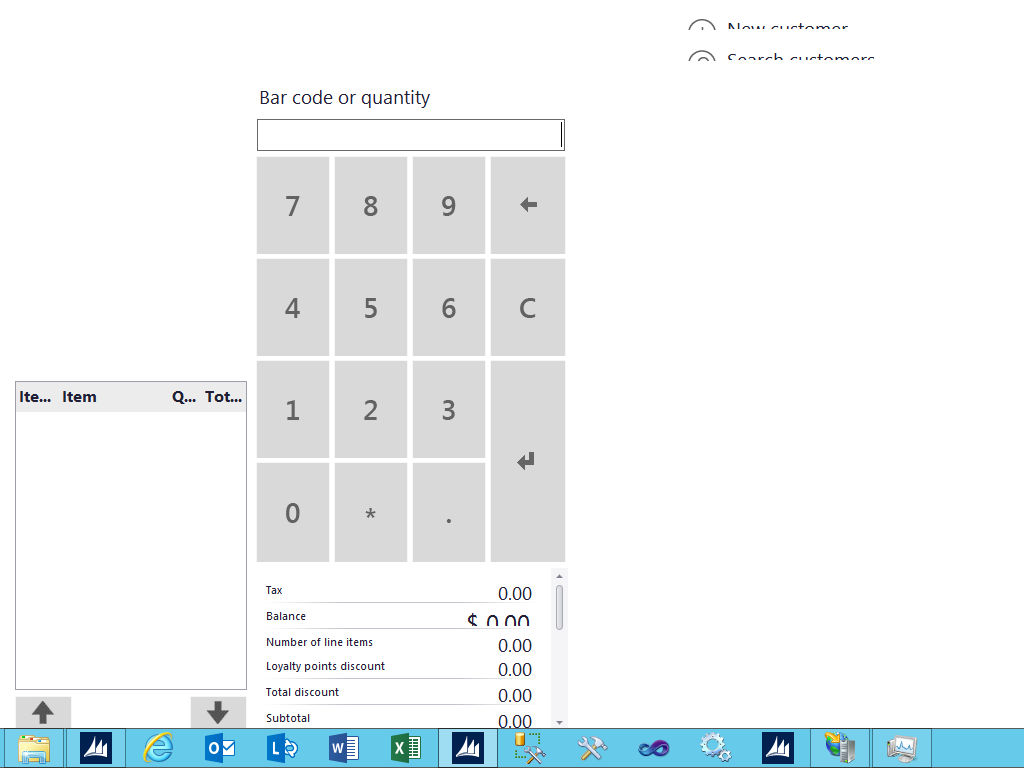
Is there maybe someone familiar with POS/Retail enough, to advice what I am missing? I would like to see (after login obviously) one of predefined screen layouts, not the one as above. If possible, would prefer answers from people who are doing such a things on daily basis, not from some who have read some docs, not tested/not worked with retail, but think that '..it should help..' :)

regards

Tomasz

*This post is locked for comments

I have the same question (0)
  • Suggested answer
    Praveen Profile Picture
    1,201 on at

    Tomasz, since you are "trying" to change the POS layout, have you considered to re-create a new channel DB and push the changes again. Hopefully the issue would have been fixed with the new flush.

    Else the risky option is to tamper with the POS Client layout tables directly to check if there is any issues. These are the main ones that deal with the Layout that you see at both Back End and POS

    RETAILBUTTONGRID

    RETAILBUTTONGRIDBUTTONS

    RETAILIMAGES

    RETAILTILLLAYOUT

    .RETAILVISUALPROFILE

    RetailDeviceTypes

    RetailPOSTheme

    RetailTillLayoutZone

    RetailTillLayoutZoneReference

    Take a backup of the Tables before you modify anything.

    Post back if you've solved it!

  • Suggested answer
    Ian Nuttycombe Profile Picture
    471 on at

    Hi Tomasz, Firstly there are a few places you must Assign or can assignthe layout out to in r3. These are the following employee and Store. The employee will take preference over the store if the employee has a layout assigned.

    You can do manual Changes on the POS if your employee has permissions. You can try this and see if the Changes or menus you created are availble to be selected. If not did you use the correct Company and you should check the download sessions were successful

    In r3 you have both EPOS & MPOS application type layouts. so make sure u have used the correct one. The Visual layout can also have an impact

    I have seen this issue Before on demo image. What i recommend you do is run all jobs down to the POS again

  • Community Member Profile Picture
    on at

    Hi,

    You talk about the runtime interface pos or MPOS ? Aside from making a backup of the following tables, there no solution to generate different views such as those found in the vm demo contoso ?

  • Suggested answer
    Debashish Bardhan Profile Picture
    745 on at

    Hi,

    In screen layout you set the height and width of POS screen, and in Visual profile you add the image which comes on welcome screen. For inside design you need to check on visual profile a check box "Design allowed at POS". Then on POS just right click on any button, click button properties and then on dropdown select enable design mode, click Ok. Now the button configured as design enabled. Click on the button, POS screen will go to design mode, where you can do drag and position your payment section, customer section, transaction section etc etc as per your desire. After do this try to close the design box and POS will prompt for save, just save it and you will have the design what you are looking for. Try this and inform.

    Debashish

  • Suggested answer
    sumit0417 Profile Picture
    2,890 on at

    Hi Tomek,

    Check the Devices form in Retail >> Setup >> Devices. Check the Application column of the POS Register(Device ID is the POS register) which you are trying to connect. If it is anything other than Enterprise POS, then it will show you the weird layout as per your screenshot. Once you fix this run the Register Job and then try to Open the POS again.

  • Community Member Profile Picture
    on at

    Hi Tomasz,

    Could you please share the resolution for the same ePOS screen layout issue? I have working ePOS but suddenly the same issue appeared with the following error log in eventvwr. I am using AX R3 CU8.

    Data at the root level is invalid. Line 1, position 1.: System.Xml.XmlException: Data at the root level is invalid. Line 1, position 1.
    at System.Xml.XmlTextReaderImpl.Throw(Exception e)
    at System.Xml.XmlTextReaderImpl.Throw(String res, String arg)
    at System.Xml.XmlTextReaderImpl.ParseRootLevelWhitespace()
    at System.Xml.XmlTextReaderImpl.ParseDocumentContent()
    at System.Xml.XmlTextReaderImpl.Read()
    at System.Xml.XmlTextReader.Read()
    at DevExpress.Utils.Serializing.XmlXtraSerializer.DeserializeCore(Stream stream, String appName, IList objects)
    at DevExpress.Utils.Serializing.XmlXtraSerializer.Deserialize(Stream stream, String appName, IList objects)
    at DevExpress.Utils.Serializing.XtraSerializer.DeserializeObject(Object obj, Stream stream, String appName, OptionsLayoutBase options)
    at DevExpress.XtraLayout.LayoutControlImplementor.RestoreLayoutCore(XtraSerializer serializer, Object path)
    at DevExpress.XtraLayout.LayoutControlImplementor.RestoreLayoutFromStream(Stream stream)
    at DevExpress.XtraLayout.LayoutControl.RestoreLayoutFromStream(Stream stream)
    at LSRetailPosis.POS.frmMain.LoadDesign().

    Regards,

    Dip

  • Suggested answer
    sumit0417 Profile Picture
    2,890 on at

    Hi Paul,

    Make sure you have attached the layout to either Worker, Terminal or Store. Also make sure your device settings is configured as EPOS and not the Windows 8 under Retail devices.

  • Community Member Profile Picture
    on at

    Still the same issue continues. All the setup looks fine. Data has been published to CH DB.

  • Suggested answer
    Ashraf Sharaf Profile Picture
    50 on at

    Check the application columns value for this POS register in the devices form in AX retail setup. I believe it is MPOS not POS. Change it and then synch registers job, it should be ok.

  • Suggested answer
    Community Member Profile Picture
    on at

    Hi Ashraf,

    Your suggestion has worked it out. Thanks mate.

    Regards,

    Dip

Under review

Thank you for your reply! To ensure a great experience for everyone, your content is awaiting approval by our Community Managers. Please check back later.

Helpful resources

Quick Links

Responsible AI policies

As AI tools become more common, we’re introducing a Responsible AI Use…

Neeraj Kumar – Community Spotlight

We are honored to recognize Neeraj Kumar as our Community Spotlight honoree for…

Leaderboard > 🔒一 Microsoft Dynamics AX (Archived)

#1
Martin Dráb Profile Picture

Martin Dráb 4 Most Valuable Professional

#1
Priya_K Profile Picture

Priya_K 4

#3
MyDynamicsNAV Profile Picture

MyDynamicsNAV 2

Last 30 days Overall leaderboard

Featured topics

Product updates

Dynamics 365 release plans
