web
You’re offline. This is a read only version of the page.
close
Skip to main content

Notifications

Announcements

No record found.

Community site session details

Community site session details

Session Id :
Finance | Project Operations, Human Resources, ...
Answered

Excel Refreshable Report Connection Error After 18.4 YE Update

(1) ShareShare
ReportReport
Posted on by 35

Our company recently applied the GP 18.4 YE update. Now, we are noticing that a lot of our Excel Refreshable Reports are broken, even after redeployment.

Here is an example in '[Company Name] PurchaseOrders Default' Excel Report:

pastedimage1639507069023v1.png

Here's what we're seeing in the Connection Properties (command type is SQL):
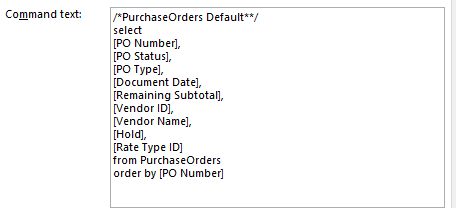
pastedimage1639507110558v2.png

Is anyone else experiencing this problem after upgrade? Any suggestions for solutions?

Much appreciated,

Asiya in IT

Categories:
I have the same question (0)
  • Suggested answer
    Derek Albaugh Profile Picture
    on at

    We haven't seen any case volume to suggest this is an issue after upgrading to 18.4 YE, at least as of yet.

    If you re-deploy the default Excel Reports from Dynamics GP, does that resolve the issue?

    Thanks

  • TechyWolves Profile Picture
    35 on at

    Hi Derek, redeploying the reports did not help.

    It's on a Network Share currently so I'm going to see if it works via SharePoint Online.

  • TechyWolves Profile Picture
    35 on at

    Still getting the error with this method also.

  • Verified answer
    Beat Bucher  GP Geek  GPUG All Star Profile Picture
    28,058 Moderator on at

    From the Error Message I can guess that Excel isn't able to get access to the company's SQL views which looks to be used (PurchaseOrders is a default SQL view in each GP company).

    The context under which the user runs the Excel query is the Windows Security, unless otherwise specified in your Excel Data Connection..

    This looks more like a permission issue on the SQL side than anything else.

    Please confirm the user can query SQL by creating a new Excel workbook from scratch and use the SQL Data connection to retrieve the list of Views from that GP company..

  • TechyWolves Profile Picture
    35 on at

    Hi Beat,

    Thank you - this pointed us in the right direction.

    After checking the views on the particular company, looks like the ones with the error were somehow deleted from the Database. We're going to recreate the missing views from a database backup.

  • Beat Bucher  GP Geek  GPUG All Star Profile Picture
    28,058 Moderator on at

    You're welcome.

    No need to restore a backup.. Unless this view was customized, you can simply right-click on any other GP company's SQL view of the name "PurchaseOrders" and chose "Script View... > CREATE TO > New Query Window"

    Then you just execute that script against the company where it's missing.

    The other option would be to use the GP Maintenance Utility, but that takes usually more time than the above steps, especially for only one SQL view. Not saying if you'd have to recreate them all, the GPMU would be much faster.

Under review

Thank you for your reply! To ensure a great experience for everyone, your content is awaiting approval by our Community Managers. Please check back later.

Helpful resources

Quick Links

Responsible AI policies

As AI tools become more common, we’re introducing a Responsible AI Use…

Neeraj Kumar – Community Spotlight

We are honored to recognize Neeraj Kumar as our Community Spotlight honoree for…

Leaderboard > Finance | Project Operations, Human Resources, AX, GP, SL

#1
Martin Dráb Profile Picture

Martin Dráb 503 Most Valuable Professional

#2
André Arnaud de Calavon Profile Picture

André Arnaud de Cal... 434 Super User 2025 Season 2

#3
BillurSamdancioglu Profile Picture

BillurSamdancioglu 278 Most Valuable Professional

Last 30 days Overall leaderboard

Product updates

Dynamics 365 release plans
