web
You’re offline. This is a read only version of the page.
close
Skip to main content

Notifications

Announcements

No record found.

Community site session details

Community site session details

Session Id :
Microsoft Dynamics AX (Archived)

How to query Financial Dimension Field in Sales Contract

(0) ShareShare
ReportReport
Posted on by 50

Hello,

For a new company we are going to record a frame contract number that is a level higher than the Sales Contract. The intention is that this happens when the contract is created and that the number is stored in the financial dimensions in the sales contract (header view - Financial dimensions / see screenshot). The number is also needed for financial analysis.

Only when I view the field do I see that it is not stored in a regular AXtable but as a Dimension Value. Does anyone know how I can link this field to a sales contract (salestable)? I have found that the fields appear in the DefaultdimensionView but that is then linked to the LedgerJournalTrans and LedgerJournalTable (with the defaultdimension field) but that is only filled later in the process, so when I create the Sales contract I can not show that value yet.

Hope somebody can help.

Attached a screenshot.

Thanks!

Frank
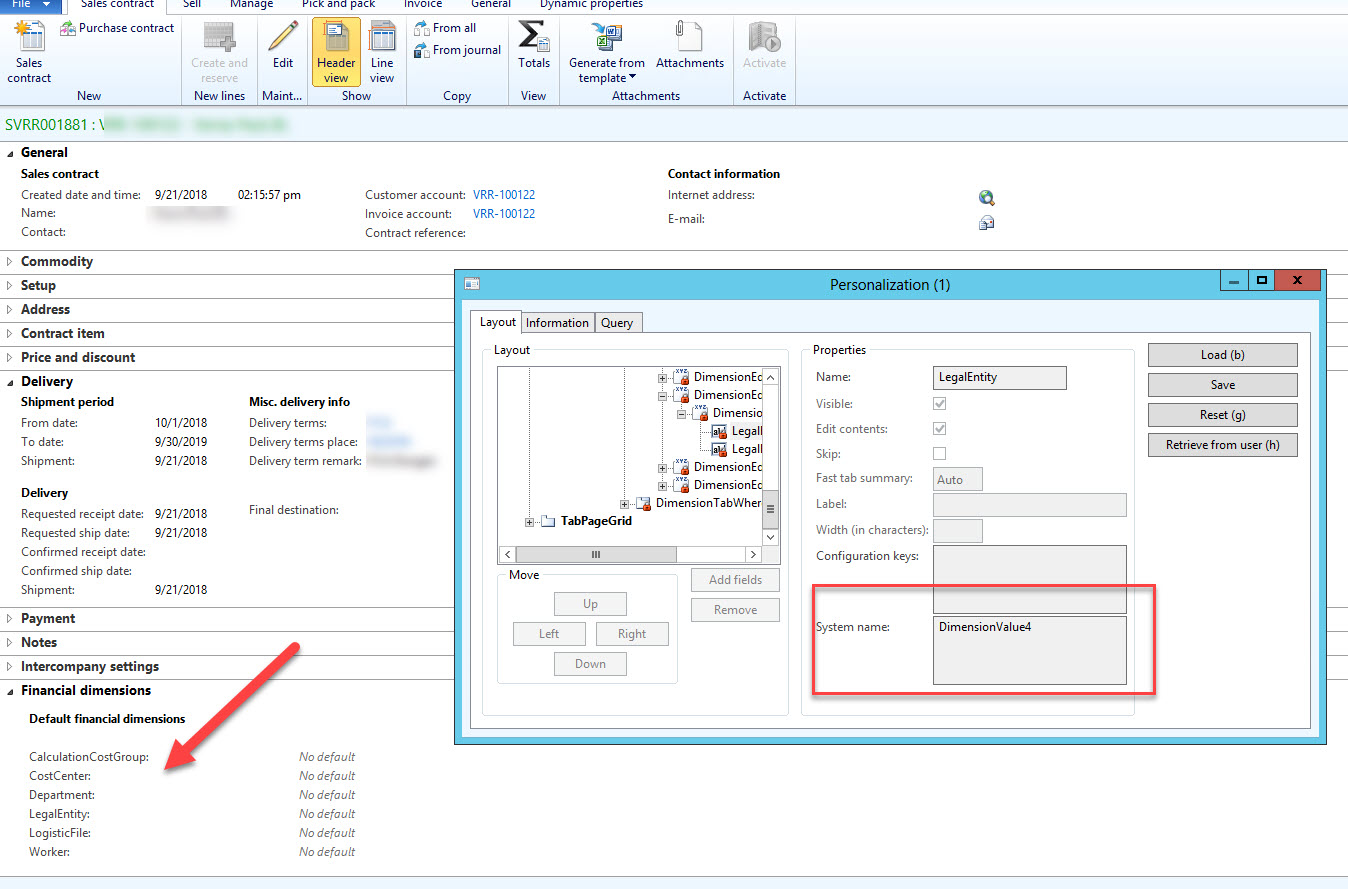
2018_2D00_09_2D00_21_5F00_15_2D00_32_2D00_39.jpg

*This post is locked for comments

I have the same question (0)
  • Suggested answer
    Rustem Galiamov Profile Picture
    8,072 on at

    Hi FrankRaij!

    Take a look at this discussions:

    https://community.dynamics.com/ax/f/33/t/294280

    https://community.dynamics.com/ax/f/33/t/292227

  • FrankRaij Profile Picture
    50 on at

    Hi Rustem!

    Maybe a lack of knowledge. I checked the discussions, but I can't see how I can make a relation between the Dimension Value (AX Financial Dimensions in Sales Contract) and the Sales Contract Number. As said I only see a relation between financial posting tables and the dimension values. I need it for a custom made report via SQL Server Management Studio.

    Thanks!

  • Verified answer
    Rustem Galiamov Profile Picture
    8,072 on at

    To get Sales Contract Number from Financial dimension of SalesTable you should use DefaultDimensionView.

    As example, how to find value of Department dimension by DefaultDimension value:

    static void Job181(Args _args)
    {
        SalesTable           salesTable;
        DefaultDimensionView defDimView;
        
        select firstOnly salesTable
            where salesTable.DefaultDimension;
        
        select defDimView
            where defDimView.DefaultDimension == salesTable.DefaultDimension
               && defDimView.Name             == "Department";
            
        info(defDimView.DisplayValue);
    }


    It's easiest way to get dimension value.

  • FrankRaij Profile Picture
    50 on at

    Thanks a lot Rustem!

    Any idea how to get the description of the DISPLAYVALUE (from DFAULTDIMENSIONVIEW)? I only found the DISPLAYVALUE ('VR') in the table but not the description.

    Checked google but I can't find it.

    Thanks!

    2018_2D00_09_2D00_24_5F00_10_2D00_15_2D00_58.jpg

  • Suggested answer
    Rustem Galiamov Profile Picture
    8,072 on at

    The description of DisplayValue field you can get from related table.

    static void Job181(Args _args)
    {
        SalesTable           salesTable;
        DefaultDimensionView defDimView;
        OMOperatingUnit      operationUnit;
    
        select firstOnly salesTable
            where salesTable.DefaultDimension;
    
        select defDimView
            where defDimView.DefaultDimension == salesTable.DefaultDimension
               && defDimView.Name             == "Department"
        join operationUnit
            where operationUnit.RecId                 == defDimView.EntityInstance
               && operationUnit.omOperatingUnitType   == OMOperatingUnitType::OMDepartment;
               
        info(operationUnit.Name);
    }


  • FrankRaij Profile Picture
    50 on at

    Hi Rustem,

    Checked the view  OPERATINGUNITVIEW but this view does not contain the description of the DISPLAYVALUE (the OMDEPARTMENTVIEW also not). Maybe our AX Datasource is different?

    Thanks!

  • Rustem Galiamov Profile Picture
    8,072 on at

    Check the OMOperatingUnit table (for my example).

  • FrankRaij Profile Picture
    50 on at

    DIMENSIONFINANCIALTAG

Under review

Thank you for your reply! To ensure a great experience for everyone, your content is awaiting approval by our Community Managers. Please check back later.

Helpful resources

Quick Links

Responsible AI policies

As AI tools become more common, we’re introducing a Responsible AI Use…

Neeraj Kumar – Community Spotlight

We are honored to recognize Neeraj Kumar as our Community Spotlight honoree for…

Leaderboard > 🔒一 Microsoft Dynamics AX (Archived)

#1
Martin Dráb Profile Picture

Martin Dráb 4 Most Valuable Professional

#1
Priya_K Profile Picture

Priya_K 4

#3
MyDynamicsNAV Profile Picture

MyDynamicsNAV 2

Last 30 days Overall leaderboard

Featured topics

Product updates

Dynamics 365 release plans
