web
You’re offline. This is a read only version of the page.
close
Skip to main content

Announcements

No record found.

News and Announcements icon
Community site session details

Community site session details

Session Id :
Microsoft Dynamics AX (Archived)

Query from SecurityRole system table error after data and model database copy

(0) ShareShare
ReportReport
Posted on by

Hello,

in AX 2012 R3 we experienced this issue at our customer when a query using SecurityRole system table is called. The error happens after we copy data and model database A (PROD) to data and model database B (PREPROD - another environment with different SQL and AOS servers). Then in database B, when we call the query which inludes SecurityRole table, the following error is thrown.

Error: "Invalid object name <original model database name>.dbo.SECURITYROLE_INLINEFUNC".

Obviously, AX is still using original database path when calling SECURITYROLE_INLINEFUNC. The problem is solved by DataDictionary synchronization in the target environment. But where is the path to original model database stored then?

I found out that the SecurityRole_INLINEFUNC object is a SQL table-valued function in a AX model database (as I have read it works as the SQL view but it can handle/use input parameters).
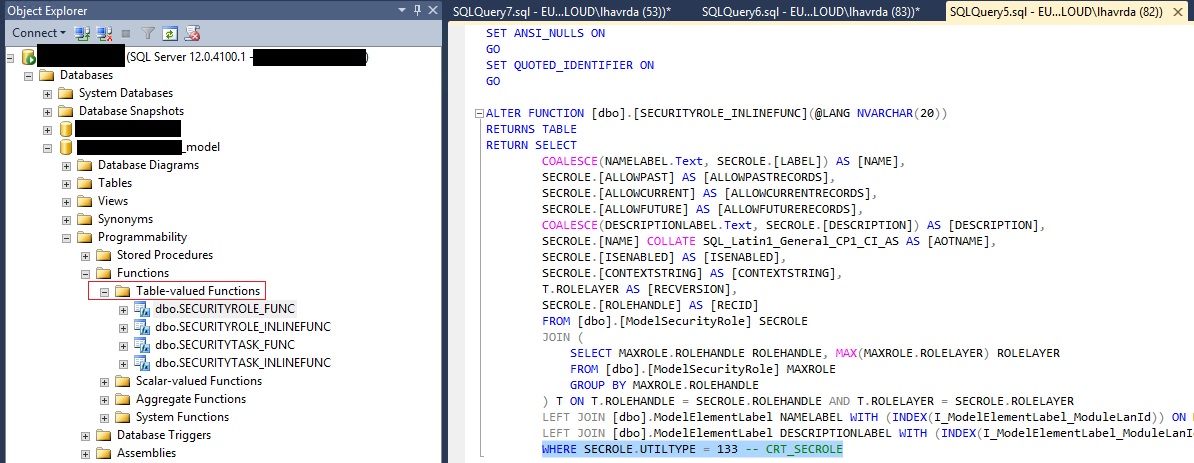
AXModelDB_5F00_TableValuedFunctions.jpg


I guess this function is called by AOS when a „select“ should be done on SecurityRole system table.

SecurityRole table is used in the our query which throws the error and it is a system table and it is possible that AOS handles that in a special way.
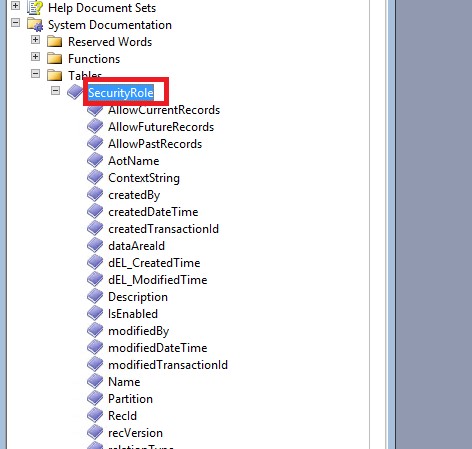
SystemTables.SecurityRole.jpg

When I open a TableBrowser on the SecurityRole table retrieved data correspond to those retrieved by the SECURITYROLE_INLINEFUNC function (data, columns, number of rows returned).

Does anybody have any more details on the implementation of SecurityRole (and SecurityTask as well) system tables in AX 2012?

*This post is locked for comments

I have the same question (0)
  • Brandon Wiese Profile Picture
    17,790 on at

    I've worked with the security tables quite a lot.  What details do you want?

  • André Arnaud de Calavon Profile Picture
    304,711 Super User 2026 Season 1 on at

    Hi Lukas,

    At some customers where they copy the databases for the same purpose we don't have this issue. Could it be related to security permissions on the database(s) or the table valued functions?

  • Verified answer
    Brandon Wiese Profile Picture
    17,790 on at

    There are some built-in views that reference the model store.  After restoring the business database and model store under new names, the AOS will repair these views during the service startup.  I also have some custom views (built in the AOT, not outside of AX at all) that reference the model store by referencing special "tables" like SecurityRole and such, and those do not get repaired on AOS start.  I have to manually Synchronize those views after a restore of PROD to TEST, for example.

    It's probably possible to add those views to the Application object so they also get sync'ed on an AOS start, but there's always some risk there touching system objects, so I haven't attempted it.

  • Suggested answer
    Lukas Havrda Profile Picture
    on at

    Hi, thank you all for your quick responces.

    Andre Arnaud de Calavon With full access to the target db and in AX we also experienced the issue so this was not related to permissons. Thanks for your suggestion, though.

    Brandon Wiese Sorry I didn't answer your first question immediately. You had provided the second answer before I answered. Your remarks about built-in and custom views were correct. The custom views (created in AOT) which we use for the final query are stored in the business data database (in the Views node) were not corrected after data and model store db were copied to databases with different names and AOS start. I am sorry I didn't specify that the custom AX query uses custom AX views as data sources. When I checked the custom views definition in SQL, in model database, I saw AX automatically added the call to table-valued function in model database in the custom view SQL definition. See below.

    AOTViewSQLDefinition.jpg

    And you were absolutely right that this is not fixed by AOS start untill the Data Dict sync is run.

    That explains our error: After a copy of business data database and modelstore from PROD to PREPROD the string pointing to original model database  in the custom view is copied and is not fixed during AOS start untill the Data Dictionary is synchronize.

    Thanks for your insights to this topic which led me to find the location of call of the table-valued function. We will try overwritting this by SQL script before AOS start so we don't have to run Data Dict sync every night.

Under review

Thank you for your reply! To ensure a great experience for everyone, your content is awaiting approval by our Community Managers. Please check back later.

Helpful resources

Quick Links

Introducing the 2026 Season 1 community Super Users

Congratulations to our 2026 Super Stars!

Meet the Microsoft Dynamics 365 Contact Center Champions

We are thrilled to have these Champions in our Community!

Congratulations to the April Top 10 Community Leaders

These are the community rock stars!

Leaderboard > 🔒一 Microsoft Dynamics AX (Archived)

#1
CP04-islander Profile Picture

CP04-islander 39

#2
Michel ROY Profile Picture

Michel ROY 14

#3
imran ul haq Profile Picture

imran ul haq 8

Last 30 days Overall leaderboard

Featured topics

Product updates

Dynamics 365 release plans
