web
You’re offline. This is a read only version of the page.
close
Skip to main content

Notifications

Announcements

No record found.

Community site session details

Community site session details

Session Id :
Microsoft Dynamics AX (Archived)
Answered

Cost Analysis Workspace - Cost Analysis updates

(0) ShareShare
ReportReport
Posted on by Microsoft Employee

Hi,

I would like to know how one can setup and influence when the cost analysis tyles, inventory KPIs and inventory value graphs are updated?

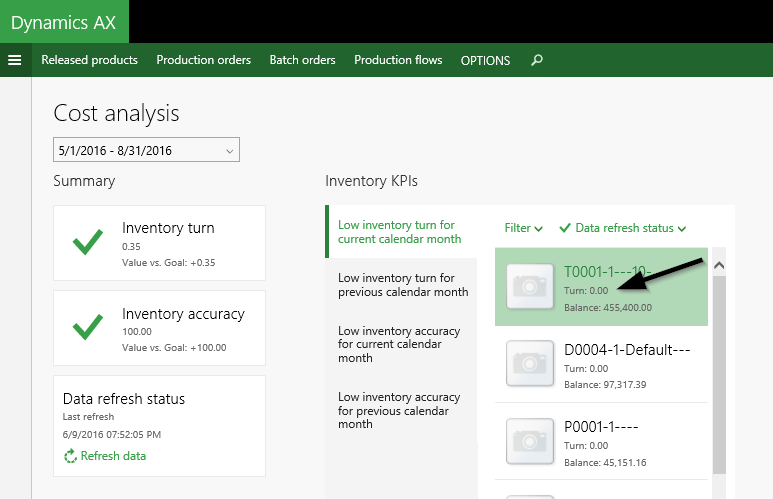
A second thing I am interested in is the the turn value shown for each of the items.

Where and how is this value defined and how can I check (and influence) this calculation.
it.png

Would be great if somebody can help.

Many thanks and best regards,

Ludwig

*This post is locked for comments

I have the same question (0)
  • André Arnaud de Calavon Profile Picture
    301,025 Super User 2025 Season 2 on at

    Hi Ludwig,

    Have you noticed the Data refresh status tile? In the environment where I started this workspace the Refresh data has been disabled at this moment. No data is shown. I have to find out about the reason for this.

  • Ludwig Reinhard Profile Picture
    Microsoft Employee on at

    Good morning Andre, It was the same for me. I found something in the system admin module under setup-cache and was finally able to get the data somehow updated. Yet, I am not sure about what AX shows me and would like to have more details on that. If you find something in addition, please let me know. Many thanks in advance, Ludwig

  • Suggested answer
    André Arnaud de Calavon Profile Picture
    301,025 Super User 2025 Season 2 on at

    Hi Ludwig,

    You can watch the video "Cost management redefined in Microsoft Dynamics AX" from the Technical conference 2016 (mbs.microsoft.com/.../DynamicsTechnicalConference16)

    It is also discussinig the workspaces.

  • Verified answer
    Ludwig Reinhard Profile Picture
    Microsoft Employee on at

    Good morning Andre,

    Yesterday, I also found the video but could not find the information I was interested in. I thus asked somebody from MS directly and got the following feedback regarding this feature. Copied his feedback & screenshots below

    The Cost management workspaces works based on Data set cache. We co developed this feature with the Platform teams. By default it is defined as a 24 hour Cache. But we allow users to manually update

    4555.4.png

    I inserted a Card showing last data update so users knows the validity of data. You also see a Refresh data icon on the Card. This functionality can be enabled if required

    The other Cost cache will get auto updated after this main cache has been updated. We call 2nd level Cache.
    This was the only way we could get all this new and more depth information into Workspaces really fast
    5141.2.png
    7217.3.png
    How is the inventory turn calculated?
    (Sales+Productionconsumption)/ ((Beginning inventory + Ending inventory)/2)
    Where can one define the goal figure?
    4555.4.png
    Best regards,
    Ludwig
  • André Arnaud de Calavon Profile Picture
    301,025 Super User 2025 Season 2 on at

    Hi Ludwig,

    Interesting. Thanks.

    Not all Microsoft employees like to have their name mentioned. Probably you can edit the post and remove the name.

  • Veronika Filonenko Profile Picture
    1,261 on at

    Hello Ludwig and André,

    This is all good information. Only one thing is missing is it is still very unclear on how to turn on that Data refresh status? 

    Mine is grayed out. I went to system admin in data cash section but could find nothing. 

    Please identify the steps if possible.

  • Jana K. Profile Picture
    95 on at

    Veronika,

    System administration > Setup > Data cache > Data cache parameters > Cache refresh tab > Initialize batch job button

    This process starts a "Data cache refresh batch" batch job, which is refreshing the data and activates Data refresh status

Under review

Thank you for your reply! To ensure a great experience for everyone, your content is awaiting approval by our Community Managers. Please check back later.

Helpful resources

Quick Links

Responsible AI policies

As AI tools become more common, we’re introducing a Responsible AI Use…

Neeraj Kumar – Community Spotlight

We are honored to recognize Neeraj Kumar as our Community Spotlight honoree for…

Leaderboard > 🔒一 Microsoft Dynamics AX (Archived)

#1
Martin Dráb Profile Picture

Martin Dráb 4 Most Valuable Professional

#1
Priya_K Profile Picture

Priya_K 4

#3
MyDynamicsNAV Profile Picture

MyDynamicsNAV 2

Last 30 days Overall leaderboard

Featured topics

Product updates

Dynamics 365 release plans



