web
You’re offline. This is a read only version of the page.
close
Skip to main content

Announcements

News and Announcements icon
Community site session details

Community site session details

Session Id :
Finance | Project Operations, Human Resources, ...
Suggested Answer

Multi select lookup on SSRS report issue

(0) ShareShare
ReportReport
Posted on by 229

Hi guys,

I'm trying to create multi select lookup for my ssrs report but values are not given as i expected and dont figure why ?

i used this query 

        Query query = new query();

        qbds = query.addDatasource(tablenum(OmOperatingUnit));
        qbds1 = qbds.addDatasource(tablenum(OmHierarchyRelationship));
        qbds1.addLink(fieldnum(OmOperatingUnit,RecId),fieldnum(OmHierarchyRelationship, ChildOrganization));
        qbds1.relations(false);
        qbds1.addRange(fieldnum(OmHierarchyRelationship, ParentOrganization)).value(queryvalue(omIo.RecId));

        TableId multiSelectTableNum = tableNum(OMOperatingUnit);
        container selectedFields = [multiSelectTableNum, fieldName2id(multiSelectTableNum, fieldStr(OMOperatingUnit, OMOperatingUnitNumber))];

        SysLookupMultiSelectGrid::lookup(query,_control,_control,_control,selectedFields);

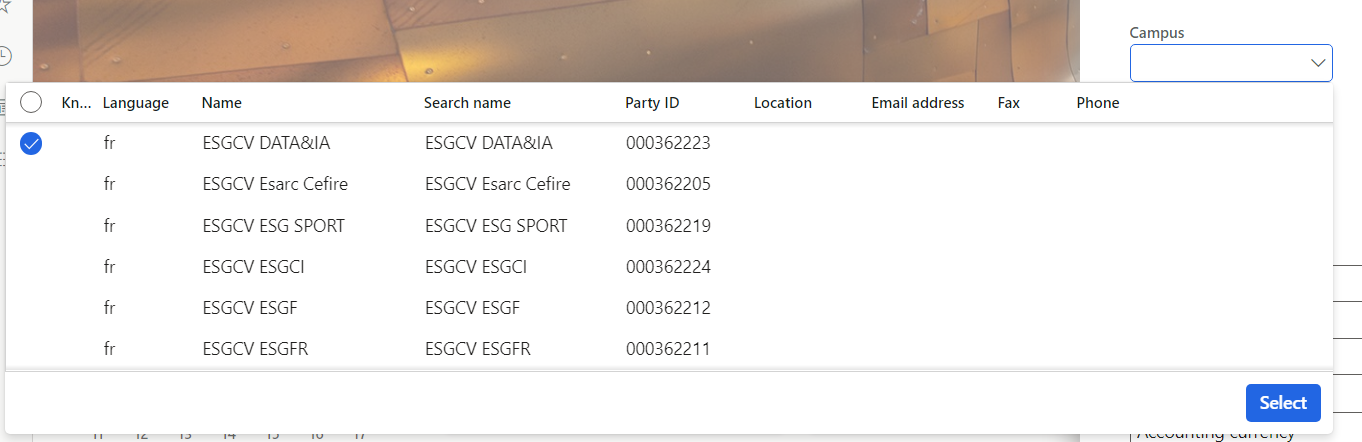
Here is the result of my query
pastedimage1685989278435v2.png

And what i want to reach is to have only OMOperatingUnitNumber
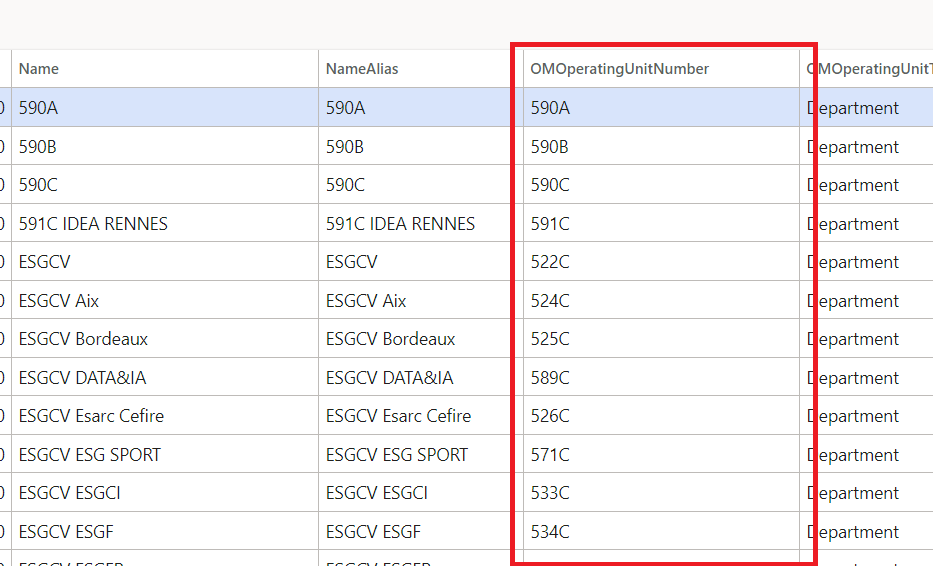


Could someone help please ?

Regards

I have the same question (0)
  • Awaxx Profile Picture
    229 on at

    I have to add that when i tried my query in a job i got the good result but i dont know why its not working on my lookup.

  • Suggested answer
    Mohit Rampal Profile Picture
    12,573 Moderator on at

    Hi, Can you try adding qbds.addLookupField and remove EDT on Campus field or set EdTRelation table field property to No.

  • Suggested answer
    GirishS Profile Picture
    27,843 Moderator on at

    Hi awaxx,

    I think you are asking how to show lookup with only operating unit number. Is that correct?

    If yes you can create an query and use it in code. In that query you can set dynamic property of the datasource and add only your required fields. 
    Refer to the below thread.


    Thanks,

    Girish S.

  • Awaxx Profile Picture
    229 on at

    Hi GirishS Mohit Rampal 

    I m close to reach my goal

    I added those 3 lines on my query 

    qbds.fields().dynamic(true);
    qbds.fields().addField(fieldNum(OmOperatingUnit, OMOperatingUnitNumber));
    qbds.fields().addField(fieldNum(OmOperatingUnit,Name ));

    Now i ve got this lookup


    How could i delete the next columns after name ?

    Regards

  • GirishS Profile Picture
    27,843 Moderator on at

    As I said earlier, I think it won't hide unnecessary columns until you create a query with Dynamic fields property set to No and add only required fields. Use that query in the lookup code. Please see the thread which I have posted.

    Thanks,

    Girish S.

Under review

Thank you for your reply! To ensure a great experience for everyone, your content is awaiting approval by our Community Managers. Please check back later.

Helpful resources

Quick Links

Season of Sharing Community Challenge Winners!

Congratulations to our community stars!

Women in Power Builds Momentum

Expanding mentorship, skilling, and AI innovation

Congratulations to the June Top 10 Community Leaders

These are the community rock stars!

Leaderboard > Finance | Project Operations, Human Resources, AX, GP, SL

#1
André Arnaud de Calavon Profile Picture

André Arnaud de Cal... 407 Super User 2026 Season 1

#2
Subra Profile Picture

Subra 394

#3
Martin Dráb Profile Picture

Martin Dráb 275 Most Valuable Professional

Last 30 days Overall leaderboard

Product updates

Dynamics 365 release plans
