web
You’re offline. This is a read only version of the page.
close
Skip to main content

Announcements

No record found.

News and Announcements icon
Community site session details

Community site session details

Session Id :
Finance | Project Operations, Human Resources, ...
Answered

Missing detail record in payroll transactions

(0) ShareShare
ReportReport
Posted on by 74

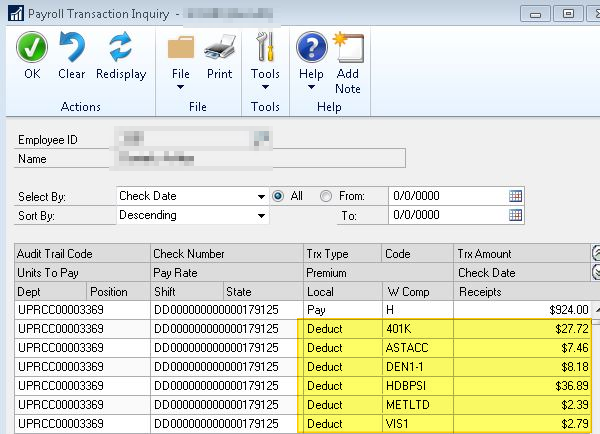
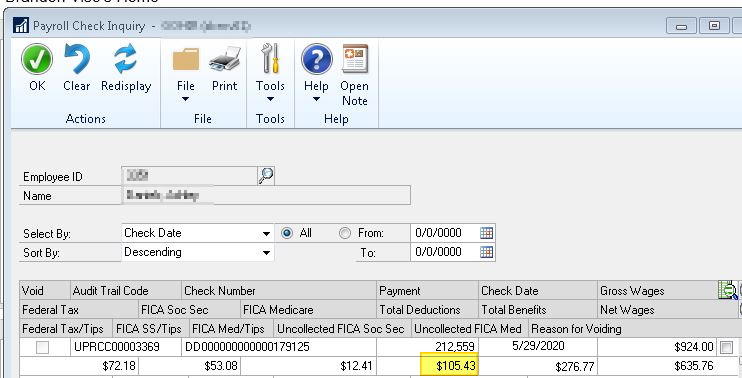
When viewing Check history, total deductions are more than the sum of deductions when looking at this check from payroll transaction inquiry window. Specifically one deduction code that is included in the summary is not show at all in the transactions.
pastedimage1591119145036v1.png

Total is $105.43

pastedimage1591119276519v2.png

Sum is 85.43

I've run check links and reconcile on the employee. Neither of those fixed this discrepancy. From what I can tell, there is a missing record in the UPR30300 Table for the deduction code. Without adding in records to that table manually, how could I fix this? 

Categories:
  • Suggested answer
    Terry R Heley Profile Picture
    Microsoft Employee on at

    This is a good find as typically those two would tie out.

    If you go to Cards | Payroll | Deduction for this employee and click Summary  does the month of May total out for you as you would expect?  This is pulling from the UPR30301 which is the summary table to the UPR30300 where you state it is missing.  This would have popped up on a reconcile report so I'm guessing it is not there?

    If it is missing in both tables, we could do a manual check for the deduction which will then make it right and totals correctly.

    Let me know what you find, thanks

    Terry

    Terry Heley | Sr. Escalation Engineer | Microsoft Dynamics

    701-492-6376 (o) | 701-412-5619 (m) | theley@microsoft.com

  • JBurgess Profile Picture
    74 on at

    Hey Terry, thanks for the response. It appears that it's missing on the Summary as well. As the Month of May should be $40 and it's showing $20:

    pastedimage1592577550825v1.png

    That being the case, I will suggest that the client does a manual check for the deduction to fix this. Can you think of any reason why this would happen, and more importantly, a way to check for additional situations like this and prevent them?

    Jason

  • Suggested answer
    Terry R Heley Profile Picture
    Microsoft Employee on at

    If it is missing from both, it should be fine, thanks!

    Terry

  • JBurgess Profile Picture
    74 on at

    This same issue has happened again for the same client. What could be causing this? Anything to watch out for as far as processing goes? or a way to catch these without them finding them when looking at specific employees?

Under review

Thank you for your reply! To ensure a great experience for everyone, your content is awaiting approval by our Community Managers. Please check back later.

Helpful resources

Quick Links

Season of Sharing Community Challenge Winners!

Congratulations to our community stars!

Women in Power Builds Momentum

Expanding mentorship, skilling, and AI innovation

Congratulations to the July Top 10 Community Leaders

These are the community rock stars!

Leaderboard > Finance | Project Operations, Human Resources, AX, GP, SL

#1
Martin Dráb Profile Picture

Martin Dráb 426 Most Valuable Professional

#2
CU10121822-0 Profile Picture

CU10121822-0 358

#3
André Arnaud de Calavon Profile Picture

André Arnaud de Cal... 353 Super User 2026 Season 2

Last 30 days Overall leaderboard

Product updates

Dynamics 365 release plans