web
You’re offline. This is a read only version of the page.
close
Skip to main content

Notifications

Announcements

No record found.

Community site session details

Community site session details

Session Id :
Microsoft Dynamics AX (Archived)

AX 2012: Adding indicators to the Business Overview web part

(0) ShareShare
ReportReport
Posted on by 456

H0576.AddIndicator_2D00_2.png"/resized-image.ashx/__size/550x0/__key/CommunityServer-Components-UserFiles/00-00-00-24-16-Attached+Files/3125.AddIndicator_2D00_1.png" border="0" />

But if I try to do that from any other server, it fails with this error (it appears right after I click Add indicators):

An unexpected error occurred while processing the Business overview Web part. Contact your system adminstrator.
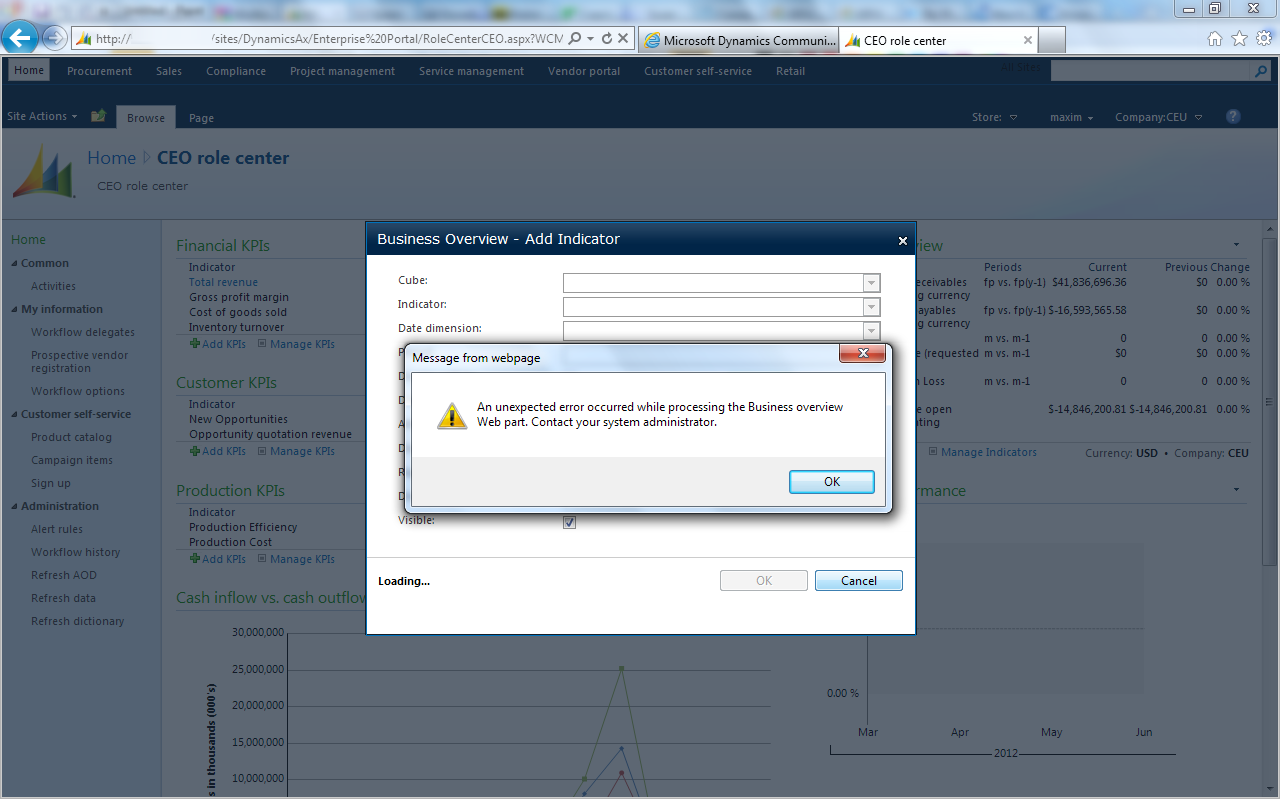
The EventLog on the PORTAL server records the following error at this time:

An unexpected error has occurred.

A connection cannot be made. Ensure that the server is running.

Microsoft.AnalysisServices.ConnectionException
at Microsoft.AnalysisServices.XmlaClient.Connect(ConnectionInfo connectionInfo, Boolean beginSession)
at Microsoft.AnalysisServices.Server.Connect(String connectionString, String sessionId)
at Microsoft.Dynamics.Framework.Portal.UI.WebControls.WebParts.CubeHelper.IsFiscalDateDimension(String dimensionName, String cubeName, AdomdConnection connection)
at Microsoft.Dynamics.Framework.Portal.UI.WebControls.WebParts.BusinessOverviewWebPart.PopulateListWithTimePeriods(ArrayList list, Dimension dimension, String cubeName)
at Microsoft.Dynamics.Framework.Portal.UI.WebControls.WebParts.BusinessOverviewWebPart.CubeChanged(String args)
at Microsoft.Dynamics.Framework.Portal.UI.WebControls.WebParts.BusinessOverviewWebPart.RaiseCallbackEvent(String eventArgument)


Unable to read data from the transport connection: An existing connection was forcibly closed by the remote host.

System.IO.IOException
at System.Net.Sockets.NetworkStream.Read(Byte[] buffer, Int32 offset, Int32 size)
at System.IO.BufferedStream.Read(Byte[] array, Int32 offset, Int32 count)
at Microsoft.AnalysisServices.DimeRecord.ForceRead(Stream stream, Byte[] buffer, Int32 length)
at Microsoft.AnalysisServices.DimeRecord.ReadHeader()
at Microsoft.AnalysisServices.DimeReader.ReadRecord()
at Microsoft.AnalysisServices.TcpStream.GetResponseDataType()

An existing connection was forcibly closed by the remote host

System.Net.Sockets.SocketException
at System.Net.Sockets.NetworkStream.Read(Byte[] buffer, Int32 offset, Int32 size)

Also, in the SSAS Flight Recorder, I found logon attempts with ANONYMOUS LOGON at the same time. It looks like a connection is first made using business connector account (which is the account running the application pool on the IIS), and then the web part is trying to connect to the OLAP database using anonymous logon and fails (rather expectedly).

Does anyone have any idea how to resolve this?

Any help is highly appreciated. Thank you!


*This post is locked for comments

I have the same question (0)
  • simong1105 Profile Picture
    on at

    I'm experiencing exactly the same issue.  Did you ever resolve it?  Thanks!

  • Community Member Profile Picture
    on at

    Has this been resolved?  

  • Barry-Wehmiller AX Pro Profile Picture
    460 on at

    Need to go through the following steps one by one.
    1.      Make sure in IIS , anonyms Authentication is disabled
    2.      Check the respective domain user id is added in SSRS security.
    3.      Needs to check corresponding SQL client Protocols enabled (such as Shared memory, TCP/IP)
    4.      Any firewall related issues.
    5.      Password change or expire (system restart required)
    6.      Verify SSAS connection properties SSRS

  • simong1105 Profile Picture
    on at

    Hi, apologies for the delay in testing this.

    The website had anonymous authentication enabled, so I've now disabled that.  Unfortunately the issue remains.

    Could you clarify how to verify the SSAS connection properties in SSRS as per step 6?

    many thanks

    Simon

  • Suggested answer
    Brandon Ahmad Profile Picture
    2,465 User Group Leader on at

    I need to run but check the post that I just made above this one.  This is an data connection error having something to do with the authentication provider.  

    Check the two links that I provided on how to setup and configure accounts to work with Enterprise Portal.  Make sure you go through all of the checklists and steps.  You can ask me any questions on it if something confuses you.  

    community.dynamics.com/.../100625.aspx

Under review

Thank you for your reply! To ensure a great experience for everyone, your content is awaiting approval by our Community Managers. Please check back later.

Helpful resources

Quick Links

Responsible AI policies

As AI tools become more common, we’re introducing a Responsible AI Use…

Neeraj Kumar – Community Spotlight

We are honored to recognize Neeraj Kumar as our Community Spotlight honoree for…

Leaderboard > 🔒一 Microsoft Dynamics AX (Archived)

#1
Martin Dráb Profile Picture

Martin Dráb 4 Most Valuable Professional

#1
Priya_K Profile Picture

Priya_K 4

#3
MyDynamicsNAV Profile Picture

MyDynamicsNAV 2

Last 30 days Overall leaderboard

Featured topics

Product updates

Dynamics 365 release plans



