Hi Sneha,
There is no straightforward way to enter number without rounding off, but you can create two fields and use Math.trunc() function to achieve it.
Here are steps.
1.create two fields. (one is whole number data type, another is decimal number data type)
If you need, you can set whole number filed is read-only.

2.Js code.
function setNumber(executionContext) {
    var formContext = executionContext.getFormContext();
    var oriNumber = formContext.getAttribute("new_testnum").getValue();
    var number=Math.trunc(oriNumber);
    if(oriNumber!=null)
    {
    Xrm.Page.getAttribute("new_testnumber").setValue(number);
    }
}
Add the JS code as web resource to OnChange event.
3.Test
When I fill ‘testnum’ field with value ’11.6’, the ‘testnumber’ field will be filled with ‘11’.
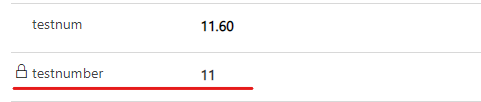
Regards,
Leah Ju
Please mark as verified if the answer is helpful. Welcome to join hot discussions in Dynamics 365 Forums.







