web
You’re offline. This is a read only version of the page.
close
Skip to main content

Notifications

Announcements

No record found.

Community site session details

Community site session details

Session Id :
Microsoft Dynamics NAV (Archived)

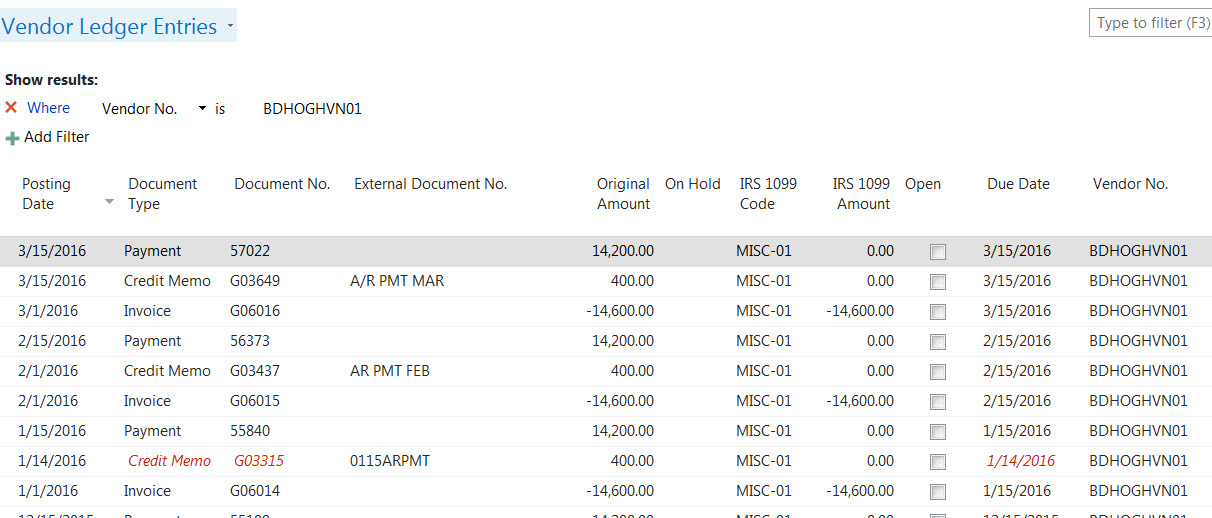
Entry in Vendor Ledger Entries that is showing red

(0) ShareShare
ReportReport
Posted on by

I have entries in Vendor Ledger Entries that are red. The item is not open for this vendor. Is there something that I need to look at and correct? This particular vendor, when I run the 1099 report does not show an accurate amount paid to them.

Thanks
bd-haven-jan-feb-mar-entries.jpg

*This post is locked for comments

I have the same question (0)
  • Community Member Profile Picture
    on at

    Check the Vendor ledger entries and see if entries are properly applied.

    Can you attach entries screen shot here for further understanding?

  • Community Member Profile Picture
    on at

  • Community Member Profile Picture
    on at

    vendor-entries-in-red.jpg

  • Community Member Profile Picture
    on at

    Use Rich formatting option and attach screen shot.

  • Community Member Profile Picture
    on at

    What is the exact issue with this entry?

  • Community Member Profile Picture
    on at

    Why is part of this entry showing red. I have been deducting 400. per month from the vendor  for an outstanding a/r and right now when I run my 1099 on this vendor, it is 400.00 short. I was thinking this "red" entry may have something to do with it. 1099 amount should be 43800. however when I run the report, it shows 43,400.

    4405.bd-haven-jan-feb-mar-entries.jpg

  • Verified answer
    Alexander Ermakov Profile Picture
    28,096 on at

    That is a nice one :-), we have also been wondering about such cases some time ago.

    The style for this record is controlled by a code in OnAfterGetRecord of the page. In some fields, it refers to the style, described in the table itself. Here is this part:

    IF Open THEN BEGIN

     IF WORKDATE > "Due Date" THEN

       EXIT('Unfavorable')

    END ELSE

     IF "Closed at Date" > "Due Date" THEN

       EXIT('Attention');

    EXIT('');

    That is, if the Closed at Date is > then Due Date, then it will be marked with red.

    Check at what date the credit memo is applied?

  • Community Member Profile Picture
    on at

    I  process these Credit Memos on the first of the month. I have a few vendors that their terms are 14 days and I will pay and apply these credit memos on the 15th of the month. Also,  is there a reason why my 1099 report is not showing the correct amount? If you look at the screen shot of my entries for B & D, I have deducted 400.00 from them each month and currently when I run the report, it is off by 400.

    Thanks

Under review

Thank you for your reply! To ensure a great experience for everyone, your content is awaiting approval by our Community Managers. Please check back later.

Helpful resources

Quick Links

Responsible AI policies

As AI tools become more common, we’re introducing a Responsible AI Use…

Neeraj Kumar – Community Spotlight

We are honored to recognize Neeraj Kumar as our Community Spotlight honoree for…

Leaderboard > 🔒一 Microsoft Dynamics NAV (Archived)

Last 30 days Overall leaderboard

Featured topics

Product updates

Dynamics 365 release plans
