web
You’re offline. This is a read only version of the page.
close
Skip to main content

Notifications

Announcements

No record found.

Community site session details

Community site session details

Session Id :
Microsoft Dynamics GP (Archived)

OPENING CHECKBOOK BALANCE

(1) ShareShare
ReportReport
Posted on by

CB-INQUIRY-REPORT.JPG

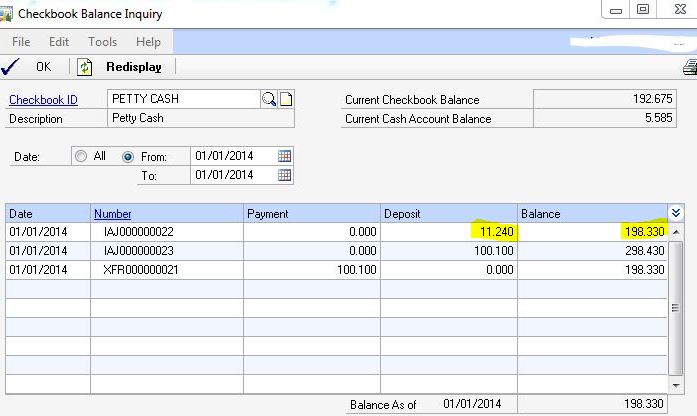
my check book balance enquiry report is showing me a starting balance with a difference of 187.090 with the actual opening balance.

the difference between the highlighted figures would be my opening balance which is wrong. 

how it has taken this extra amount of 187.090. the report is showing that this amount was already available in the CBM opening balance.

The actual opening balance amount should be 11.240, which i have made the IAJ0000000022 (to reflect the opening in the bank reconcialition only the GL posting update was disabled while making this adjustment) as the GL was already updated in the Trial balance GL posting.

Please advise.

*This post is locked for comments

I have the same question (0)
  • Suggested answer
    babubaskaran@outlook.com Profile Picture
    12 on at

    Hi Rabia,

    Please click here to see Microsoft KB to fix the balance of checkbook.

  • Suggested answer
    soma Profile Picture
    24,410 on at

    Hi Rabia,

    Its looks like some transaction was made before jan 2014. Please change the date all and check if any transaction available before Jan 2014.

    Note: you can also check the bank transactions from smartlist before jan2014.

    Hope this helps!!!

  • Verified answer
    Redbeard Profile Picture
    12,931 on at

    Rabia,

    I have seen similar scenarios to the one you have here, when someone has adjusted the CURRBLNC field in the CM00100 table.  This is a not uncommon scenario, when General Ledger transaction history for cash accounts was imported into the General Ledger and not Bank Transaction Entry.

    Your post indicates you entered an 11.240 Increase Adjustment into Bank Transaction Entry, and deleted the General Ledger Distributions, instead of Posting, which should have had the desired effect.  You should have been rewarded with a beginning balance of 11.240.  

    Since there aren't any other transactions in your Inquiry screen shot, the transaction, which changed your balance either occurred in a different period or was a SQL update to the CM00100 table. The good news is the answer is the same, in either case.

    I would suggest entering a Decrease Adjustment for 187.090 in much the same way you entered the 11.240 Increase Adjustment, with Bank Transaction Entry posting configured to post to, not through, the General Ledger, in Setup > Posting > Posting.  Based on your description of the problem you need to remove the 187.090 without having it update the General Ledger.

    If I have misinterpreted your post, and both the Checkbook Balance and the General Ledger need to be updated, then post the General Ledger Entry created by the Decrease Adjustment.

  • Community Member Profile Picture
    on at

    Hi Harry, i was having the same solution to implement & see, but before i could do that you suggested it too. I have done & my problem has been solved.

    Thanks alott all over here for suggested possible solutions.

    Thanks

Under review

Thank you for your reply! To ensure a great experience for everyone, your content is awaiting approval by our Community Managers. Please check back later.

Helpful resources

Quick Links

Responsible AI policies

As AI tools become more common, we’re introducing a Responsible AI Use…

Neeraj Kumar – Community Spotlight

We are honored to recognize Neeraj Kumar as our Community Spotlight honoree for…

Leaderboard > 🔒一 Microsoft Dynamics GP (Archived)

#1
Community Member Profile Picture

Community Member 2

#2
mtabor Profile Picture

mtabor 1

#2
Victoria Yudin Profile Picture

Victoria Yudin 1

Last 30 days Overall leaderboard

Featured topics

Product updates

Dynamics 365 release plans



