web
You’re offline. This is a read only version of the page.
close
Skip to main content

Notifications

Announcements

No record found.

Community site session details

Community site session details

Session Id :
Service | Customer Service, Contact Center, Fie...
Answered

ReferenceError: formContext is not defined - Javascript Web Resource on Email main form

(0) ShareShare
ReportReport
Posted on by 20

Hello Team,

I am brand new to javascript. So, I'm struggling to understand the correct syntax for my requirement. I have a main email form and for that specific form, I'd like to populate the From column with a queue mailbox when the form state (getformtype) value is Create (1). 

Here is the code from the .js web resource I've created:

function _setFromUser() {
    var formType = formContext.ui.getFormType();
    var legalQueueID = "dcc80a43-39e4-e711-817f-e0071b715bc1";
    var recordName = "";
    var entityName = "queue";
    if(formType == 1) {
        Xrm.Page.getControl("from").getAttribute().setValue([{ id: legalQueueID, name: recordName, entityType: entityName }]);
}}

Here is how I have the event handler configured on the form:
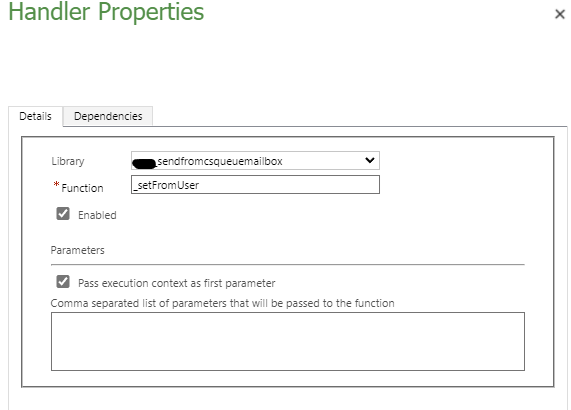
pastedimage1640704984891v2.png

Here is the error I receive: 

ReferenceError: formContext is not defined
    at eval (eval at _executeFunctionInternal (https://********.crm.dynamics.com/uclient/scripts/app.js?v=1.4.3618-2111.2:1988:5296), :1:2)
    at eval ()
    at y._executeFunctionInternal (https://********.crm.dynamics.com/uclient/scripts/app.js?v=1.4.3618-2111.2:1988:5296)
    at y.executeSync_DO_NOT_USE (https://********.crm.dynamics.com/uclient/scripts/app.js?v=1.4.3618-2111.2:1988:3404)
    at r (https://********.crm.dynamics.com/uclient/scripts/app.js?v=1.4.3618-2111.2:1719:61)
    at ee._convertEventDescriptorToCustomEvent (https://********.crm.dynamics.com/uclient/scripts/app.js?v=1.4.3618-2111.2:151:32656)
    at https://********.crm.dynamics.com/uclient/scripts/app.js?v=1.4.3618-2111.2:151:32306
    at Array.map ()
    at ee._getEventHandlerList (https://********.crm.dynamics.com/uclient/scripts/app.js?v=1.4.3618-2111.2:151:32294)
    at Object.execute (https://********.crm.dynamics.com/uclient/scripts/app.js?v=1.4.3618-2111.2:151:20784)

I've tried passing the formContext parameter to the function using the "Comma separated list of parameters that will be passed to the function" column in the event handler dialog. But, that doesn't seem to work either. Any ideas? 

I have the same question (0)
  • Verified answer
    Nya Profile Picture
    29,060 on at

    Hi,

    The new formContext object is used to in place of the Xrm.Page object.

    It should be used in its normal form as follows:

    function displayName(executionContext)
    {
    	var formContext = executionContext.getFormContext(); // get formContext
    
    	// use formContext instead of Xrm.Page	
    	...
    }

  • Verified answer
    Bipin D365 Profile Picture
    28,983 Moderator on at

    Hi,

    You need to update your code as below -

    function _setFromUser(executionContext) {
    var formContext=executionContext.getFormContext();
        var formType = formContext.ui.getFormType();
        var legalQueueID = "dcc80a43-39e4-e711-817f-e0071b715bc1";
        var recordName = "";
        var entityName = "queue";
        if(formType == 1) {
            Xrm.Page.getControl("from").getAttribute().setValue([{ id: legalQueueID, name: recordName, entityType: entityName }]);
    }}

    Please mark my answer verified if this is helpful!

    Regards,

    Bipin Kumar

    Follow my Blog: xrmdynamicscrm.wordpress.com/

  • AbleAmazing Profile Picture
    20 on at

    Thanks so much. This worked perfectly. The only change I had to make was adding an additional return value to the if(formType) statement. I added an OR operator to include the "undefined" form state because it seems as though the client API does not recognize draft replies as a "create" form state. So, code on line 7 now looks like this:

    if(formType == 1 || formType ==0)

    And now it appears to be working perfectly for my requirement. Thanks again!

Under review

Thank you for your reply! To ensure a great experience for everyone, your content is awaiting approval by our Community Managers. Please check back later.

Helpful resources

Quick Links

Responsible AI policies

As AI tools become more common, we’re introducing a Responsible AI Use…

Neeraj Kumar – Community Spotlight

We are honored to recognize Neeraj Kumar as our Community Spotlight honoree for…

Leaderboard > Service | Customer Service, Contact Center, Field Service, Guides

#1
Tom_Gioielli Profile Picture

Tom_Gioielli 45 Super User 2025 Season 2

#2
Daniyal Khaleel Profile Picture

Daniyal Khaleel 27 Most Valuable Professional

#3
Soundari Profile Picture

Soundari 15

Last 30 days Overall leaderboard

Featured topics

Product updates

Dynamics 365 release plans
