web
You’re offline. This is a read only version of the page.
close
Skip to main content

Notifications

Announcements

No record found.

Community site session details

Community site session details

Session Id :
Customer experience | Sales, Customer Insights,...
Suggested Answer

Problem w/ Business Rule: Show Error Message + Set Business Required

(0) ShareShare
ReportReport
Posted on by 12,163

I created a Business Rule that enforces Business Requirement on a Contact field when another field is updated. Additionally, it Shows an Error Message on the Contact field stating why it is required. However, once the Contact is entered, the error message does not go away and the user is not able to save the record.

Either I have deployed the rule incorrectly or am not understanding how it should be used or it is a bug.

I have the same question (0)
  • Suggested answer
    Charles Abi Khirs Profile Picture
    3,569 on at

    Hello,

    Make sure that the business rule scope is set to all forms, activated and that ALL the fields that are used in the business rule ALL exist on the form.

  • Joe Woltering Profile Picture
    12,163 on at

    Hi,

    Well that's just it. I don't need it on ALL forms and the field that triggers the rule only exists on one form by necessity.

  • Suggested answer
    Charles Abi Khirs Profile Picture
    3,569 on at

    Hi,

    You can of course select the needed form, but make sure that all the fields used in the BR (in the conditions and actions selected) exist all on the selected form, finally verify that the BR is activated.

  • Suggested answer
    LuHao Profile Picture
    40,892 on at

    Hi Joe,

    Did you only set the conditional branch that turned out to be True, but did not set the conditional branch that turned out to be False?

    Like this:
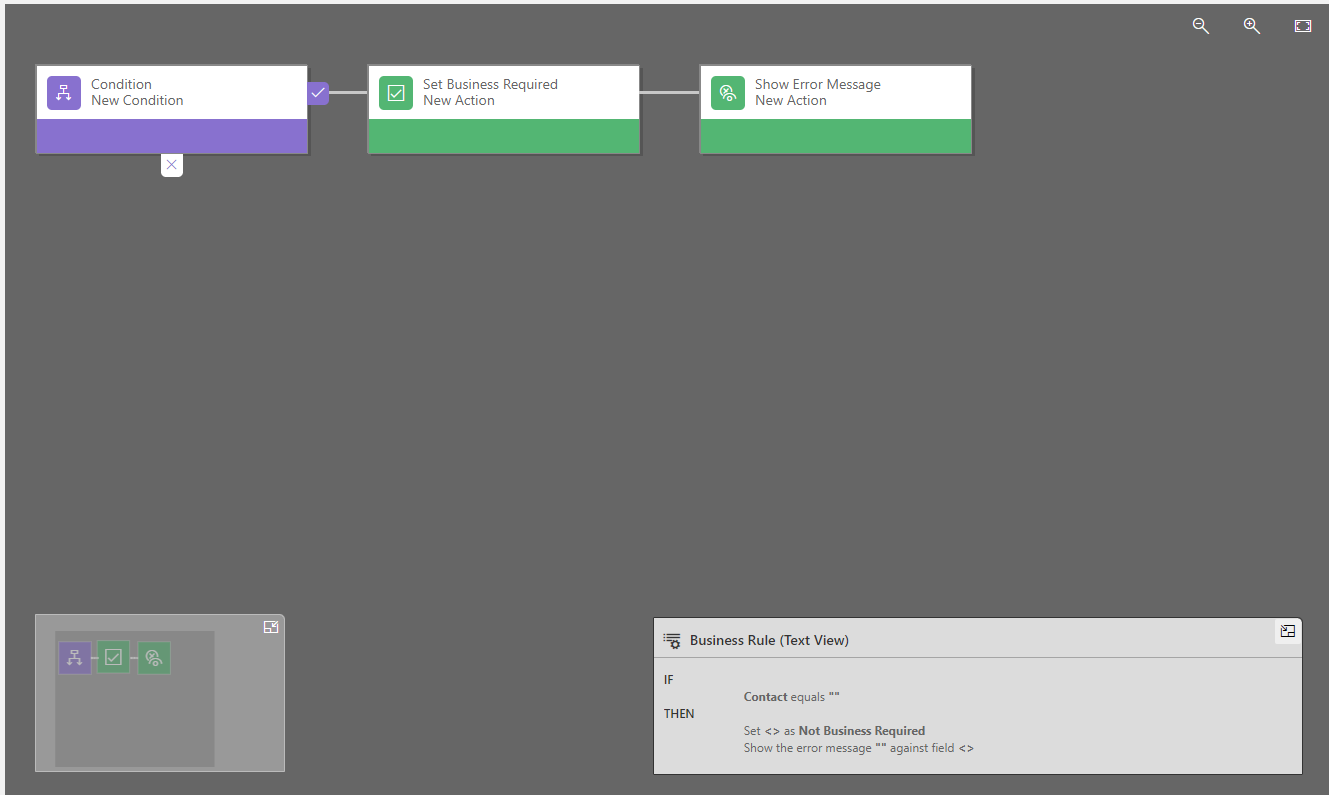
    pastedimage1614844312272v1.png

    I would recommend you create two business rules, each contains an action.

    For example, at the beginning you only have one business rule, and its action is If True, then set Business Requirement, and Shows an Error Message.

    So you can create two business rules, one action is If True, then set Business Requirement. The other action is If True, then Shows an Error Message.

    Don't forget to deactivate the original business rule.

  • Joe Woltering Profile Picture
    12,163 on at

    Ah, yes. That kind of makes sense. So I would need to construct the rule to check if the Contact field contains data and then show the error message or not?

  • Suggested answer
    LuHao Profile Picture
    40,892 on at

    Hi Joe,

    As mentioned in my last reply, please place "Shows an Error Message" in a separate business rule.

    Because "Shows an Error Message" is a one-way action, there is no action to clear the Error Message (no opposite action), so we have to place "Shows an Error Message" in a separate business rule to make the system clearly judge whether to display Error Message according to the condition.

Under review

Thank you for your reply! To ensure a great experience for everyone, your content is awaiting approval by our Community Managers. Please check back later.

Helpful resources

Quick Links

Responsible AI policies

As AI tools become more common, we’re introducing a Responsible AI Use…

Neeraj Kumar – Community Spotlight

We are honored to recognize Neeraj Kumar as our Community Spotlight honoree for…

Leaderboard > Customer experience | Sales, Customer Insights, CRM

#1
Tom_Gioielli Profile Picture

Tom_Gioielli 171 Super User 2025 Season 2

#2
#ManoVerse Profile Picture

#ManoVerse 83

#3
Jimmy Passeti Profile Picture

Jimmy Passeti 50 Most Valuable Professional

Last 30 days Overall leaderboard

Product updates

Dynamics 365 release plans



