web
You’re offline. This is a read only version of the page.
close
Skip to main content

Notifications

Announcements

No record found.

Community site session details

Community site session details

Session Id :
Finance | Project Operations, Human Resources, ...
Unanswered

SSRS Visual Studio Project Error AX3026

(0) ShareShare
ReportReport
Posted on by 505

Good day.

i hope that someone could assist me with an issue i am having trying to make changes to the VendInvoiceDocumentReport. it is giving me the following errors in AX as well as when trying to edit the report in Visual studio 2010.
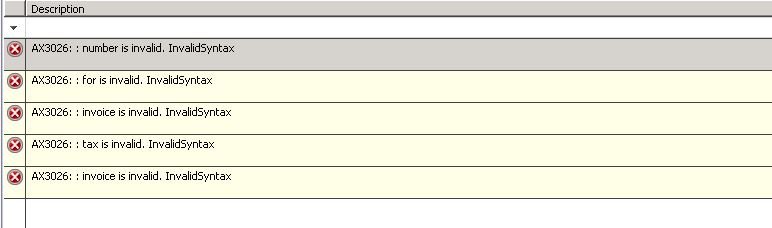
8688.ReportError.JPG

i cannot make any changes to this report by clicking on edit and opening it in Visual studio as i get the same errors there.

i cannot figure out how to find out which field is causes the issue. has anyone come across this issue before and found a way to find out what is causing it in order to fix it?

any help would be appreciated.

I have the same question (0)
  • Gunjan Bhattachayya Profile Picture
    35,423 on at

    Hi B.A,

    Are there existing customizations on the report?

  • B.W Profile Picture
    505 on at

    Hi Gunjan.

    thank you for your response.

    not that i am aware of.

    i am battling to try and figure out where to even start looking for these errors.

  • Gunjan Bhattachayya Profile Picture
    35,423 on at

    Hi B.A,

    You can check in the AOT and check if there are any existing modifications done. The errors look like issues with expressions in the report. In case some changes were done, you can log into the layer the changes were done on and delete the report. This will remove any issues with the report and you will have the default AX report . You should not have any errors on the report anymore when you open the VS project.

    Please make sure you have a backup of the report as well, just in case there were some changes done on it.

  • Community Member Profile Picture
    on at

    Hi B.A,

    Please try to double click the error message in vs which may help you locate the corresponding expression.

  • B.W Profile Picture
    505 on at

    Good day Leo and Gunjan.

    i have tried all suggestions and none has worked. it is a very strange issue indeed. i will be parking this change for now and pick it up at a later stage.

    i would like to thank you both for taking the time to respond and offer assistance in this matter.

Under review

Thank you for your reply! To ensure a great experience for everyone, your content is awaiting approval by our Community Managers. Please check back later.

Helpful resources

Quick Links

Responsible AI policies

As AI tools become more common, we’re introducing a Responsible AI Use…

Neeraj Kumar – Community Spotlight

We are honored to recognize Neeraj Kumar as our Community Spotlight honoree for…

Leaderboard > Finance | Project Operations, Human Resources, AX, GP, SL

#1
Martin Dráb Profile Picture

Martin Dráb 611 Most Valuable Professional

#2
André Arnaud de Calavon Profile Picture

André Arnaud de Cal... 529 Super User 2025 Season 2

#3
Sohaib Cheema Profile Picture

Sohaib Cheema 285 User Group Leader

Last 30 days Overall leaderboard

Product updates

Dynamics 365 release plans



