web
You’re offline. This is a read only version of the page.
close
Skip to main content

Notifications

Announcements

No record found.

Community site session details

Community site session details

Session Id :
Finance | Project Operations, Human Resources, ...
Suggested Answer

Date format in ssrs report

(0) ShareShare
ReportReport
Posted on by 75

Hi all,

I wonder how the data format on SSRS reports works. I want to view Free text invoice 
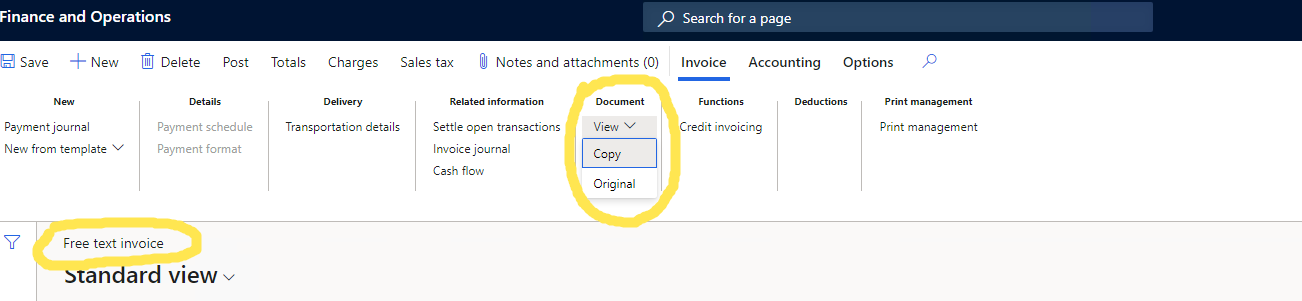
pastedimage1663065175958v2.png

and the data format, that is in the report, should be in a format based on the User options -> Preferences, for example, when I choose the "Date, time, and number format" and "Country/region" fields, so the format should be like DD/MM/YYYY, it is showed correctly in the Free text invoices list:
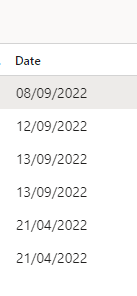
pastedimage1663065591290v3.png

but when I create the document, the format of the data is not the same as in the list. I would like to ask, please, how the format is chosen? Because in debugging, I saw the format of the field in code is like MM/DD/YYYY, but the result is different. For example now I got the format like dd.mm.yyyy, although in the list the format is like dd/mm/yyyy and however I change the preferences, I still got this format in report..

Many thanks

I have the same question (0)
  • Suggested answer
    Arunraj Rajasekar Profile Picture
    1,743 on at

    Hi Sayid,

    Under user options, try configuring the date, time, and number format preferences.

    pastedimage1663094417651v1.png

  • Sayid Profile Picture
    75 on at

    Hi Arunraj,

    That's the problem, that's what I am trying to do, but configuring the data time and number format preferences does not apply in the report and I have no idea why.

  • Suggested answer
    Komi Siabi Profile Picture
    13,122 Most Valuable Professional on at

    I hope this speaks to same post by you.

    community.dynamics.com/.../1277957

Under review

Thank you for your reply! To ensure a great experience for everyone, your content is awaiting approval by our Community Managers. Please check back later.

Helpful resources

Quick Links

Responsible AI policies

As AI tools become more common, we’re introducing a Responsible AI Use…

Neeraj Kumar – Community Spotlight

We are honored to recognize Neeraj Kumar as our Community Spotlight honoree for…

Leaderboard > Finance | Project Operations, Human Resources, AX, GP, SL

#1
Abhilash Warrier Profile Picture

Abhilash Warrier 669 Super User 2025 Season 2

#2
André Arnaud de Calavon Profile Picture

André Arnaud de Cal... 449 Super User 2025 Season 2

#3
Martin Dráb Profile Picture

Martin Dráb 384 Most Valuable Professional

Last 30 days Overall leaderboard

Product updates

Dynamics 365 release plans



