web
You’re offline. This is a read only version of the page.
close
Skip to main content

Notifications

Announcements

No record found.

Community site session details

Community site session details

Session Id :
Microsoft Dynamics AX (Archived)

Tax information in sales Line through X++

(0) ShareShare
ReportReport
Posted on by 30

Dear All,

In SalesLine we already inserted data through Code only.

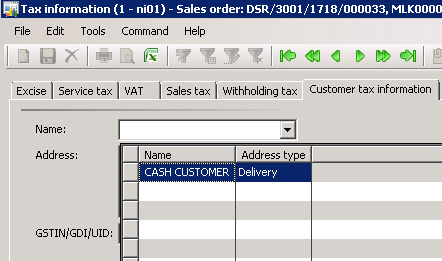
In Tax Information button we want to update "Customer Tax Information" tab In Name and Address automatically means while insert data in to salesLine through code.

it's not showing Customer name and  Address automatically.

But it's showing in lookup. When user select then it's updated properly.
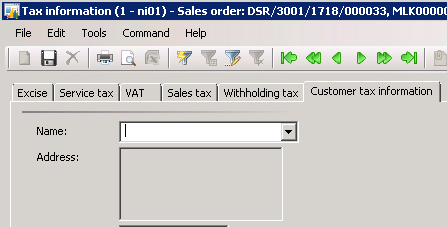
4628.a1.png

4048.a2.png

Note : Customer wants to update Name and Address in Customer Tax Information tab automatically means when import data in to SalesLine.

*******

I checked in back end "TransTaxInformationTmp_IN" table is there. It's temp table.

Please give me more shed on this.

Thanks!

Arpan

*This post is locked for comments

I have the same question (0)
  • Sukrut Parab Profile Picture
    71,710 Moderator on at

    Is this on salesTable Form ?

  • @rp@n Profile Picture
    30 on at

    Yes Sukrut,

    In Tax information GST number and other fields are updated properly.

    Please give me more shed on this.

    Thanks!

    Arpan

  • Suggested answer
    Sukrut Parab Profile Picture
    71,710 Moderator on at

    If you are not creating TransTaxInformation_IN Try this code in your import process .

                     CustTable custTable = CustTable::find(salesTable.CustAccount);

                       SalesLine salesLineLoc;

                       TransTaxInformation_IN transTaxInformation;

    while select salesLineLoc

                           where salesLineLoc.SalesId == salesTable.SalesId

                       {

                           TransTaxInformation_IN transTaxInformation = TransTaxInformationHelper_IN::findOrCreateTransTaxInformation(salesLine.TableId, salesLine.RecId);

                           if (transTaxInformation)

                           {

                               ttsbegin;

                               transTaxInformation.selectForUpdate(true);

                               TransTaxInformationHelper_IN::initFromCustVend(transTaxInformation, custTable);

                               transTaxInformation.update();

                               ttscommit;

                           }

                       }

  • @rp@n Profile Picture
    30 on at

    Thanks Sukrut,

    As you mentioned above Table TransTaxInformation_IN  not present in AOT

    TransTaxInformationTmp_IN is there.

    Please confirm.

    I need to paste above code after SalesLine.CreateLine() and before Salsline.update().

    Means in between?

    Thanks!

    Arpan

  • Sukrut Parab Profile Picture
    71,710 Moderator on at

    yes use TransTaxInformationTmp_IN. Yes that correct .. try that

  • @rp@n Profile Picture
    30 on at

    Thanks Sukrut,

    1234.a1.png

    In Class TransTaxInformationHelper_IN the method you mentioned is not there.

    I am using AX 2009.

    Please give me more shed on this.

  • Sukrut Parab Profile Picture
    71,710 Moderator on at

    can you go to SalesLine datasource ItemId Field on salesTable form and see how they are inserting records in  TransTaxInformationTmp_IN , I don't have 2009 to see

  • @rp@n Profile Picture
    30 on at

    sure, i will check

  • @rp@n Profile Picture
    30 on at

    Hi Sukrut,

    I checked in SaleTable form and entire form in find with "TransTaxInformationTmp_IN " but NO result.

    I checked also in SalesTable and SalesLine but NO result.

    I am surprised.

    But when i am creating manually record in SalesLine then it's get updated properly. NO Issue.

    But when i import through code in SalesLine then it's NOT get updated.

    Arpan

  • Sukrut Parab Profile Picture
    71,710 Moderator on at

    Check saleslinetype and salestabletype class

Under review

Thank you for your reply! To ensure a great experience for everyone, your content is awaiting approval by our Community Managers. Please check back later.

Helpful resources

Quick Links

Responsible AI policies

As AI tools become more common, we’re introducing a Responsible AI Use…

Neeraj Kumar – Community Spotlight

We are honored to recognize Neeraj Kumar as our Community Spotlight honoree for…

Leaderboard > 🔒一 Microsoft Dynamics AX (Archived)

#1
Martin Dráb Profile Picture

Martin Dráb 4 Most Valuable Professional

#1
Priya_K Profile Picture

Priya_K 4

#3
MyDynamicsNAV Profile Picture

MyDynamicsNAV 2

Last 30 days Overall leaderboard

Featured topics

Product updates

Dynamics 365 release plans