I'm trying to create the sql query code based on a flow filter calc formula
So I have the table "Vendor Ledger Entry" with a important field called "Remaining Amount". This is a flowfield, calculated based on formulas with other tables(in this case Detailed Vendor Ledger Entry
Remaining Amount: `"Sum("Detailed Vendor Ledg. Entry".Amount WHERE (Vendor Ledger Entry No.=FIELD(Entry No.),Posting Date=FIELD(Date Filter),Excluded from calculation=CONST(No)))"`
So I "convert" the "Remaining Amount" to this sql query
Select Sum([E18375$Detailed Vendor Ledg_ Entry].[Amount]) as 'Valor pendente'
FROM [E18375$Detailed Vendor Ledg_ Entry]
INNER JOIN [E18375$Vendor Ledger Entry] ON [E18375$Detailed Vendor Ledg_ Entry].[Entry No_] = [E18375$Vendor Ledger Entry].[Entry No_]
WHERE [E18375$Detailed Vendor Ledg_ Entry].[Excluded from calculation] = 0 and [E18375$Vendor Ledger Entry].[Document No_]='1707NC006' and [E18375$Detailed Vendor Ledg_ Entry].[Amount]>0
The problem is I get the value "Valor pendente" equals to "NULL" instead of "10" like the image below.
I follow this example i found online to create my sql query..
Sum("Detailed Cust. Ledg. Entry"."Amount (LCY)" WHERE (Cust. Ledger Entry No.=FIELD(Entry No.),Entry Type=FILTER(Initial Entry),Posting Date=FIELD(Date Filter)))
Select Sum([Amount (LCY)] FROM [Detailed Cust. Ledg. Entry]
INNER JOIN
[Cust. Ledg. Entry]
ON
[Detailed Cust. Ledg. Entry].[Entry No.] = [Cust. Ledg. Entry].[Entry No.]
WHERE
[Detailed Cust. Ledg. Entry].[Entry Type] = "Initial Entry"
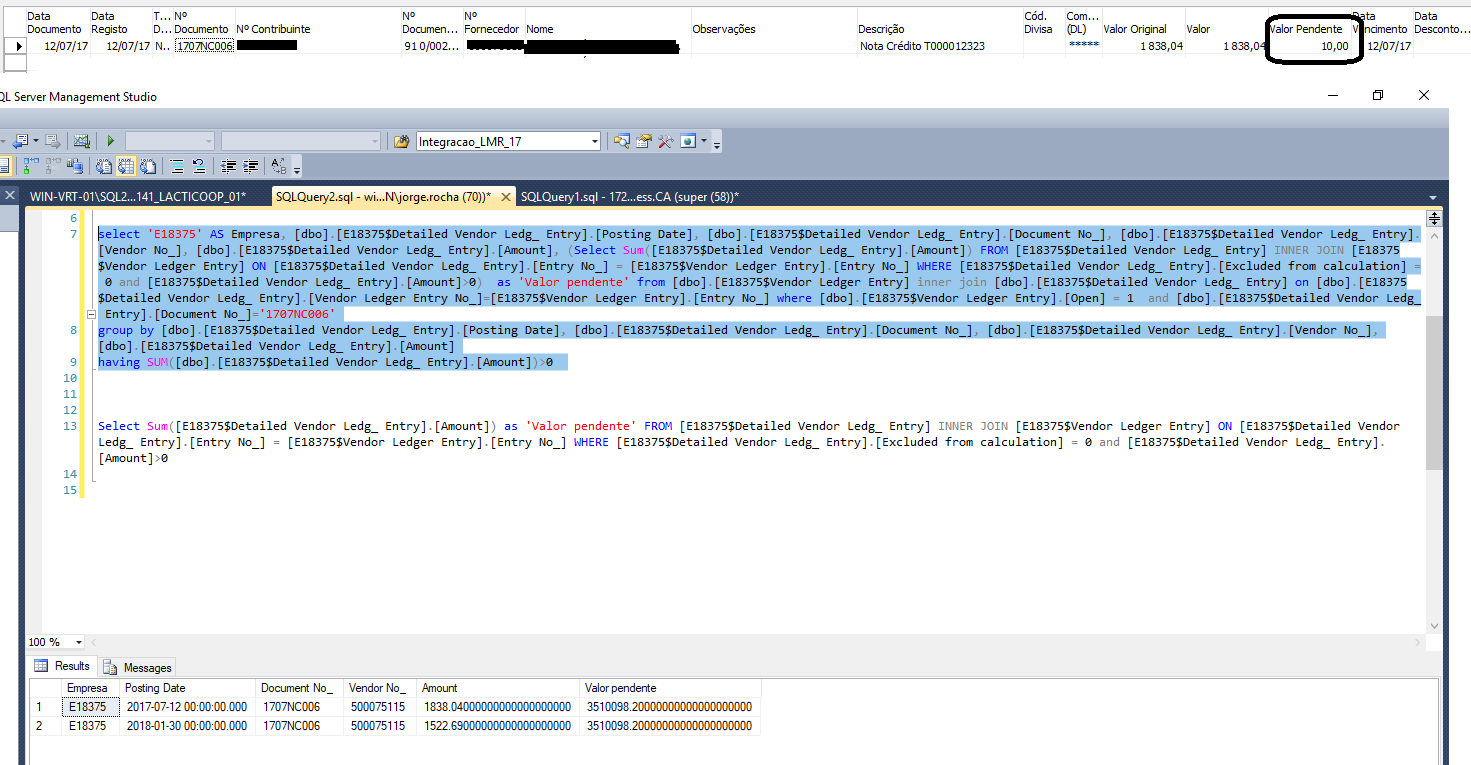
I need the "Empresa", Posting Date, document No and Vendor No (from detailed vendor ledger entry) and Remaining Amount (the flowfield I want to "convert")
My full query is here below:
select 'E18375' as Empresa, [E18375$Detailed Vendor Ledg_ Entry].[Posting Date],
[E18375$Detailed Vendor Ledg_ Entry].[Document No_],
[E18375$Detailed Vendor Ledg_ Entry].[Vendor No_],
[E18375$Detailed Vendor Ledg_ Entry].Amount, (Select Sum([Amount (LCY)])
FROM [E18375$Detailed Vendor Ledg_ Entry]
INNER JOIN [E18375$Vendor Ledger Entry] ON [E18375$Detailed Vendor Ledg_ Entry].[Entry No_] = [E18375$Vendor Ledger Entry].[Entry No_]
WHERE [E18375$Detailed Vendor Ledg_ Entry].[Excluded from calculation]=0
AND [E18375$Detailed Vendor Ledg_ Entry].[Amount]>0) as 'Valor pendente'
from [E18375$Vendor Ledger Entry] inner join [E18375$Detailed Vendor Ledg_ Entry] on [E18375$Detailed Vendor Ledg_ Entry].[Vendor Ledger Entry No_]=[E18375$Vendor Ledger Entry] .[Entry No_]
where [E18375$Vendor Ledger Entry].[Open]=1 and [E18375$Detailed Vendor Ledg_ Entry].[Document No_]='1707NC006'
group by [E18375$Detailed Vendor Ledg_ Entry].[Posting Date], [E18375$Detailed Vendor Ledg_ Entry].[Document No_],
[E18375$Detailed Vendor Ledg_ Entry].[Vendor No_], [E18375$Detailed Vendor Ledg_ Entry].[Vendor Ledger Entry No_],
[E18375$Detailed Vendor Ledg_ Entry].[Amount]
having sum([E18375$Detailed Vendor Ledg_ Entry].[Amount])>0


