web
You’re offline. This is a read only version of the page.
close
Skip to main content

Notifications

Announcements

No record found.

Community site session details

Community site session details

Session Id :
Customer experience | Sales, Customer Insights,...
Unanswered

Invalid User Authorization while running CRM reports

(0) ShareShare
ReportReport
Posted on by

While trying to run the reports in CRM (on-peemise) , we are getting "Invalid User Authorization"

For reference ,please check the log file error message below:-

"Invalid User Authentication. The user authentication passed to the platform is not valid". There is error "Microsoft.Crm.CrmException: The current organization id could not be determined" 

Note: User is a part of both Priv User group and Sql Access group

Looking for the positive response as early as possible.
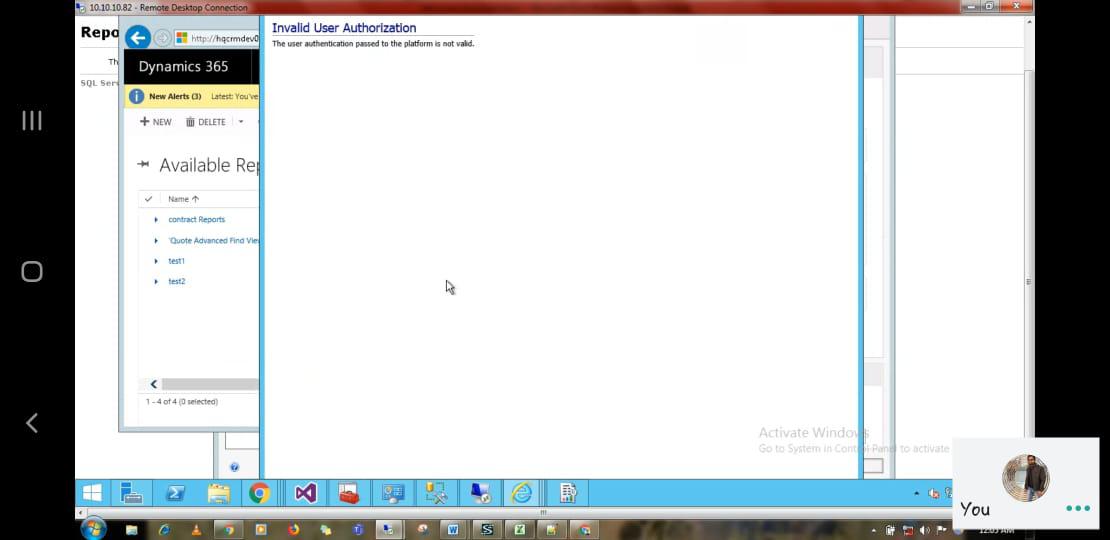
Invalid-User-Authorization.png

I have the same question (0)
  • edmunch Profile Picture
    on at

    Is this happening with both OOB reports and custom ones?  Can you run these reports directly from SSRS?  What does it show in the CRM Platform traces?

  • Community Member Profile Picture
    on at

    Thank you for your quick feedback

    Yes it is happening for both OOB and custom reports. Also we we are not able to run the reports from  SSRS  and we havent found any traces in CRM Platform Trace.

  • Daniel Schneider Profile Picture
    172 on at

    Try to add the user who is runnig the report to the groups in the ad

    PrivUserGroup and SQLAccessGroup.

  • Community Member Profile Picture
    on at

    Thank you for your response..

    As i had already mentioned in  the description , User is added in both the mentioned groups.

  • Community Member Profile Picture
    on at

    Thank you for your response

    As i have already mentioned in the description ,  User is been added in  both the groups

  • Daniel Schneider Profile Picture
    172 on at

    Is the user who try to use report the service user for reporting service? Please open SQL Reporting Configuration with the Report Service User and try test the connection to the DB by changing the Database. Please only test the connection and dont change the db. If test is failed you need to add the user to administrator group on to the local sql machine. I had the same issue and add the user to the group on sql machine and directly in sql as new connection.

  • Daniel Schneider Profile Picture
    172 on at

    I looked at the group son my ad and saw the reporting service user is added to PrivReportingGroup and PrivUserGroup.

    On the sql Server try on cmd grpupdate /force

    Hope this helps

  • Community Member Profile Picture
    on at

    Thank you for your response.

    User is a part of PrivReportingGroup and PrivUserGroup.

    We tried run the cmd (gpupdate/force) in sql server  however the issue still persist.

  • Alan Ericson Profile Picture
    on at

    I have encountered this error in the past and it was due to port 808 being blocked on the CRM Web front end server.

    I would suggest to run a platform trace on the CRM Web front end when attempting the report and review for related errors.

Under review

Thank you for your reply! To ensure a great experience for everyone, your content is awaiting approval by our Community Managers. Please check back later.

Helpful resources

Quick Links

Responsible AI policies

As AI tools become more common, we’re introducing a Responsible AI Use…

Neeraj Kumar – Community Spotlight

We are honored to recognize Neeraj Kumar as our Community Spotlight honoree for…

Leaderboard > Customer experience | Sales, Customer Insights, CRM

#1
Tom_Gioielli Profile Picture

Tom_Gioielli 170 Super User 2025 Season 2

#2
#ManoVerse Profile Picture

#ManoVerse 61

#3
Gerardo Rentería García Profile Picture

Gerardo Rentería Ga... 52 Most Valuable Professional

Last 30 days Overall leaderboard

Product updates

Dynamics 365 release plans
