web
You’re offline. This is a read only version of the page.
close
Skip to main content

Announcements

No record found.

News and Announcements icon
Community site session details

Community site session details

Session Id :
Finance | Project Operations, Human Resources, ...
Answered

Display SalesTable.SalesName at the header of ProdCalcTrans SRSS Report (outside tablix)

(0) ShareShare
ReportReport
Posted on by 46

Hi all,

This should be a very simple expression probably, But I haven't got the result yet. Please give a hand with the following.

I am customizing the ProdCalcTrans SRSS report. I have added the SalesTable and SalesLine tables to the datasource query (the query is working properly). I just want to display the Customer name at the header of the report and that is outside of the report. Note: the ProdId group has a page brake so each single prodId would be attach to each page header

if I have this expresion inside the ProdId group: =Fields!salesTableName.Value it shows the related customer name properly.

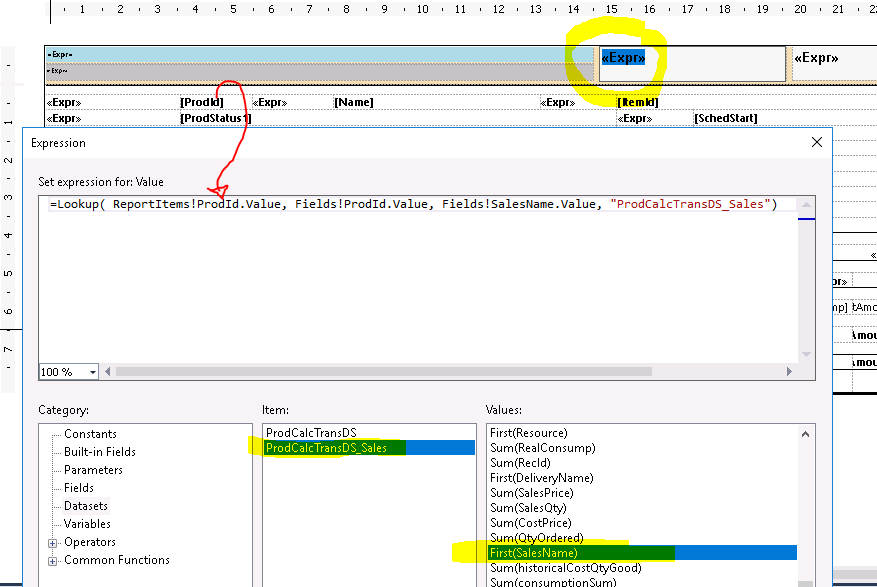
But I want to this outside the tablix just at the page header and I have made something like this: =Lookup(Fields!ProdId.Value, ReportItems!ProdId.Value, Fields!SalesName.Value, "ProdCacTransDS_Sales")

but it is not working (Lookup is invalid: invalidIdentifier)
pastedimage1597229936908v1.png

I have the same question (0)
  • Sergei Minozhenko Profile Picture
    23,093 on at

    Hi Nestor,

    Outside the tablix you need to use aggregated functions. Why you can't add sales name to tablix headers as well as each production order is printed on separated page?

  • CBNestor Profile Picture
    46 on at

    Hi Sergei, Thanks for replay,

    I can get the sales name Inside the tablix without any problem. But as you said. How to get the same but in the Page Header ( outside the tablix) what would be the expression for that?

    I just have the related ProdId which I can get in the textbox field called ProdId

  • Sergei Minozhenko Profile Picture
    23,093 on at

    Hi Nestor,

    I assume you want to see on each page different sales names based on the production order on the same page. And you can't use the header in this case. The header is the same for all pages (as footer as well). If you want to implement this kind of change you need to utilize the same tablix and simulate header in it.

  • CBNestor Profile Picture
    46 on at

    Mmm somthing is telling its possible,

    I have at the header the ProdId displayed of the current ProdId on each page. and its working As you can see in the screenshot.

    I just need to build an expression to lookup at the query the SalesName where the ProdId is =ReportsItems!ProdId.Value

    pastedimage1597232674726v1.png 

  • Sergei Minozhenko Profile Picture
    23,093 on at

    Hi Nestor,

    That's quite interesting and quite new to me. To be honest, haven't used ReportsItems and usually put only static data to the header (except page numbers).

    In this case, I assume you need to switch 1st and 2nd parameters according to the syntax docs.microsoft.com/.../report-builder-functions-lookup-function (check also example explanation)

    1st parameter is a source

    2nd parameter is a destination

    =Lookup(ReportItems!ProdId.Value, Fields!ProdId.Value,  Fields!SalesName.Value, "ProdCacTransDS_Sales")

  • CBNestor Profile Picture
    46 on at

     tried all combinatios xD, error still shows: Invalid Identifier

    this is how the query data looks like

    pastedimage1597236710919v2.png

  • Verified answer
    Sergei Minozhenko Profile Picture
    23,093 on at

    Hi Nestor,

    Have you tried to add SalesName to tablix somewhere, hide it and use it as ReportItem in header?

  • CBNestor Profile Picture
    46 on at

    Hi Sergei,

    that's I nice workarournd and actually does the job, thanks for the idea :).

    Unthough I still want to now how to make this Lookup :(

Under review

Thank you for your reply! To ensure a great experience for everyone, your content is awaiting approval by our Community Managers. Please check back later.

Helpful resources

Quick Links

Introducing the 2026 Season 1 community Super Users

Congratulations to our 2026 Super Stars!

Congratulations to our 2025 Community Spotlights

Thanks to all of our 2025 Community Spotlight stars!

Leaderboard > Finance | Project Operations, Human Resources, AX, GP, SL

#1
André Arnaud de Calavon Profile Picture

André Arnaud de Cal... 514 Super User 2026 Season 1

#2
Giorgio Bonacorsi Profile Picture

Giorgio Bonacorsi 390

#3
Adis Profile Picture

Adis 266 Super User 2026 Season 1

Last 30 days Overall leaderboard

Product updates

Dynamics 365 release plans
