web
You’re offline. This is a read only version of the page.
close
Skip to main content

Announcements

News and Announcements icon
Community site session details

Community site session details

Session Id :
Dynamics 365 Community / Forums / Finance forum / Modify Dialog on Vendo...
Finance forum

Modify Dialog on Vendor Payment Creation

(0) ShareShare
ReportReport
Posted on by 105

Hello Guys,

I need to modify a standard dialog in D365FO, back in AX2012 it was very simple to override any method on any form to modify a dialog or a certain range but I cannot find the dialog code in D365FO.

The preset range for Payment Status is None or Rejected, I want to change this range by Removing None and adding Approved, how can I achieve this using extensions?
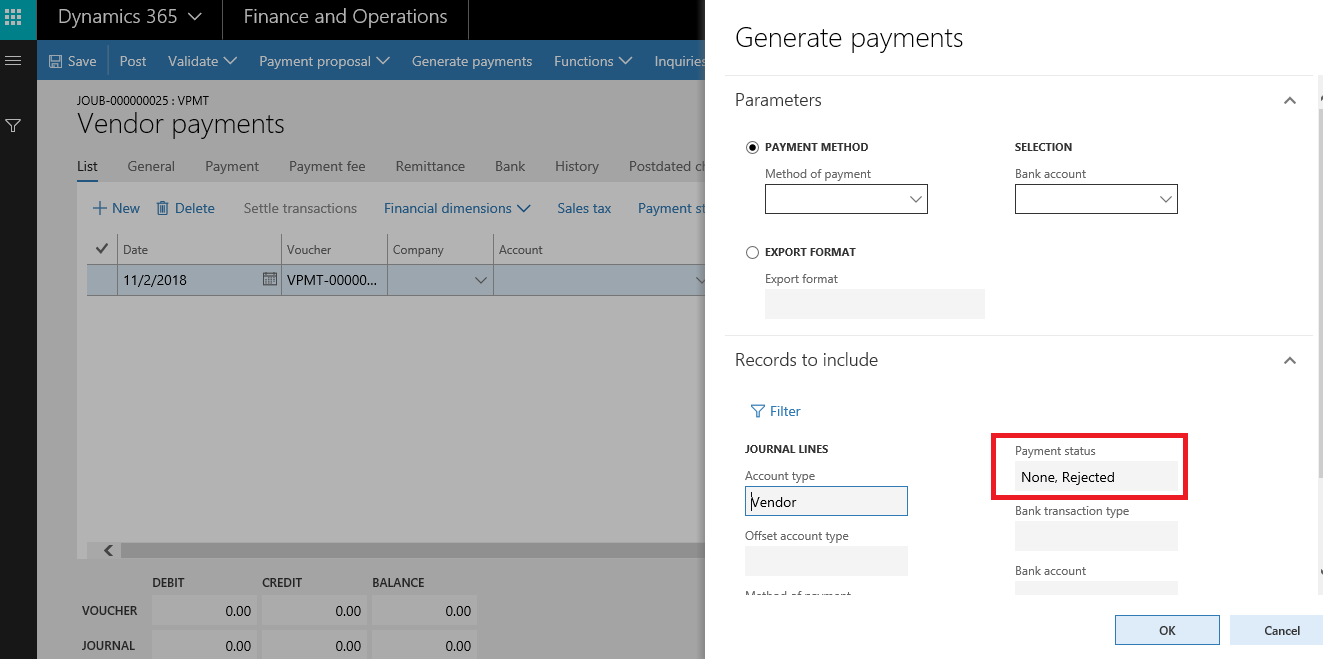
PaymStatus.png

Thank you

I have the same question (0)
  • Community Member Profile Picture
    on at

    there are many choices:

    • CoC
    • Events (Framework or pre/post)

    Simplest way would be to capture data field change event (framework), get the field and table reference in the event handler and implement your logic.

  • Najib Saad Profile Picture
    105 on at

    Dear Rahul,

    Thank you for your input, can you please elaborate on Option 2?

  • Suggested answer
    nmaenpaa Profile Picture
    101,172 Moderator on at

    Use the right click menu on the dialog to see what form or class it is. Then look into the form / class and try to understand how the ranges are initialized.

    Then use CoC or events to manipulate the values.

  • Najib Saad Profile Picture
    105 on at

    I found the form and created an extension for it, but I cannot view the code of the methods to find the dialog code. all methods are disabled in VS.

  • nmaenpaa Profile Picture
    101,172 Moderator on at

    You can't add code in a form extension. Instead you need to make an extension class for the form.

    What form is it, maybe we can help?

  • Najib Saad Profile Picture
    105 on at

    8103.PaymStatus.png

    It is VendPayment if I recall correctly as I don't have access to the environment at this moment.

    Any help is much appreciated, thanks a lot.

    Form name: LedgerJournalTransVendPaym

    Thank you

  • Najib Saad Profile Picture
    105 on at

    Hello @Nikolaos,

    the form name is LedgerJournalTransVendPaym, can you point me in the right direction?

    Thanks

  • Suggested answer
    nmaenpaa Profile Picture
    101,172 Moderator on at

    So, I went to form LedgerJournalTransVendPaym and looked what "Generate payments" button really is.

    It is a MenuItemButton that calls action menu item VendSumForPaym. That menu item launches class VendSumForPaym, which is responsible for generating the "Generate payments" dialog.

    But this class doesn't contain the definition for the filter criteria of the dialog. Instead it's done in the parent class CustVendSumForPaym. There we have method "buildQuery" which sets the range values for "Payment status" field and also locks the range from editing.

    You could use Chain of Command on that method and try to unlock and/or set the range after calling the "next" (= the original implementation).

    Your class would look something like this:

    [ExtensionOf(classStr(CustVendSumForPaym))]
    public final class MyCustVendSumForPaym_Extension
    {
        protected Query buildQuery()
        {
            Query query = next buildQuery();
    
            if (this is VendSumForPaym) // we only want to change the dialog for Vendor payment
            {
                QueryBuildDataSource  qbdsLedgerJournalTrans = query.dataSourceTable(tableNum(LedgerJournalTrans));
    
                SysQuery::findOrCreateRange(qbdsLedgerJournalTrans, fieldNum(LedgerJournalTrans, PaymentStatus)).status(RangeStatus::Open); // Use this if you want to unlock the range criteria
                qbdsLedgerJournalTrans.rangeField(fieldNum(LedgerJournalTrans, PaymentStatus)).value(strFmt('%1,%2', CustVendPaymStatus::Approved, CustVendPaymStatus::Rejected)); // Use this if you want to set new range criteria
            }
        }
    } 
    
    
  • Najib Saad Profile Picture
    105 on at

    Thank you for the detailed explanation, my code now looks like this:

    [ExtensionOf(classStr(CustVendSumForPaym))]
    public final class MyCustVendSumForPaym_Extension
    {
       protected Query buildQuery()
       {
           Query query = next buildQuery();
    
           if (this is VendSumForPaym) // we only want to change the dialog for Vendor payment
           {
               QueryBuildDataSource  qbdsLedgerJournalTrans = query.dataSourceTable(tableNum(LedgerJournalTrans));
    
               //SysQuery::findOrCreateRange(qbdsLedgerJournalTrans, fieldNum(LedgerJournalTrans, PaymentStatus)).status(RangeStatus::Open); // Use this if you want to unlock the range criteria
    
               qbdsLedgerJournalTrans.rangeField(fieldNum(LedgerJournalTrans, PaymentStatus)).value(strFmt('%1,%2', CustVendPaymStatus::Confirmed, CustVendPaymStatus::Rejected)); // Use this if you want to set new range criteria
    
           }
           return query;
       }
    }


    I had to add the return query line because I got an error that not all paths return a value.

    I also commented out the SysQuery line because it was giving an error:

    "The name SysQuery does not designate a class or table"

    but still the range in the dialog is unchanged

  • Verified answer
    nmaenpaa Profile Picture
    101,172 Moderator on at

    The SysQuery class exists in AX2012 but apparently not in D365FO, so you can ignore that part.

    By the way when you share your code, please click "Use rich text formatting" and then click the "</>" to format your text accordingly. I did it for you this time.

    Please try to reset your usage data and see if it helps you. For these RunBase based classes, the previously used query is saved so it might still use the old query.

    If that doesn't help, try to build your whole model.

    If it still doesn't work, you could debug and make sure this code gets called.

Under review

Thank you for your reply! To ensure a great experience for everyone, your content is awaiting approval by our Community Managers. Please check back later.

Helpful resources

Quick Links

November Spotlight Star - Khushbu Rajvi

Congratulations to a top community star!

Forum Structure Changes Coming on 11/8!

In our never-ending quest to help the Dynamics 365 Community members get answers faster …

Dynamics 365 Community Platform update – Oct 28

Welcome to the next edition of the Community Platform Update. This is a status …

Leaderboard > Finance

Last 30 days Overall leaderboard

Featured topics

Product updates

Dynamics 365 release plans
