web
You’re offline. This is a read only version of the page.
close
Skip to main content

Notifications

Announcements

No record found.

Community site session details

Community site session details

Session Id :
Microsoft Dynamics AX (Archived)

Update grid query based on values from other controls on form

(0) ShareShare
ReportReport
Posted on by 648

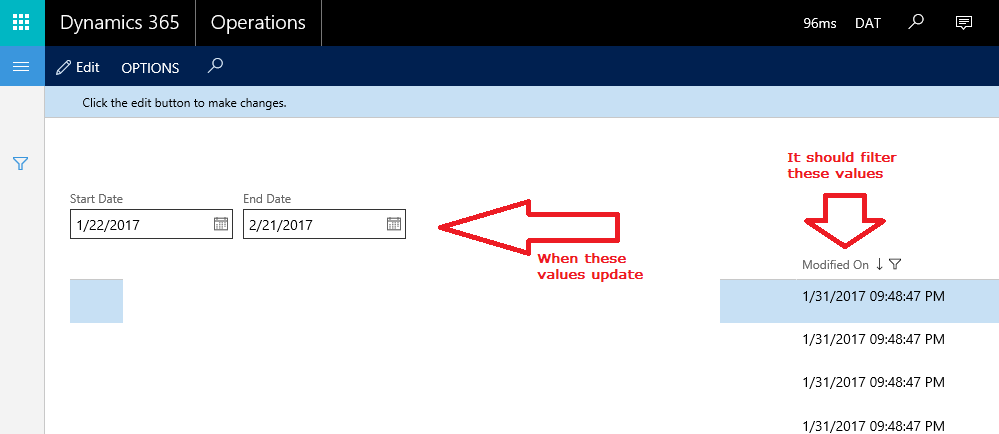
I have a relatively simple form, it has a start date control and end date control that users can modify and it needs to update the grid filter based on those values.
0243.ax.png

Form class:

[DataSource]
    class griddata
    {
        /// <summary>
        ///
        /// </summary>
        public void executeQuery()
        {
            QueryBuildRange qbr;
            qbr = this.query().dataSourceTable(tableNum(griddata)).addRange(fieldNum(griddata, ModifiedOn));
            var startDate = StartDateControl.dateValue();
            var endDate =  DateTimeUtil::date(DateTimeUtil::addDays(EndDateControl.dateValue(), 1));
            qbr.value(SysQuery::range(startDate, endDate));
            super();      
        }

        /// <summary>
        ///
        /// </summary>
        public void init()
        {
            super();
            this.query().dataSourceTable(tableNum(griddata)).addSortField(fieldNum(griddata, ModifiedOn), SortOrder::Descending);       
        }

        /// <summary>
        ///
        /// </summary>
        /// <param name = "_retainPosition"></param>
        public void research(boolean _retainPosition = false)
        {   
            griddata_ds.executeQuery();
            super(_retainPosition);
        }

    }

Event handlers:

    [FormControlEventHandler(formControlStr(MyForm, StartDateControl), FormControlEventType::Modified)]
    public static void StartDateControl_OnModified(FormControl sender, FormControlEventArgs e)
    {
        var ds = sender.formRun().dataSource("griddata");
        ds.research();
    }

    /// <summary>
    ///
    /// </summary>
    /// <param name="sender"></param>
    /// <param name="e"></param>
    [FormControlEventHandler(formControlStr(MyForm, EndDateControl), FormControlEventType::Modified)]
    public static void EndDateControl_OnModified(FormControl sender, FormControlEventArgs e)
    {
        var ds = sender.formRun().dataSource("griddata");
        ds.research();
    }


I am having an issue that the grid correctly loads the filters and sorting correctly at the initial launch. But it does not update the grid once either of the start date or end date are updated.

1) Is this the correct idea on how to handle this?

2) What else do I need to do to make the grid values update based on the user input?


*This post is locked for comments

I have the same question (0)
  • Verified answer
    Mea_ Profile Picture
    60,284 on at

    Hi FP_Alex,

    It's correct idea, except one small detail. You don't need to override research() and you don't need to call it is well. So instead of research() call ds.executeQuery()  in Modified event handlers. You can read about difference between research and executeQuery in this blog post kashperuk.blogspot.co.nz/.../tutorial-reread-refresh-research.html

    The main difference is query they working with and it cause your issues.

  • Verified answer
    Brandon Wiese Profile Picture
    17,788 on at

    I see you are using .addRange() in your .executeQuery() method.  That means each time it fires, you keep adding more and more ranges to your query.  Instead, you should create the range once, and merely change the .value() of that range before the super() in .executeQuery().  Try adding the range in your data source .init() method, and keeping a reference to the range in a form global variable.  Alternately, use SysQuery::findOrCreateRange() which is smart and either creates a new range or returns an existing range if one already exists.

  • Mea_ Profile Picture
    60,284 on at

    Brandon noticed quite important issues that I missed, here is a blog describing his advice in details dynamics-ax-live.blogspot.co.nz/.../how-to-filter-records-in-form-by-code.html

  • alexmeyer.itguy Profile Picture
    648 on at

    ievgen,

    Thanks for pointing me in the right direction, I do have one issue currently. The executeQuery() method is not available in my Modified event handlers, it's really weird because I do have access to Refresh, Reread, and Research (which is why I chose those initially), but if I try to use executeQuery I get the following error:

    Severity Code Description Project File Line Suppression State
    Error ClassDoesNotContainMethod: Class 'FormObjectSet' does not contain a definition for method 'executeQuery' and no extension method 'executeQuery' accepting a first argument of type 'FormObjectSet' is found on any extension class. 

    This is the code I'm trying to get to work currently:

        public static void EndDateControl_OnModified(FormControl sender, FormControlEventArgs e)
        {
            var ds = sender.formRun().dataSource("griddata");
            ds.executeQuery();
        }


    Thanks again for any help you can give!

  • alexmeyer.itguy Profile Picture
    648 on at

    ievgen,

    Thanks for your help, I think I'm getting closer. One final issue I'm having is that I cannot call executeQuery from my Modified event handler. I can call Refresh, Reread, or Reseach but when I try to call executeQuery I get the following error:

    ClassDoesNotContainMethod: Class 'FormObjectSet' does not contain a definition for method 'executeQuery' and no extension method 'executeQuery' accepting a first argument of type 'FormObjectSet' is found on any extension class.

    Any help on this final issue would be great!

  • alexmeyer.itguy Profile Picture
    648 on at

    Brandon,

    Thanks for your input, definitely used your suggestion!

  • Mea_ Profile Picture
    60,284 on at

    Try next code:

    public static void EndDateControl_OnModified(FormControl sender, FormControlEventArgs e)
    {
        FormDataSource  ds = sender.formRun().dataSource("griddata") as FormDataSource;
        if (ds)
        {    
            ds.executeQuery();
        }
    }


    and don't forget about creating range only once.

  • alexmeyer.itguy Profile Picture
    648 on at

    ievgen,

    Thank you that worked perfectly, I also made the change Brandon recommended moving the query range creation to the init and leaving the query value in the executeQuery method.

  • alexmeyer.itguy Profile Picture
    648 on at

    Here's the solution with help from others.

    In the form class, declare the QueryBuildRange:

     QueryBuildRange qbr;

    In the data source class:


    public void executeQuery() { var startDate = StartDateControl.dateValue(); var endDate = DateTimeUtil::date(DateTimeUtil::addDays(EndDateControl.dateValue(), 1)); qbr.value(SysQuery::range(startDate, endDate)); super(); } public void init() { super(); this.query().dataSourceTable(tableNum(griddata)).addSortField(fieldNum(griddata, ModifiedOn), SortOrder::Descending); qbr = this.query().dataSourceTable(tableNum(griddata)).addRange(fieldNum(griddata, ModifiedOn)); }


    In the event handlers:

            FormDataSource ds = sender.formRun().dataSource("griddata") as FormDataSource;
            if(ds)
            {
                ds.executeQuery();
            }

Under review

Thank you for your reply! To ensure a great experience for everyone, your content is awaiting approval by our Community Managers. Please check back later.

Helpful resources

Quick Links

Responsible AI policies

As AI tools become more common, we’re introducing a Responsible AI Use…

Neeraj Kumar – Community Spotlight

We are honored to recognize Neeraj Kumar as our Community Spotlight honoree for…

Leaderboard > 🔒一 Microsoft Dynamics AX (Archived)

#1
Martin Dráb Profile Picture

Martin Dráb 4 Most Valuable Professional

#1
Priya_K Profile Picture

Priya_K 4

#3
MyDynamicsNAV Profile Picture

MyDynamicsNAV 2

Last 30 days Overall leaderboard

Featured topics

Product updates

Dynamics 365 release plans
