web
You’re offline. This is a read only version of the page.
close
Skip to main content

Notifications

Announcements

No record found.

Community site session details

Community site session details

Session Id :
Finance | Project Operations, Human Resources, ...
Suggested Answer

Product Attributes in the Browser not the Same as stored in the Database

(1) ShareShare
ReportReport
Posted on by 45

Let me preface by saying I'm still new to Dynamics 365.

I wanted to fetch an attribute for a product so I started by listing out all the attributes for the product. I wrote this X++ code to do that. The product '1301' is hard-code I'm using it to test with.
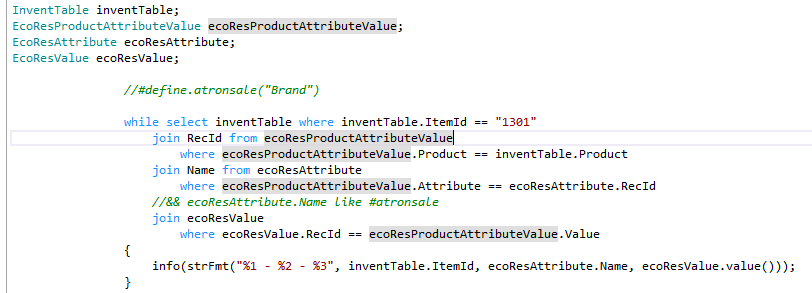
pastedimage1591995904457v2.png

These are the results - 8 attributes.
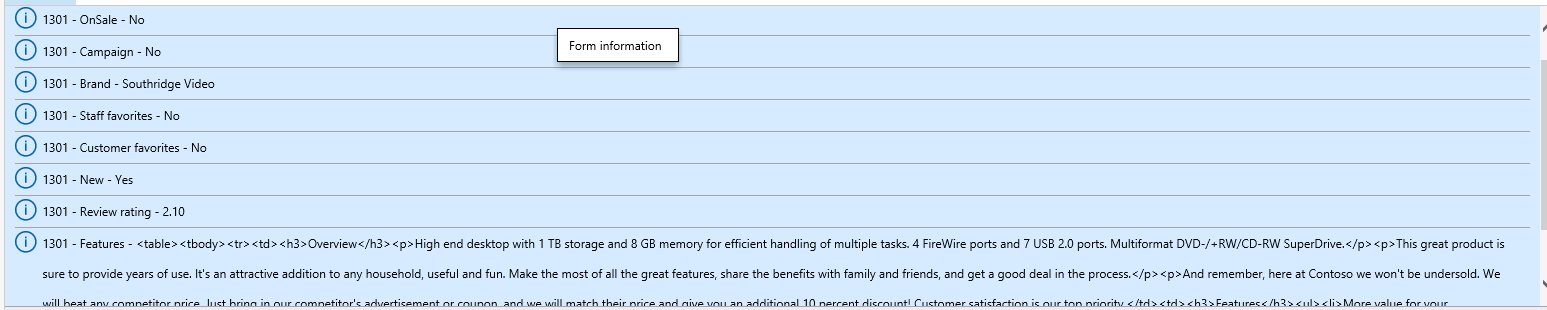
pastedimage1591996560054v3.png

The problem is that when I check the attributes for that same product I only see 3 attributes.
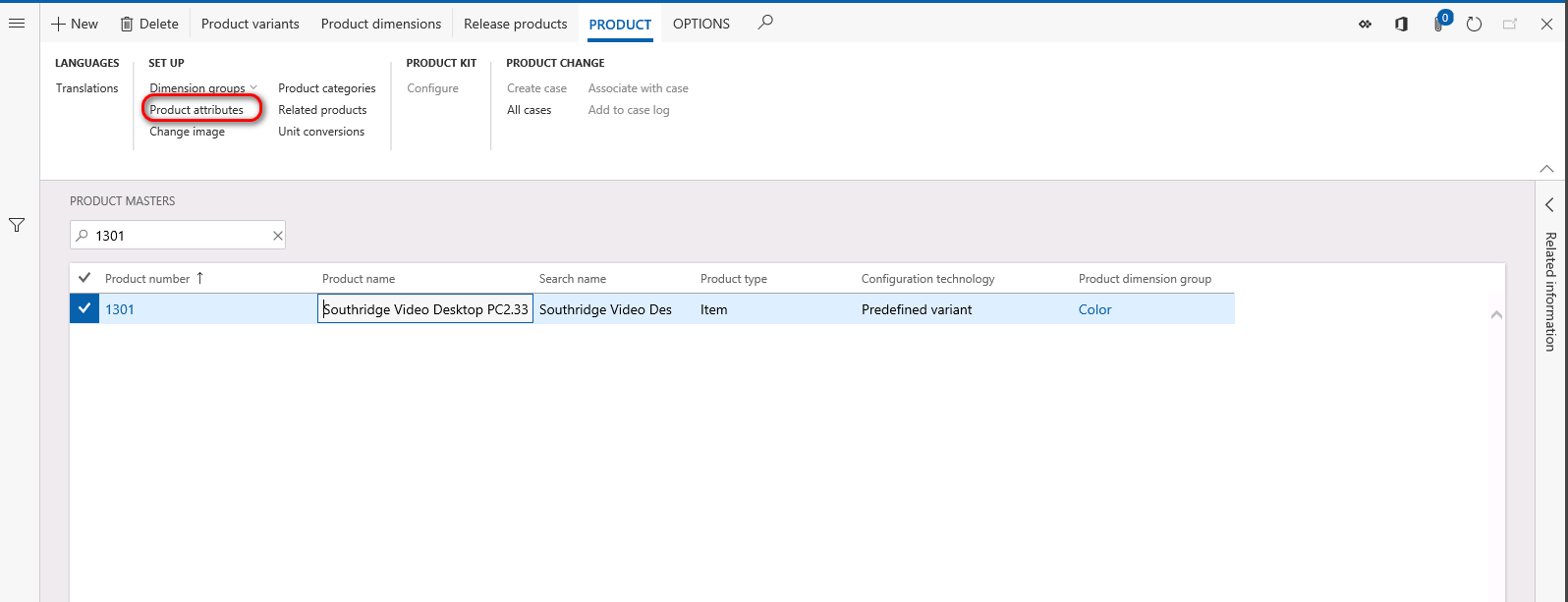
pastedimage1591996659148v4.png

pastedimage1591996666597v5.png

I checked in the database and it also shows 8 attributes with values.
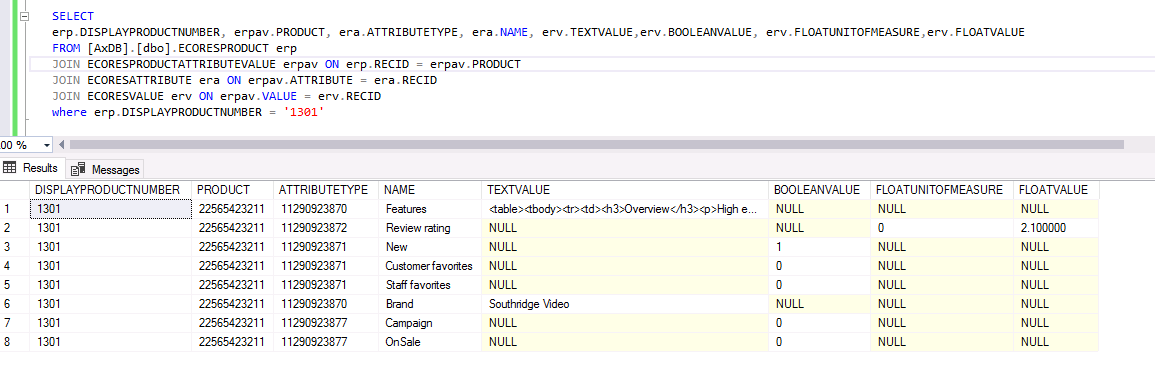
pastedimage1591996713266v6.png

Can someone help me understand why there is a discrepancy. Why don't I see the 5 other attributes in the browser?

I have the same question (0)
  • André Arnaud de Calavon Profile Picture
    301,075 Super User 2025 Season 2 on at

    Hi Dynamics365user,

    It is hard to say what is wrong. What is correct here? The attributes on the form or your query? As I don't know your setup and table contents, I can't verify it. To me, I would initially say that you might forgot a certain filter in your query. In SQL you duplicated the exact same query as in your coding. Probably, you have to verify the product attribute values form logic to find your answer.

  • dynamics356user Profile Picture
    45 on at

    Hi Andre,

    This is in the Contoso environment from Microsoft. I don't think this is the case but, are attributes legal-entity specific?

  • Suggested answer
    Rahul Mohta Profile Picture
    21,032 on at

    try exporting attributes in Excel using data management and compare with values first

    attribute may not be a full table cache hence the way it is being pulled matters

  • André Arnaud de Calavon Profile Picture
    301,075 Super User 2025 Season 2 on at

    Hi Dynamics365user,

    My question is why you think that your coding and your SQL statement is correct. Did you already check the form logic? The attributes are global.

  • dynamics356user Profile Picture
    45 on at

    Thanks for the tip. I exported the attributes and the same 3 attributes that exist in the form were in the output file. Maybe my query is wrong.

  • dynamics356user Profile Picture
    45 on at
    [quote]

    Hi Dynamics365user,

    My question is why you think that your coding and your SQL statement is correct. Did you already check the form logic? The attributes are global.

    [/quote]

    I used the ax 2012 table descriptions to give me an idea of the tables and fields to use. They are not completely accurate for dynamics 365 but the table descriptions don't seem to exist online for d365.

    EcoResProduct:The EcoResProduct table stores products and is the base table in the products hierarchy.

    EcoResProductAttributeValue:The EcoResAttributeValue table contains the definition of attribute values for an instance of a product or component.

    EcoResAttribute:The EcoResAttribute table contains information about the attributes.

    EcoResValue:The EcoResValue table is the parent table for attribute values. It does not store any value information itself; it only contains the type of attribute value, and where the data is actually stored.

    For the query I used RecId from the EcoResProduct table to look up the product in the EcoResProductAttributeValue table. The EcoResProductAttributeValue table contains an ATTRIBUTE and a VALUE field; each one of those corresponds to the RECID of the EcoResAttribute and EcoResValue tables, respectively.

    Seems like a simple enough query to me. The only problem is I'm not sure if I'm using the correct tables.

  • Suggested answer
    nmaenpaa Profile Picture
    101,162 Moderator on at

    Try to include EcoResAttribute.AttributeModifier in your infolog. 

    In the UI you use form "Product attributes" so perhaps it shows only attributes where AttributeModifier is "Product". However this is just a guess.

    Did you look at how EcoResAttributeValue form fetches the data? The code seems to have comments that explain the joins used.

    You can also capture trace when you open the form, and then analyze it in Trace parser to see what was the SQL query.

Under review

Thank you for your reply! To ensure a great experience for everyone, your content is awaiting approval by our Community Managers. Please check back later.

Helpful resources

Quick Links

Responsible AI policies

As AI tools become more common, we’re introducing a Responsible AI Use…

Neeraj Kumar – Community Spotlight

We are honored to recognize Neeraj Kumar as our Community Spotlight honoree for…

Leaderboard > Finance | Project Operations, Human Resources, AX, GP, SL

#1
Martin Dráb Profile Picture

Martin Dráb 503 Most Valuable Professional

#2
André Arnaud de Calavon Profile Picture

André Arnaud de Cal... 434 Super User 2025 Season 2

#3
BillurSamdancioglu Profile Picture

BillurSamdancioglu 278 Most Valuable Professional

Last 30 days Overall leaderboard

Product updates

Dynamics 365 release plans