After days of searching, I finally found a work around!
I created an HTML web resource with the code below:
Static Address named 'company' with lat = 47.64 and long=-122.1297.
Dynamic Address named 'Customer' using address1 lat and long fields.
I called address1 (Dynamic Address) lat and long using window.parent.Xrm.Page.getAttribute
window.parent.Xrm.Page.getAttribute("address1_latitude").getValue(), window.parent.Xrm.Page.getAttribute("address1_longitude").getValue()
and I entered my Bing Map ID: YourBingMapKey
And it partially solve the majority of the problem. Partially because who ever create the lead has to get miles from the map (Web Resource) and enter it manually into Distance Field (new_distance), unfortunately, someone at every job has to complain!
Result:
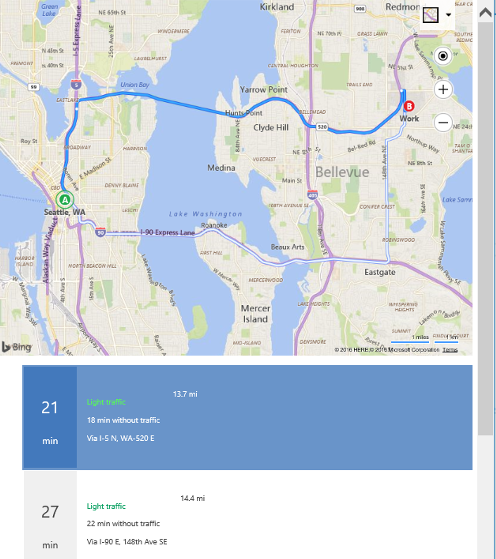
I used this manual to do this https://docs.microsoft.com/en-us/bingmaps/v8-web-control/map-control-concepts/directions-module-examples/calculate-driving-directions
NOTE: For some reason solution's Bing Map calling Script didn't work so use the one I used.
ANOTHER SOLUTION https://docs.microsoft.com/en-us/bingmaps/v8-web-control/map-control-concepts/directions-module-examples/directions-with-options
ANOTHER SOLUTION https://docs.microsoft.com/en-us/bingmaps/v8-web-control/map-control-concepts/directions-module-examples/directions-module-events
Please let me know if anyone can find a way to retrieve the distance in Miles and store it in the distance field.
Also, let me know if anyone needs any help
Don't forget to delete the space in the bing map calling script
CODE:
<html><head>
<title></title>
<meta charset="utf-8">
<script type="text/javascript">
var map;
var directionsManager;
function GetMap()
{
map = new Microsoft.Maps.Map('#myMap', {});
//Load the directions module.
Microsoft.Maps.loadModule('Microsoft.Maps.Directions', function () {
//Create an instance of the directions manager.
directionsManager = new Microsoft.Maps.Directions.DirectionsManager(map);
//Create waypoints to route between.
var workWaypoint = new Microsoft.Maps.Directions.Waypoint({ address: 'company', location: new Microsoft.Maps.Location(47.64, -122.1297) });
directionsManager.addWaypoint(workWaypoint);
var seattleWaypoint = new Microsoft.Maps.Directions.Waypoint({ address: 'Customer', location: new Microsoft.Maps.Location(window.parent.Xrm.Page.getAttribute("address1_latitude").getValue(), window.parent.Xrm.Page.getAttribute("address1_longitude").getValue()) });
directionsManager.addWaypoint(seattleWaypoint);
//Specify the element in which the itinerary will be rendered.
directionsManager.setRenderOptions({ itineraryContainer: '#directionsItinerary' });
//Calculate directions.
directionsManager.calculateDirections();
});
}
</script>
<script src="https://www.bing.com/api/maps/mapcontrol?
DELETE THE SPACE callback=GetMap&key=YourBingMapKey" defer="" type="text/javascript" async=""></script>
<meta><meta><meta><meta><meta><meta><meta><meta><meta><meta><meta></head>
<body style='overflow-wrap: break-word;' onfocusout='parent.setEmailRange();'>
<div id="myMap" style='position:relative;width:800px;height:600px;'></div>
<div id="directionsItinerary"></div>
</body></html>


