web
You’re offline. This is a read only version of the page.
close
Skip to main content

Notifications

Announcements

No record found.

Community site session details

Community site session details

Session Id :
Customer experience | Sales, Customer Insights,...
Answered

Compose Email - Record Type Limited to Users

(0) ShareShare
ReportReport
Posted on by 25

We currently use Queues to send outbound emails from a shared/group mailbox.

It appears today we are unable to select the queue as the record type for the "From" field. 

Tested the following:

a. Sales Hub - Doesn't work, restricted to User Table only.
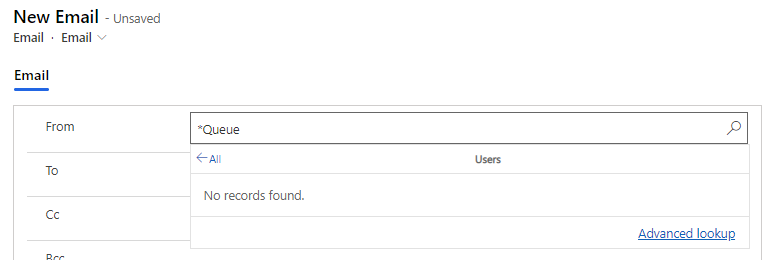
pastedimage1644950343244v2.png

b. Custom Hub - Works, shows record lookup.

pastedimage1644950253423v1.png

Our sales hub is version 9.0.22032.15001, the overall environment (where both hub applications are) is on 2022 Release Wave 1

Is this a known issue?

I have the same question (0)
  • Verified answer
    Community Member Profile Picture
    on at

    Hi Kyle,

    Have you added the Queue entity to the Sales Hub app? 

    By default, the Queue entity is not in the Sales Hub app, so you need add it manually.

    (1)Open in app designer:

    pastedimage1644990017440v1.png

    (2)Add Queue entity, save and publish.

    pastedimage1644990097246v2.png

    Result:

    pastedimage1644990402545v3.png

  • Suggested answer
    Bipin D365 Profile Picture
    28,983 Moderator on at

    Hi,

    Customer hub - it is working because Queue entity is added in Custom hub app by default and sales hub does not have queue entity added in apps.

    So you will have to add Queue entity to your sales hub via app designer so that it will visible under From lookup.

    Hope this helps!

    Please mark my answer verified if this is helpful!

    Regards,

    Bipin Kumar

    Follow my Blog: xrmdynamicscrm.wordpress.com/

  • kbirker Profile Picture
    25 on at

    Thank you both.

    This worked, for others the queue options were present prior to Wave 2 Release update. It appears that you must manually add these to the app after the update.

    Hope this helps others!

Under review

Thank you for your reply! To ensure a great experience for everyone, your content is awaiting approval by our Community Managers. Please check back later.

Helpful resources

Quick Links

Responsible AI policies

As AI tools become more common, we’re introducing a Responsible AI Use…

Neeraj Kumar – Community Spotlight

We are honored to recognize Neeraj Kumar as our Community Spotlight honoree for…

Leaderboard > Customer experience | Sales, Customer Insights, CRM

#1
Tom_Gioielli Profile Picture

Tom_Gioielli 72 Super User 2025 Season 2

#2
Daniyal Khaleel Profile Picture

Daniyal Khaleel 32 Most Valuable Professional

#3
Gerardo Rentería García Profile Picture

Gerardo Rentería Ga... 29 Most Valuable Professional

Last 30 days Overall leaderboard

Product updates

Dynamics 365 release plans



