web
You’re offline. This is a read only version of the page.
close
Skip to main content

Notifications

Announcements

No record found.

Community site session details

Community site session details

Session Id :
Microsoft Dynamics AX (Archived)

Create case category using X++

(0) ShareShare
ReportReport
Posted on by

Hello everyone,

I would like to create a case category (such as sales, service, etc) and would like to have a reference to them via coding/ X++ (not through creating using the form).

Could someone guide me through.

Currently, I am hard-coding it, which is obviously not cool...and practical...

Thanks in advance for the help.

CaseDetail          caseDetail; 

//this is a pre-created value by using the AX default form
//the value below is an Int64 "Services" enum
caseDetail.CategoryRecId     = 11290924143;

//I tried using the code below, but it did not work.
//There was no error coming from Visual Studio though, after building.
//I found this out in CaseDetailForm (default AX class), it has a parmCategoryType
//method and thought this would create a CaseCategory called Service, but it did not
//Edit: This parmCategoryType is used wrongly in my case, don't use it for reference...
caseDetailForm.parmCategoryType(CaseCategoryType::Service);

*This post is locked for comments

I have the same question (0)
  • Mohd saddaf khan Profile Picture
    20 on at

    Hi Lincoln,

    Unfortunately, it is pretty unclear that what you want to achieve?

    As per my understanding, you are creating some enum and wants to reference it somewhere else.

    Enums can always be added with multiple values(such as sales, service, etc) from visual studio.

    Once its added, you just have to reference it as CaseCategoryType::Service.

    That's it. There is no role of RecId here.

  • Community Member Profile Picture
    on at

    Hello Saddaf Khan

    Thank you so much for the reply.

    My apology for the unclear explanation I did there.

    I will try to explain it in a much clearer context.

    In AX, enum and Int64 datatypes work differently. I read from several other threads and blogs which said that for enum, we could do something like...this: CaseCategoryType::Service, however, for an Int64 datatype, we just cannot. It will complain with an error.

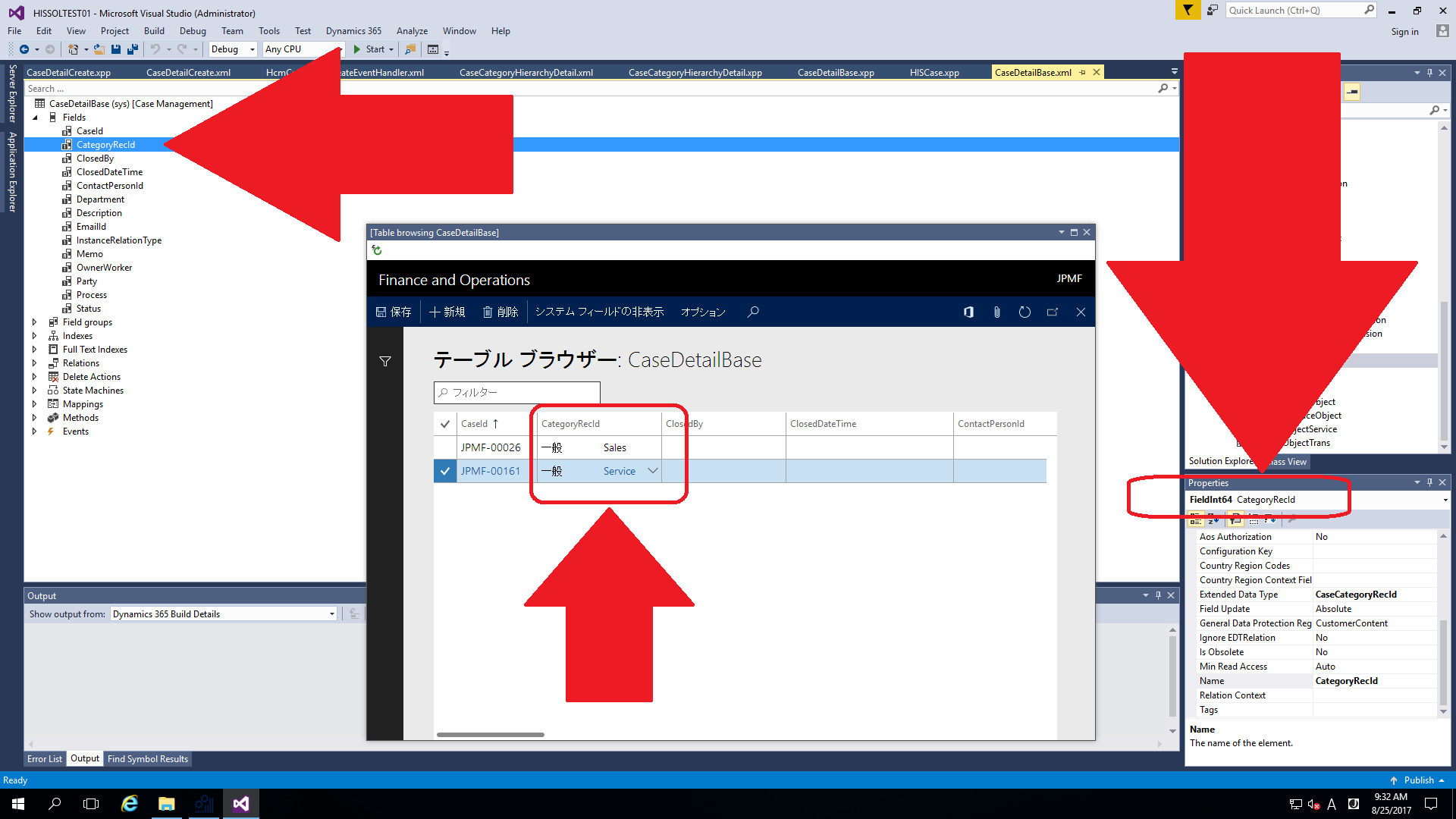
    What I am trying to achieve is, to create a record in CaseDetailBase table/ CaseDetail table (both of these are AX default tables which you could find them via AOT), with default field values initiated for the user, without needing them to go through the pain of creating one for themselves via dialog, etc. So, for example, In CaseDetailBase, I want a record inserted with CaseId field, CategoryRecId field, other mandatory fields filled via X++. 

    If CategoryRecId were to be just an enum field, I could just do this: CategoryRecId::Service. However, the problem is that I cannot, as it is an Int64 datatype.

    Here's the breakdown steps:

    1) Try to insert a record into CaseDetailBase/ CaseDetail

    2) Checks to see if a "Service" CaseCategory exists (maybe this could happen in AX's default CaseCategoryHierachyDetail table. In any case, I used the code below here for checking. However, if there is a better way than that, such as using methods provided by AX specifically for checking that, please do enlighten me.

    Edit: After checking through CaseCategoryType, I misunderstood it as Case category, where in fact, it is a Category type...so the if statement below is a complete wrong usage...don't use it for reference as it's wrong...)

    if (new DictEnum(enumNum(CaseCategoryType)).symbol2Value("Services"))

    3) If no such CaseCategory exists, the program will create one for the user, automatically, via X++

    4) Once "Service" CaseCategory exists, AX will proceed to create a record for the user

    Have a look at the screenshot below:
    _21714C98_1.png

    If the above is still unclear, please do let me know ..

    Thanks in advance.

  • Verified answer
    Community Member Profile Picture
    on at

    Also, I just realized that CaseCategoryType enum is NOT a Case category...The CaseCategoryType displays enum values of "None", "General", while a case category is actually an Int64 datatype, which works using CaseCategoryType's enum.

    Have a look at All cases's form and try to create a case and you will come upon it.

    My code at the top, with "caseDetailForm.parmCategoryType(CaseCategoryType::Service);" is completely wrong...

    Edit: After several searches and lots of readings, I found out about replacement group, which I had a real rough grasp of concept about. I was mind-blown by the usefulness of it, as CaseCategoryRecId, which is an extended Int64 datatype, uses replacement field group "Category" (you can find it inside AX form design properties), and that is actually LINKED to CaseCategoryHierarchyDetail table's "Category" group. In it, there is the CaseCategory field, which is what was trying to figure out. Mind-blown...

    Getting back to topic, I found out that we have to deal with CaseCategoryHierarchyDetail table (AX  comes with this table as default).

    And, I also found out that the CategoryRecId field (which is the Case Category) inside CaseDetail/ CaseDetailBase table is actually CaseCategoryHierarchyDetail table's RecId (A RecId is made up of Int64 datatype).

    For those of you who are following this thread, here is the solution.

    If you want to check whether a case category exists, check it against CaseCategoryHierarchyDetail's CaseCategory field. For e.g:

    select firstOnly caseCategoryHierarchyDetail
               where caseCategoryHierarchyDetail.CaseCategory == "CaseCategoryName";
    
    //If the said Case Category does not exist, force a creation of one
    if (!caseCategoryHierarchyDetail)
    {
          caseCategoryHierarchyDetail.CaseCategory = "CaseCategoryName";
          caseCategoryHierarchyDetail.insert();
    }

    Cheers!

Under review

Thank you for your reply! To ensure a great experience for everyone, your content is awaiting approval by our Community Managers. Please check back later.

Helpful resources

Quick Links

Responsible AI policies

As AI tools become more common, we’re introducing a Responsible AI Use…

Neeraj Kumar – Community Spotlight

We are honored to recognize Neeraj Kumar as our Community Spotlight honoree for…

Leaderboard > 🔒一 Microsoft Dynamics AX (Archived)

#1
Martin Dráb Profile Picture

Martin Dráb 4 Most Valuable Professional

#1
Priya_K Profile Picture

Priya_K 4

#3
MyDynamicsNAV Profile Picture

MyDynamicsNAV 2

Last 30 days Overall leaderboard

Featured topics

Product updates

Dynamics 365 release plans



