web
You’re offline. This is a read only version of the page.
close
Skip to main content

Announcements

No record found.

News and Announcements icon
Community site session details

Community site session details

Session Id :
Customer experience | Sales, Customer Insights,...
Unanswered

Setting Action Output Parameter using WebHooks

(0) ShareShare
ReportReport
Posted on by 5

Hi everyone,

I created an Azure Function that is called from CRM via WebHook. It is linked with an action in CRM. Calling the action new_WoPaTest triggers the execution of the Function. 

pastedimage1595925995248v1.png

Fair enough, input parameters of the action are passed on to the Function. However, I do not know how to transfer the output parameters from the Function to the action.
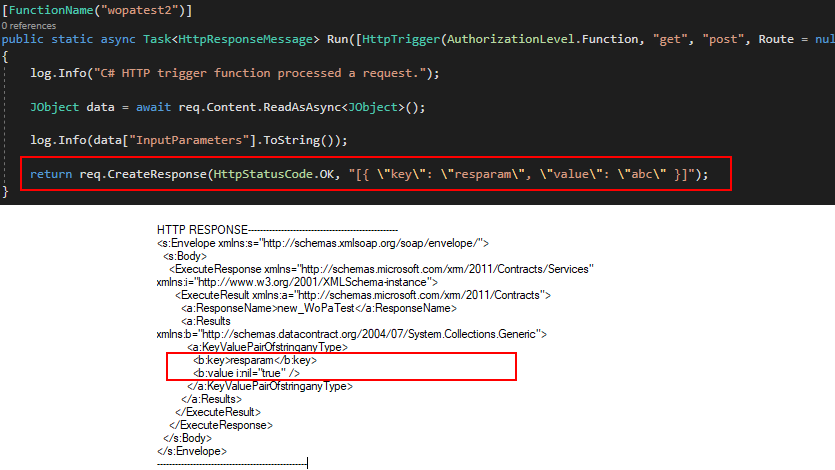
pastedimage1595927809057v2.png

Does anyone know the correct way to create the response of the Function? I've already tried some different approaches, but none has worked for me so far.

Thank you!

I have the same question (0)
  • Bipin D365 Profile Picture
    28,985 Moderator on at

    Hi,

    See below article to call azure function from plugin using 3 different ways.

    xrmdynamicscrm.wordpress.com/.../

    When we use HttpClient to invoke azure function, we can get the response from azure function as httpresponse.

    Sample code below to get response from httpclient call.

    HttpResponseMessage whoAmIResponse =

               await httpClient.GetAsync("AZURE FUNCTION URL");

           Guid userId;

           if (whoAmIResponse.IsSuccessStatusCode)

           {

               JObject jWhoAmIResponse =

                   JObject.Parse(whoAmIResponse.Content.ReadAsStringAsync().Result);

               userId = (Guid)jWhoAmIResponse["UserId"];

    }

    If found helpful, Please mark my answer verified.

  • Patrick Profile Picture
    5 on at

    Thanks for your answer. But is there a way to inject output parameters directly, without the need for creating a separate plugin?

Under review

Thank you for your reply! To ensure a great experience for everyone, your content is awaiting approval by our Community Managers. Please check back later.

Helpful resources

Quick Links

Introducing the 2026 Season 1 community Super Users

Congratulations to our 2026 Super Stars!

Meet the Microsoft Dynamics 365 Contact Center Champions

We are thrilled to have these Champions in our Community!

Congratulations to the March Top 10 Community Leaders

These are the community rock stars!

Leaderboard > Customer experience | Sales, Customer Insights, CRM

#1
ManoVerse Profile Picture

ManoVerse 196 Super User 2026 Season 1

#2
11manish Profile Picture

11manish 129

#3
CU11031447-0 Profile Picture

CU11031447-0 100

Last 30 days Overall leaderboard

Product updates

Dynamics 365 release plans
