web
You’re offline. This is a read only version of the page.
close
Skip to main content

Notifications

Announcements

No record found.

Community site session details

Community site session details

Session Id :
Finance | Project Operations, Human Resources, ...
Answered

How to get inventdim id in inventonhand item form inventdim datasource

(0) ShareShare
ReportReport
Posted on by

Hi,

In inventonhanditem form has a inventdim, inventsum datasource.
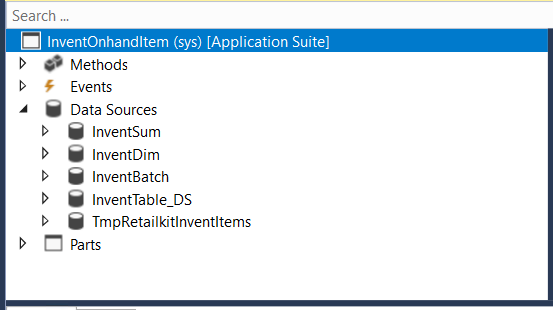
pastedimage1625851470744v1.png

I can't get a record from datasource, If try to show inventdimid in inventonhanditem form grid.

So, I try to create a display method in inventsum table and also tried inventdim table 

[ExtensionOf(tablestr(InventSum))]
final class inventsum_extension
{
    display InventDimId getinventdim(InventSum  inventdim)
    {
        return  inventdim.InventDimId;
    }

}

But record not selected just itemid field and ordered,postedqty fields are contain values but remaining fields are contain a null values only.

How to get inventdimid values? Please give your ideas

Thanks in advance

I have the same question (0)
  • Sukrut Parab Profile Picture
    71,710 Moderator on at

    Hi Ashokkumar,

    I did not get what you are trying to achieve here ?  Invent on hand form already has inventdim as datasource , what's the reason behind writing display method ?

  • Suggested answer
    André Arnaud de Calavon Profile Picture
    301,037 Super User 2025 Season 2 on at

    Hi Ashokkumar,

    The datasource on the form is not presenting the literal contents of the table. When you look at the form coding, it calls another class which is calculating aggregated data which will be displayed. The data could be viewed for a single site across all warehouses and locations. In that case, there is no single InventDim value representing the view.

    So, like Sukrut asked, I'm also curious what you want to achieve with displaying a single InventDim value where the on-hand information per line would be representing multiple InventDim combinations.

  • Community Member Profile Picture
    on at

    Hi Sukrut Parab,

    Thanks for your reply,

    I need to display countjournal and countdate from inventcountjour table to inventonhanditem form against itemid and warehouse.

    So I need a itemid and inventdim id for get countjournal and countdate from inventcountjour table.

     I couldn't get a inventdim id from form datasource, Give some idea how to do this,(I need counting history)

  • Community Member Profile Picture
    on at

    Hi André Arnaud de Calavon

    Thanks for your reply,

    I need to display countjournal and countdate from inventcountjour table to inventonhanditem form against itemid and warehouse.

    So I need a itemid and inventdim id for get countjournal and countdate from inventcountjour table.

     I couldn't get a inventdim id from form datasource, Give some idea how to do this, 

  • Verified answer
    André Arnaud de Calavon Profile Picture
    301,037 Super User 2025 Season 2 on at

    Hi Ashokkumar,

    This requirement doesn't make sense to me. The on-hand form has a purpose to show on-hand information and is not supposed to be used as history/analysis form.

    I would suggest to create a new form for this purpose and check per item for the last count in the item transactions.

  • Community Member Profile Picture
    on at

    Thanks for this,

    But I need to show recently created (countjournalid) transaction for against item and warehouse.

    In this please suggest how to get value from form datasource(inventonhanditem) form(inventsum)table

  • Verified answer
    Sukrut Parab Profile Picture
    71,710 Moderator on at

    I agree with Andre , just for showing counting journal id and whatever information you need ,  changing on hand form is not a good idea.  May be create your own form  where you can show this information. Anyways as explained earlier by Andre its not a straight forward task , the data on the form is displayed through class which has its own logic.

Under review

Thank you for your reply! To ensure a great experience for everyone, your content is awaiting approval by our Community Managers. Please check back later.

Helpful resources

Quick Links

Responsible AI policies

As AI tools become more common, we’re introducing a Responsible AI Use…

Neeraj Kumar – Community Spotlight

We are honored to recognize Neeraj Kumar as our Community Spotlight honoree for…

Leaderboard > Finance | Project Operations, Human Resources, AX, GP, SL

#1
Martin Dráb Profile Picture

Martin Dráb 544 Most Valuable Professional

#2
André Arnaud de Calavon Profile Picture

André Arnaud de Cal... 450 Super User 2025 Season 2

#3
Sohaib Cheema Profile Picture

Sohaib Cheema 250 User Group Leader

Last 30 days Overall leaderboard

Product updates

Dynamics 365 release plans



