web
You’re offline. This is a read only version of the page.
close
Skip to main content

Notifications

Announcements

No record found.

Community site session details

Community site session details

Session Id :
Customer experience | Sales, Customer Insights,...
Suggested Answer

User Permission

(0) ShareShare
ReportReport
Posted on by 110

can anyone help me to make user permission for below situation
user1--> close opportunity as worn and don't close as lose
user 2-- > close opportunity as Lost and don't close as won

I have the same question (0)
  • Benedikt Bergmann Profile Picture
    190 on at

    Hej,

    unfortunately this is not working OOB.

    What you could do is hiding/showing the Buttons based on privileges or securityroles with the Ribbon Workbench and a bit of JavaScript.

    Based on Securityrole

    butenko.pro/.../

    Based on privileges

    ribbonworkbench.uservoice.com/.../76681-hide-a-standard-out-of-the-box-button-based-on-a

    //Benedikt

  • Suggested answer
    a33ik Profile Picture
    84,331 Most Valuable Professional on at

    Hello,

    I agree with Benedikt - the best way is to develop some code and do some ribbon customizations.

    But not all the time you have developer in team to do that or willing to use OOB functionality as much as possible. And for this case you can use real-time workflow. Something like following - us.hitachi-solutions.com/.../

  • Suggested answer
    gdas Profile Picture
    50,091 Moderator on at

    Hi,

    There is a workaround without having code using Ribbon workbench , inside ribbon workbench you can find there is a Display Rule called "MiscellaneousPrivilegeRule"  where you can set some predefined Miscellaneous access by which you can show/hide the button, for example here I have a user having role "Sales Manager" roles which does not have any "Duplicate Detection" privilege.

    pastedimage1578248232708v1.png

    I open Ribbon workbench with opportunity entity , customize the button and add a display rule for the "Won" button  with following , I have set here "Duplicate Detection" privilege depth "Basic" which means user with minimum access level "Basic" on duplicate detection can see  the "Won" button  , dont forget to attach display rule with the command.
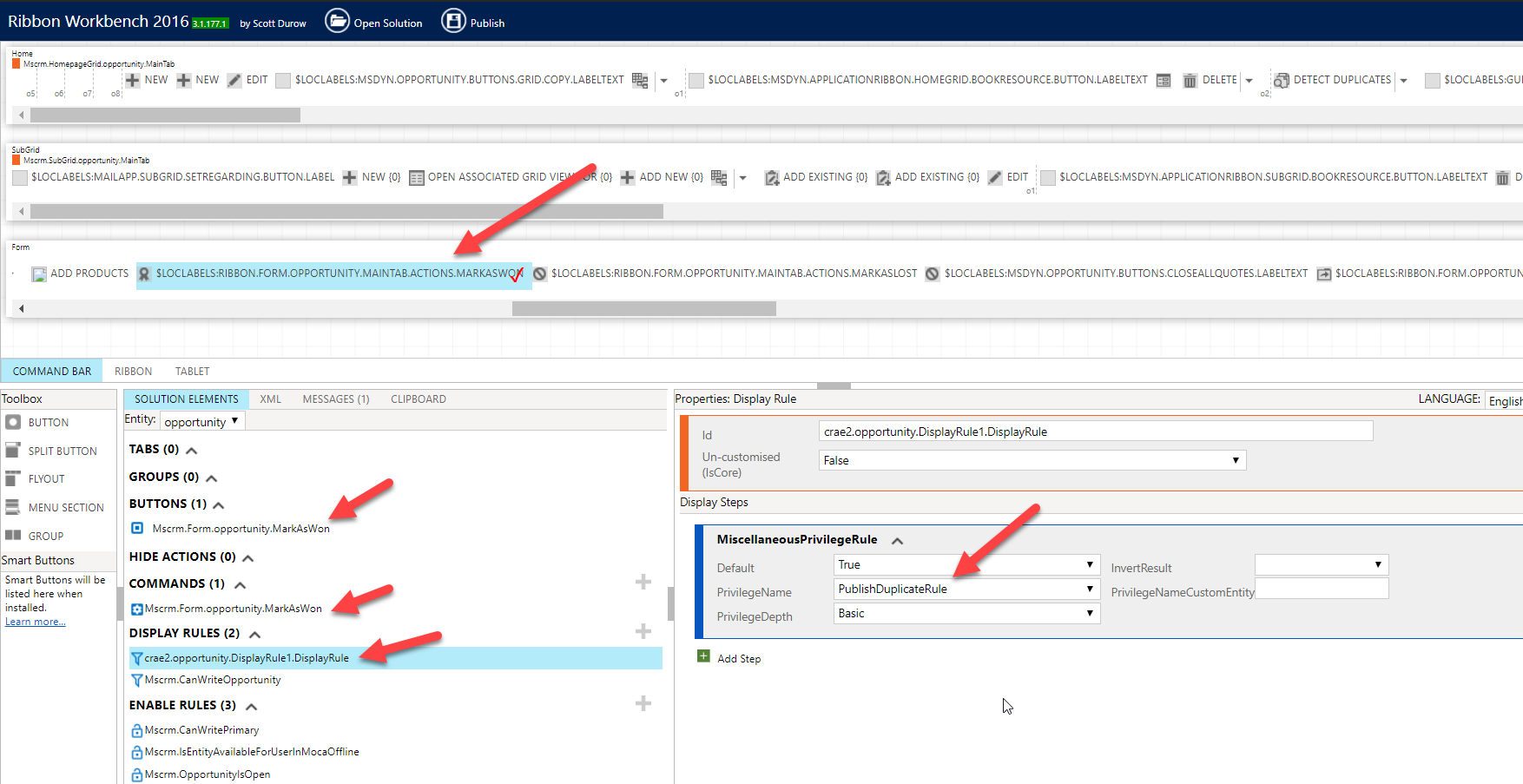
    pastedimage1578248384303v2.png

    Now I have assigned the "Sales Manager" role to the user and I could not see the button won for the user.

    pastedimage1578248801496v3.png

    You can bring back the button by simply modifying the security role and giving access to publish duplicate detection in the security role .

    Please note this is workaround , and you have to use Miscellaneous Privilege which user not needed any circumstances in future. 

    Another way would be using "EntityPrivilegeRule"  for which you need to show hide button based on another entity access. You can also use this .

    pastedimage1578249290218v4.png

    I wrote a blog for you see here -

    https://goutamdascrm.wordpress.com/2020/01/06/show-hide-ribbon-button-based-on-security-role-without-writing-code-in-dynamics-365-ce/

     Hope this helps.

  • Benedikt Bergmann Profile Picture
    190 on at

    Hej Goutam,

    that is a good workaround.

    I just would like to mention that i think it is a highly risky workaround. If it does not get documented very well or the person who implemented it stops working for the company/project it will get very hard to maintain. Since the privilege is used to show stuff that is not at all related. Just to keep it in mind.

    //Benedikt

  • Suggested answer
    gdas Profile Picture
    50,091 Moderator on at

    I understand that this need to be documented , although to maintain security access I believe somewhere we should maintain documentation in our project  no matter how big or small project size and its not so hard job for non-system Administrator. 

    And I believe you are aware about entity privilege rule which I mentioned in my below blog  , you can go ahead with this if you  really wanted to do code-less and configurable way. Remember doing hard-code in your code , its better to go configurable way so that a non-developer can do the enhancement in future to see the documentation. Now its up to you what you will be used. 

    goutamdascrm.wordpress.com/.../

Under review

Thank you for your reply! To ensure a great experience for everyone, your content is awaiting approval by our Community Managers. Please check back later.

Helpful resources

Quick Links

Responsible AI policies

As AI tools become more common, we’re introducing a Responsible AI Use…

Neeraj Kumar – Community Spotlight

We are honored to recognize Neeraj Kumar as our Community Spotlight honoree for…

Leaderboard > Customer experience | Sales, Customer Insights, CRM

#1
Tom_Gioielli Profile Picture

Tom_Gioielli 83 Super User 2025 Season 2

#2
Gerardo Rentería García Profile Picture

Gerardo Rentería Ga... 49 Most Valuable Professional

#3
#ManoVerse Profile Picture

#ManoVerse 40

Last 30 days Overall leaderboard

Product updates

Dynamics 365 release plans



