web
You’re offline. This is a read only version of the page.
close
Skip to main content

Notifications

Announcements

No record found.

Community site session details

Community site session details

Session Id :
Microsoft Dynamics AX (Archived)

AX client error after upgrading kernel

(0) ShareShare
ReportReport
Posted on by

Hello All,

Recently we installed new kernel binaries to our Ax 2012 R3 environment (we updated all clients (remoteApp - 4 boxes) and AOSes(we have 2 user AOSes)) - new version is 6.3.6000.4431. Our application version is 6.3.2000.323.

After the upgrade we deleted auc and kti files from user folders. We did not clear Usage data as this might be painful for the users. The problem is that after one day from the upgrade some users started facing client issues. 
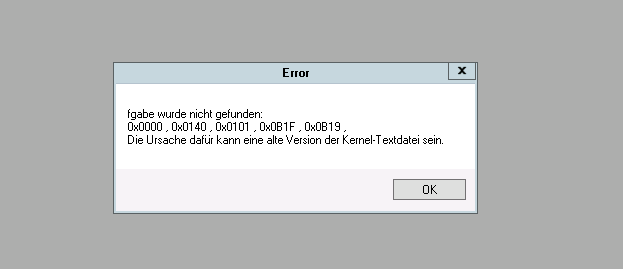
6507.error1.png

In english this would be:

The text for the following task was not found:
...
This could be due to an error or an outdated version of the kernel text file.

And when user tries to open a form some other error appears. This looks like cache issue.

0027.error2.png

To fix that problem we are removing auc and kti files one more time but it helps only for some time. Usually next day they have similar issue. But removing cache files everyday is not a good option.

Strange thing is that the issue is for limited number of users, and only for the ones using DE language.

Best regards,

Maciej

*This post is locked for comments

I have the same question (0)
  • Suggested answer
    JII SAADUDDIN Profile Picture
    1,832 on at

    Hello Have you tried your checklist during setup?

  • Community Member Profile Picture
    on at

    Hello Jii,

    Could you be mere specific? I don't understand what do you mean by 'my checklist'.

    BR,

    Maciej

  • Verified answer
    André Arnaud de Calavon Profile Picture
    300,911 Super User 2025 Season 2 on at

    Hi Majiec,

    Can you check if the KTD files are correct on all servers and clients?

    They are located in the next directory on the AOS servers: {drive}\Program Files\Microsoft Dynamics AX\60\Server\{instance name}\bin

    Clients: {drive}\Program Files (x86)\Microsoft Dynamics AX\60\Client\Bin

    The file name for the German file is: AxSysDE.ktd

    Compare the date and time with other ktd files like AxSysEN-US.ktd.

  • JII SAADUDDIN Profile Picture
    1,832 on at

    Hi kelmak, i think try this André Arnaud de Calavon mentioned above..

  • Community Member Profile Picture
    on at

    Hello Andre,

    Thank you for the suggestion. Indeed we found that on one server ktd file is outdated (client binaries have proper version though).

    We will reinstall the client. Once confirmed, I will mark your answer correct :)

    Best regards,

    Maciej

  • JII SAADUDDIN Profile Picture
    1,832 on at

    ax-checklist.png

    You will find to AX Application > system administrator > checklist

  • Community Member Profile Picture
    on at

    I faced same problem when i restored Model Database on my Development Server from Production server, What worked for me this -

    Step 1  - delete all files from "C:\Users\YourUserName\AppData\Local\Temp" folder

    Step 2 - delete all AUC from "C:\Users\service_account\AppData\Local" folder

    Done ! 

    AX Client opened and run normally after that.. however its is recommended to run FULL CIL and then synchronize 'Data Dictionary' from AOT 

  • Suggested answer
    Community Member Profile Picture
    on at

    I've faced the same issue after restoring a data database from another environment. This solution worked for me as well:

    [quote user="Manish K"]

    Step 1  - delete all files from "C:\Users\YourUserName\AppData\Local\Temp" folder

    Step 2 - delete all AUC from "C:\Users\service_account\AppData\Local" folder

    [/quote]

Under review

Thank you for your reply! To ensure a great experience for everyone, your content is awaiting approval by our Community Managers. Please check back later.

Helpful resources

Quick Links

Responsible AI policies

As AI tools become more common, we’re introducing a Responsible AI Use…

Neeraj Kumar – Community Spotlight

We are honored to recognize Neeraj Kumar as our Community Spotlight honoree for…

Leaderboard > 🔒一 Microsoft Dynamics AX (Archived)

#1
Martin Dráb Profile Picture

Martin Dráb 4 Most Valuable Professional

#1
Priya_K Profile Picture

Priya_K 4

#3
MyDynamicsNAV Profile Picture

MyDynamicsNAV 2

Last 30 days Overall leaderboard

Featured topics

Product updates

Dynamics 365 release plans



