web
You’re offline. This is a read only version of the page.
close
Skip to main content

Notifications

Announcements

No record found.

Community site session details

Community site session details

Session Id :
Finance | Project Operations, Human Resources, ...
Suggested Answer

SSRS report printing one row per page on Landscape

(0) ShareShare
ReportReport
Posted on by 507
Good day folks,

I have a report that is printing one row per page instead of printing enough rows per page. It's having every row that's coming from the dataset on it's own page. I have created a SSRS Landascape report, added a header and rows, clicked Advanced Mode and on the Header row I have the below properties
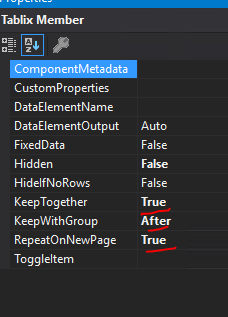
pastedimage1667194099695v1.png

On the rows I have the below properties.

pastedimage1667194099697v2.png

Is there something I'm doing wrong here or something I'm missing?

I have the same question (0)
  • Suggested answer
    GirishS Profile Picture
    27,827 Moderator on at

    Hi Huggins Mafigu ,

    Does your report has Tablix and group by?

    Try setting the below property and check.

    On the Tablix property >> General >> Page break options >> check the "Keep together on one page if possible".

    Thanks,

    Girish S.

  • Suggested answer
    Huggins Mafigu Profile Picture
    507 on at

    Hi Girish,

    Thank you for your quick response.

    Yes my report is using a Tablix and the above properties are the only properties I have set.

    "Keep together on one page if possible" is set but the results remain the same.

  • GirishS Profile Picture
    27,827 Moderator on at

    Does you have added group by on the report?

    Can you show us a screenshot of the report design along with group by?

    Thanks,

    Girish S.

  • GirishS Profile Picture
    27,827 Moderator on at

    Also try removing the column header properties you already set on the Tablix member(Screenshot of the properties you posted above).

  • Suggested answer
    Huggins Mafigu Profile Picture
    507 on at

    Hi Girish,

    Here it is

    pastedimage1667196024213v1.png

  • GirishS Profile Picture
    27,827 Moderator on at

    You don't need to set the Advance mode properties - Just remove them and check.

    Also check -  on the Group by Properties >> Whether you have added any page break options.

    On the AccountNum >> Properties >> Page break options >>  Between each instance of group should be unchecked.

    Thanks,

    Girish S.

Under review

Thank you for your reply! To ensure a great experience for everyone, your content is awaiting approval by our Community Managers. Please check back later.

Helpful resources

Quick Links

Responsible AI policies

As AI tools become more common, we’re introducing a Responsible AI Use…

Neeraj Kumar – Community Spotlight

We are honored to recognize Neeraj Kumar as our Community Spotlight honoree for…

Leaderboard > Finance | Project Operations, Human Resources, AX, GP, SL

#1
Martin Dráb Profile Picture

Martin Dráb 544 Most Valuable Professional

#2
André Arnaud de Calavon Profile Picture

André Arnaud de Cal... 450 Super User 2025 Season 2

#3
Sohaib Cheema Profile Picture

Sohaib Cheema 250 User Group Leader

Last 30 days Overall leaderboard

Product updates

Dynamics 365 release plans
