web
You’re offline. This is a read only version of the page.
close
Skip to main content

Notifications

Announcements

No record found.

Community site session details

Community site session details

Session Id :
Customer experience | Sales, Customer Insights,...
Suggested Answer

Quote sequence order changes when exporting to pdf template

(0) ShareShare
ReportReport
Posted on by 20

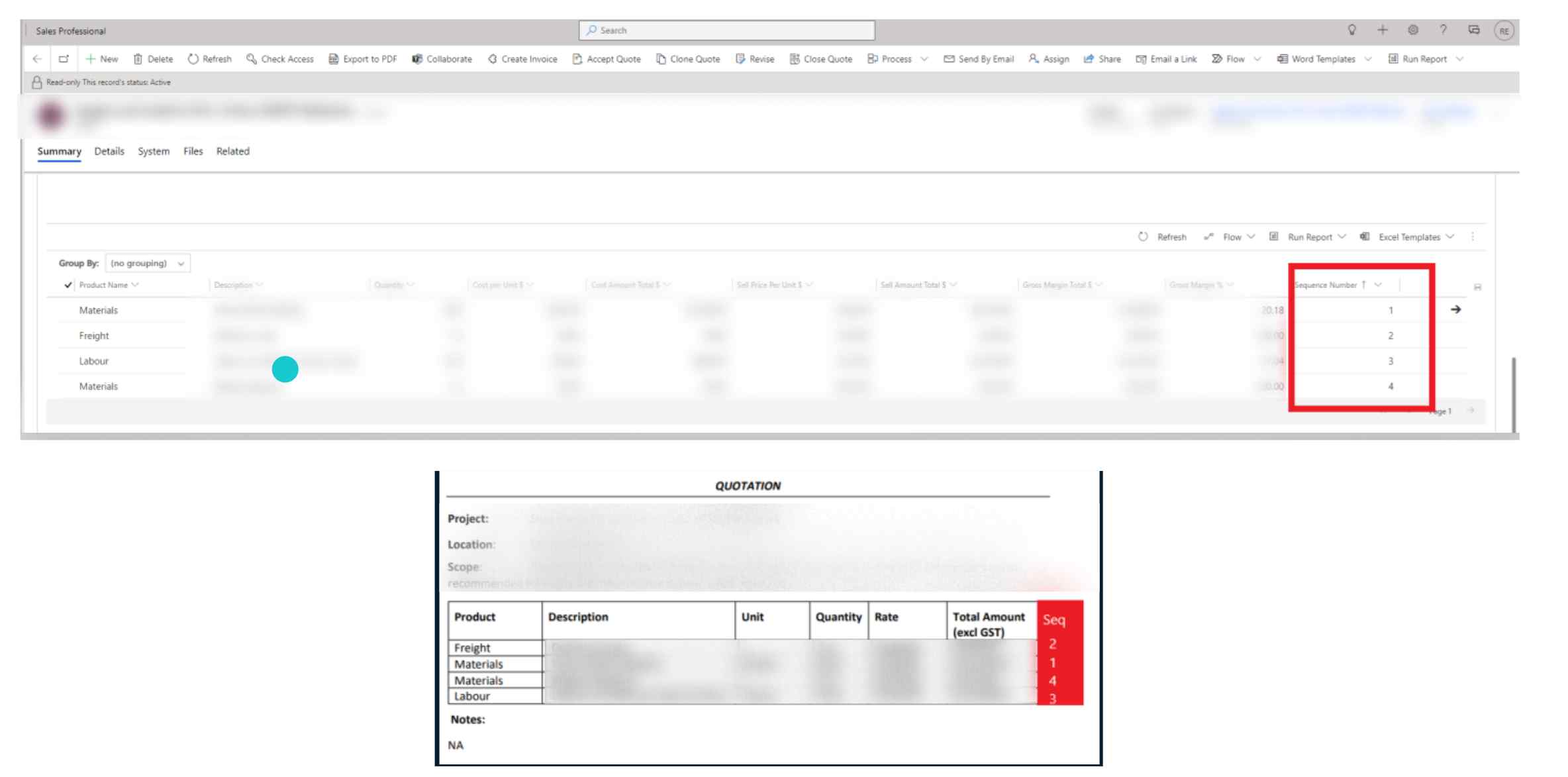
When a user modifies a quote by adding and/or reordering the products sequence number in the quote. Dynamics adjusts the sequence order of those products accordingly. However, when the quote is exported to pdf, the products always print in the original order. See below snip.


Top photo - sequence in product line

Bottom photo - sequence changed when exporting to pdf
pastedimage1667344822474v1.png

Does anyone know the solution on how to resolve this?

Thanks,


Raisa

I have the same question (0)
  • Suggested answer
    Leah Ju Profile Picture
    Microsoft Employee on at

    Hi Raisa,

    In fact, the template to generate PDF is from word template.

    Unfortunately, you can set sort of related entity records in Word Templates, which is by-design.

    From Microsoft documentation: Lists in created documents are not in the same order as records in dynamics 365.

    https://learn.microsoft.com/en-us/power-platform/admin/using-word-templates-dynamics-365#lists-in-created-documents-are-not-in-the-same-order-as-records 

    Lists of records created from a custom template may not appear in the same order in Word documents as the order in Dynamics 365. Records are listed in the order of the time and date they were created. 

  • Suggested answer
    Community Member Profile Picture
    on at

    Hi, Raisa.

    Yes, it is a well-known limitation that was already mentioned above in the previous reply.

    But there is a solution that could help you. I use Plumsail Documents to send generated quotes in PDF format with data from Dynamics CRM. It's easy to use, and no coding is required, so i guess you can do it as well. A new PDF document can be generated each time order in a quote changes with actual data. You can deliver generated documents by email with attachments and save them across your favorite apps. There is a 30-day free trial, so you can try to implement your case without payment.

    I suggest you read the article with details that can help you to implement your case.

    In short, you need to do a few steps:

    1. Create document generation process in Plumsail Documents. Configure a document template, set a resulting file as a PDF, and protect PDF if you need.
    2. Configure delivery via email or across your favorite apps with attachments.
    3. Set the integration via Power Automate or Zapier to get the resulting file with data from Dynamics CRM
  • Suggested answer
    Leah Ju Profile Picture
    Microsoft Employee on at

    Hi Raisa,

    Yes, you can use power automate to resort related records in the word template:

    https://powerautomate.microsoft.com/fr-fr/blog/generate-word-documents-in-your-flows/  

    The new Word Online (Business) connector lets you work with Word files in document libraries supported by Microsoft Graph: OneDrive for Business, SharePoint Sites, and Office 365 Groups. Today there are two actions:

    • Convert Word Document to PDF: Gets a PDF version of the selected file.
    • Populate a Microsoft Word template: Reads a Microsoft Word template to then fill the template fields with selected dynamic values to generate a Word document.

    And you can refer to the following link, which provided detailed steps: 

    https://www.strategy365.co.uk/populating-word-document-with-microsoft-power-automate/ 

Under review

Thank you for your reply! To ensure a great experience for everyone, your content is awaiting approval by our Community Managers. Please check back later.

Helpful resources

Quick Links

Responsible AI policies

As AI tools become more common, we’re introducing a Responsible AI Use…

Neeraj Kumar – Community Spotlight

We are honored to recognize Neeraj Kumar as our Community Spotlight honoree for…

Leaderboard > Customer experience | Sales, Customer Insights, CRM

#1
Tom_Gioielli Profile Picture

Tom_Gioielli 70 Super User 2025 Season 2

#2
Gerardo Rentería García Profile Picture

Gerardo Rentería Ga... 43 Most Valuable Professional

#3
Daniyal Khaleel Profile Picture

Daniyal Khaleel 32 Most Valuable Professional

Last 30 days Overall leaderboard

Product updates

Dynamics 365 release plans



