web
You’re offline. This is a read only version of the page.
close
Skip to main content

Notifications

Announcements

No record found.

Community site session details

Community site session details

Session Id :
Finance | Project Operations, Human Resources, ...
Unanswered

How to read multiple Excel files from SharePoint folder to D365fo x++?

(0) ShareShare
ReportReport
Posted on by 20

Below article helped me to read only file. 

https://allaboutdynamic.com/2020/11/30/d365-fo-download-a-sharepoint-file-using-x/

We are running a batch job in D365FO and want to read multiple Excel files from SharePoint folder and create Sales order.

How to read multiple Excel files from SharePoint folder to D365fo x++?

I have the same question (0)
  • Anton Venter Profile Picture
    20,345 Super User 2025 Season 2 on at

    Hi,

    Here is a high level description of how: You could do this by using Dynamics 365 Finance Data Management and Azure Logic Apps. You could "push" (transmit) the files from SharePpoint to Dynamics 365 Finance with the Logic App. You can configure a HTTP endpoint in Data Management (Dynamics 365 Finance) for receiving the files. A periodic batch job in Dynamics 365 Finance can process the files from the queue.

  • A.Prasanna Profile Picture
    8,223 on at

    No Idea whether you have any specific reason to read Excel from Sharepoint using X++
    but you can do the same thing using power automation without using code-level customization
    just go through this link to get an Idea:   

    Regards,

    AP

  • Arunraj Rajasekar Profile Picture
    1,743 on at

    Hi,

    You have two options to achieve this.

    1) Like others mentioned you can use logic apps or power automate, which will give you triggers on new excel files. or

    2) Save the SO files with the respective SO number as file name. Parameterize the sharepoint path where the files will be saved. write custom class to loop through the file names to see if the SO is already created else read the file using import excel code

  • Mohit Rampal Profile Picture
    12,565 Moderator on at

    Hi, As mentioned above, it can be done by logic app or power automate or by recurring integration. However, as per your previous post, you want to handle it in x++ and not azure integration services.

    You can check this thread for reference

    community.dynamics.com/.../reading-an-excel-file-from-a-sharepoint-using-x-in-microsoft-dynamics-365-for-finance-and-operations-10-0-18

  • Microsoft dynamics D365FO Profile Picture
    20 on at

    Hi Mohit,

    I used below code to read the file.

    public System.IO.MemoryStream getFileStreamFromSharepoint()

    {

    #File

    #define.https("https://")

    #define.decodeUrl("/_api/Web/GetFileByServerRelativePath(decodedurl='/")

    fileName = SOCreates+ #xlsx;

    System.Uri uri = new System.Uri(#https + host + #decodeUrl + site + "/" + folderPath + "/" + fileName + "')");

    //I throw away the part assuming that proxy is populated, because it can't ever be - we're initializing it here.

    ISharePointProxy proxy = SharePointHelper::createProxy(host, site, externalId);

    FileResults fileResults = SharePointHelper::GetFiles(proxy, FolderPath, ''); // The file result is returned successfully

    FileContents file = SharePointHelper::GetFileContents(proxy, uri); //This line returns a null value and no exception or error

    if(file)

    {

    System.IO.Stream fileStream = file.content;

    System.IO.MemoryStream ms = new System.IO.MemoryStream();

    fileStream.copyTo(ms);

    return ms;

    }

    else

    {

    return null;

    }

    }

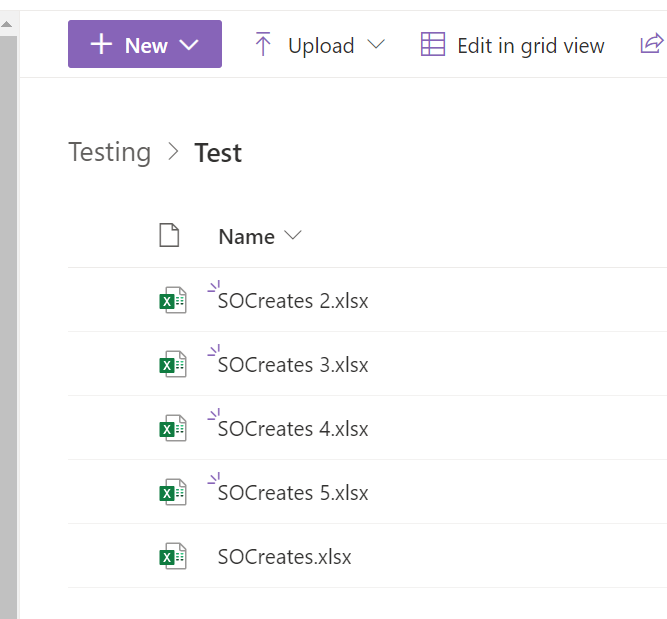
    I have hard coded the file name to fetch the file and read its work for 1 file but how can I get all file names which are there on SharePoint folder and read the files ?

    I want loop all the files which are there on SharePoint folder read the files and create sales order in D365FO.

    I'm running a batch Job in Dynamics365FO which will read all the files that are available on the SharePoint folder and create sales order.
Under review

Thank you for your reply! To ensure a great experience for everyone, your content is awaiting approval by our Community Managers. Please check back later.

Helpful resources

Quick Links

Responsible AI policies

As AI tools become more common, we’re introducing a Responsible AI Use…

Neeraj Kumar – Community Spotlight

We are honored to recognize Neeraj Kumar as our Community Spotlight honoree for…

Leaderboard > Finance | Project Operations, Human Resources, AX, GP, SL

#1
Martin Dráb Profile Picture

Martin Dráb 646 Most Valuable Professional

#2
André Arnaud de Calavon Profile Picture

André Arnaud de Cal... 529 Super User 2025 Season 2

#3
Sohaib Cheema Profile Picture

Sohaib Cheema 285 User Group Leader

Last 30 days Overall leaderboard

Product updates

Dynamics 365 release plans



