web
You’re offline. This is a read only version of the page.
close
Skip to main content

Notifications

Announcements

No record found.

Community site session details

Community site session details

Session Id :
Customer experience | Sales, Customer Insights,...
Suggested Answer

Exporting Notes from Dynamics 365 and converting them to Excel

(0) ShareShare
ReportReport
Posted on by 2

Hello,

I have set up an advanced find that works as expected and correctly pulls back the information I need in the XML view . Purpose is to extract the Notes information from our Accounts.   

However when I then covert it to excel for the majority of the Notes the below code appears in front of most the of notes wording or variations of it throughout the excel version.

<div style='font-family: "Segoe UI","Helvetica Neue",sans-serif; font-size: 14px;' data-wrapper="true">
<div>
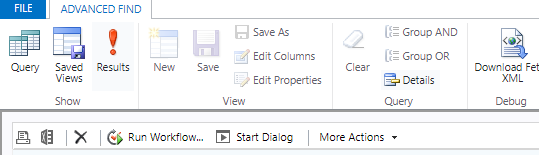
pastedimage1663035952121v1.png

Does anyone have a quick solution in how to fix so that when the data is extracted to excel the below does not occur. Selecting the Excel Icon in screen .

Excel provides the following warning message

pastedimage1663036028387v2.png_2D00_640x480.png

The above message is prompted and when you select Yes the below is written within all the notes.  If you select No then no conversion to excel occurs.

As you can tell I am a bit limited with my knowledge around this.

Thanks for any advice on this matter in advance.

I have the same question (0)
  • Suggested answer
    Abdul Wahab Profile Picture
    12,119 Moderator on at

    Hi Penny Pryde,

    Do one thing here. Add Notes table in your area or site map Use Open in Excel Online to update records. It will solve your problem I hope.

    If I answer your question then please mark it as verified.

    Let me know if I can provide you with more details.

    Thanks
    Regards,

    Abdul Wahab
    Power Platform/Customer Engagement Developer/Lead/Solution Architecture/Project Manager
    Direct/WhatsApp:+923323281237
    E-mail: abdulwahabubit@outlook.com
    Skype: abdul.wahabubit
    Linkedin: www.linkedin.com/.../

  • Penny Pryde Profile Picture
    2 on at

    Hello

    I have discovered that the issue arises when adding in extra filter fields.

    If I  just Select Notes and All Notes the data is clean but as soon as I add extra filters which I need by Selecting Regarding (Account) the data is  pulling back the <div style='font-family: "Segoe UI","Helvetica Neue",sans-serif; font-size: 14px;' data-wrapper="true">
    <div>.

    Any ideas how to get around this?

    With thanks

  • Penny Pryde Profile Picture
    2 on at

    Hello

    I have discovered that the issue arises when adding in extra filter fields.

    If I  just Select Notes and All Notes the data is clean but as soon as I add extra filters which I need by Selecting Regarding (Account) the data is  pulling back the <div style='font-family: "Segoe UI","Helvetica Neue",sans-serif; font-size: 14px;' data-wrapper="true">

    <div>.

  • Penny Pryde Profile Picture
    2 on at

    Hi Abdul,

    Thank you for your response.  To be I am a little clueless as to are or site map that you refer to.  Are you able to expand and provide guidance as to where I can locate the area to you are referencing please.

    Thank you

  • Suggested answer
    Abdul Wahab Profile Picture
    12,119 Moderator on at

    Hi Penny Pryde,

    Follow the below steps to the Notes table to your app:

    1. Log in to make.powerapps.com
    2. Make sure you are connected with the correct environment.
    3. Click on Apps
    4. Click on the ellipse with the app in which you want to add notes.
    5. pastedimage1663107304098v1.png
    6. Click on the switch to classicpastedimage1663107344555v2.png

    1. Click on the pencil of Site Mappastedimage1663107402586v3.png
    2. Click on the areapastedimage1663107479833v4.png
    3. Click on Add button and then Sub-areapastedimage1663107508091v5.png
    4. Select Entity and Notespastedimage1663107534742v6.png
    5. Save and Publish

    If I answer your question then please mark it as verified.

    Let me know if I can provide you with more details.

    Thanks
    Regards,

    Abdul Wahab
    Power Platform/Customer Engagement Developer/Lead/Solution Architecture/Project Manager
    Direct/WhatsApp:+923323281237
    E-mail: abdulwahabubit@outlook.com
    Skype: abdul.wahabubit
    Linkedin: www.linkedin.com/.../

Under review

Thank you for your reply! To ensure a great experience for everyone, your content is awaiting approval by our Community Managers. Please check back later.

Helpful resources

Quick Links

Responsible AI policies

As AI tools become more common, we’re introducing a Responsible AI Use…

Neeraj Kumar – Community Spotlight

We are honored to recognize Neeraj Kumar as our Community Spotlight honoree for…

Leaderboard > Customer experience | Sales, Customer Insights, CRM

#1
Tom_Gioielli Profile Picture

Tom_Gioielli 70 Super User 2025 Season 2

#2
Gerardo Rentería García Profile Picture

Gerardo Rentería Ga... 33 Most Valuable Professional

#3
Daniyal Khaleel Profile Picture

Daniyal Khaleel 32 Most Valuable Professional

Last 30 days Overall leaderboard

Product updates

Dynamics 365 release plans



