web
You’re offline. This is a read only version of the page.
close
Skip to main content

Notifications

Announcements

No record found.

Community site session details

Community site session details

Session Id :
Microsoft Dynamics AX (Archived)

Modules not visible in AX 2012 Enterprise Portal site after customization deployment

(0) ShareShare
ReportReport
Posted on by 10,796 User Group Leader

Enterprise portal site was showing all modules after installation in a testing environment. Later I imported changes (an xpo file which contains AX client customization and EP changes) into this environment from production, deployed all EP web controls and web menus. I also restarted IIS, refreshed all caches and restarted AOS service. Nothing worked :(

For testing purpose I added new web module and deployed it under Home page but this is also not showing. Can anyone please guide me what steps should I follow to verify either new changes are actually deploying to the site or site and where to check. 
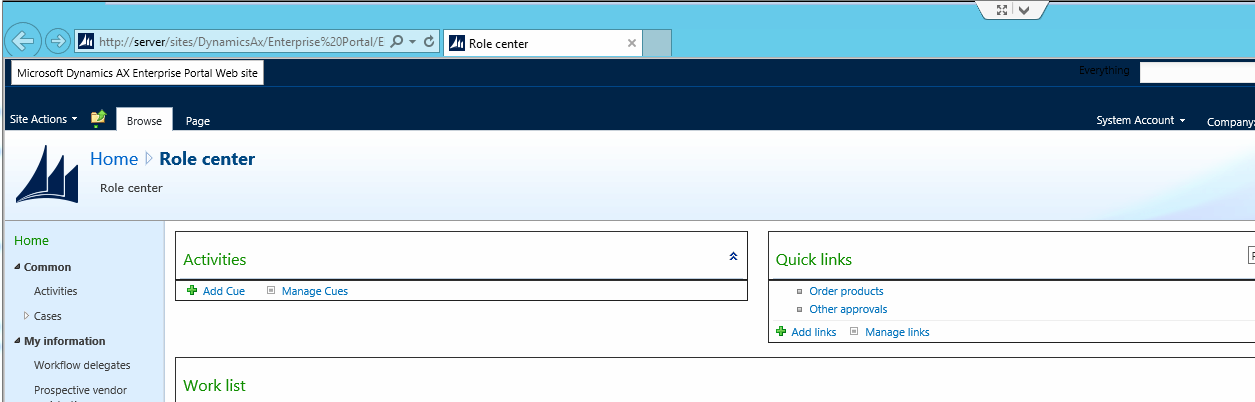
I am using AX 2012 R3 version.

*This post is locked for comments

I have the same question (0)
  • Suggested answer
    Community Member Profile Picture
    on at

    I suggest you to review following link and check if you have followed the steps accordingly while adding new module.

    https://msdn.microsoft.com/en-us/library/cc635940.aspx

    Please verify and update us with your findings

  • Faisal Fareed Profile Picture
    10,796 User Group Leader on at

    Thanks Nitesh for sharing this link, I followed same steps when I created web module. I again double checked as per your suggestion but it did not work :(

  • Mostafa Abu Taleb Profile Picture
    1,880 on at

    Same Issues with me

  • Faisal Fareed Profile Picture
    10,796 User Group Leader on at

    I checked under Site Actions > View all site contents.  Under Site and Workspaces all modules are getting deployed there and I can access these modules from there.

    It seems to me Home Page where normally it shows all Modules (Menus to access module) e.g. procurement, Sales, Vendor Portal etc got changed with this deployment. Can anyone please guide me what should I check? Do I need to check it from AOT or from sharepoint site side?

  • Community Member Profile Picture
    on at

    i know its old post but posting it for the others who can face same issue in future.

    please follow below steps

    goto services.msc and start sharepoint administrator

    10268.2.png

    now goto manage feature from the sharepoint central administrator and enable the feature of ax

    10268.2.png

Under review

Thank you for your reply! To ensure a great experience for everyone, your content is awaiting approval by our Community Managers. Please check back later.

Helpful resources

Quick Links

Responsible AI policies

As AI tools become more common, we’re introducing a Responsible AI Use…

Neeraj Kumar – Community Spotlight

We are honored to recognize Neeraj Kumar as our Community Spotlight honoree for…

Leaderboard > 🔒一 Microsoft Dynamics AX (Archived)

#1
Martin Dráb Profile Picture

Martin Dráb 4 Most Valuable Professional

#1
Priya_K Profile Picture

Priya_K 4

#3
MyDynamicsNAV Profile Picture

MyDynamicsNAV 2

Last 30 days Overall leaderboard

Featured topics

Product updates

Dynamics 365 release plans
