web
You’re offline. This is a read only version of the page.
close
Skip to main content

Notifications

Announcements

No record found.

Community site session details

Community site session details

Session Id :
Finance | Project Operations, Human Resources, ...
Suggested Answer

How to add product description to SalesQuickQuote

(0) ShareShare
ReportReport
Posted on by 235

Good day

My client needs me to add the Product description to the SalesQuickQuote form.  They want to be able to select , and filter on this field instead of having to use the Item Number field.

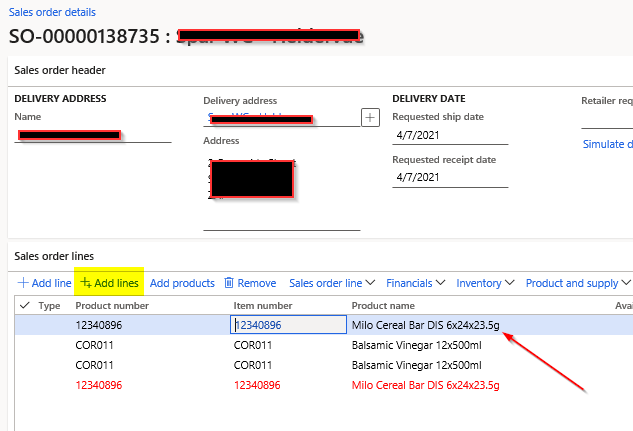
The SalesQuickQuote form is the form that opens when you select 'Add lines' on a sales order, allowing the user to create multiple lines on a sales order.

I have tried to insert a new column from the front end and only 3 fields from Invent table is available on that form.  Also even if I just tried to add the Name alias from Invent table data source the field is empty when the form displays.

I do not understand how this form is developed or where I should start to extend it to add this field.  I was hoping that even if I could not display the product name, it might be useful if they could have access to the Name alias from Invent table, at least that might have some chance of being able to search for the item on the name.
pastedimage1622552042040v1.png

I waant the Product name to be available on the the SalesQuickQuote

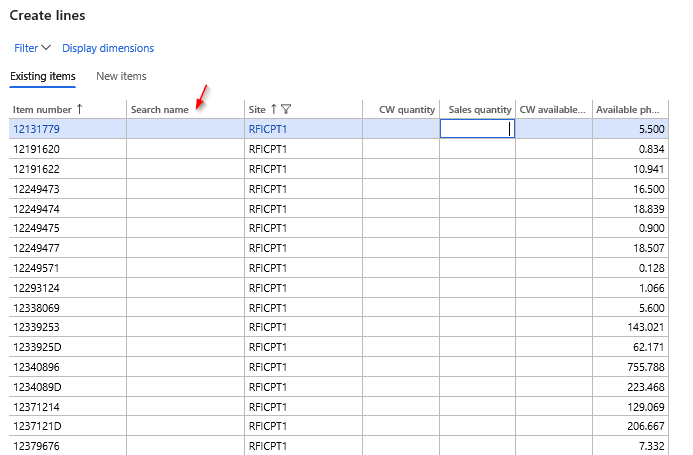
Here I added the Searchname from InventTable, but it is always empty. I need to have a filterable, selectable field Product name on the following form where the Search name is shown.

How do I do this and is it even possible?
pastedimage1622552230131v2.png

I have the same question (0)
  • Suggested answer
    Martin Dráb Profile Picture
    237,880 Most Valuable Professional on at

    Product names can be translated to multiple languages - you must decide if you want to use them. If not, I think you should use DisplayProductNumber field from EcoResProduct table.

    You'll need to create an extension of SalesQuickQuote form. Because it doesn't already have a data source for EcoResProduct, you'll need to add it (and join it to InventTable data source). Then you can add DisplayProductNumber to grids.

  • Sophia.r Profile Picture
    235 on at

    Hi Martin

    Thank you for your quick response.  The client insists on being able to filter on the field, I proposed using the DisplayProductNumber, and this wont be possible if I use a display field.  But the SalesQuickQuote form does not react the same as other F&O forms.  Even when I just tried adding the search name (nameAlias) from invent table, I could not get the field to show the data.

    The form reacts as though a query determines which fields are being displayed.  

  • Martin Dráb Profile Picture
    237,880 Most Valuable Professional on at

    I know that you want to filter by the field and therefore I suggested a joined data source, not a display method

    Or are you just afraid of the field name? That the field is called "Display..." doesn't mean that it's a display method. It's a regular field.

  • Suggested answer
    André Arnaud de Calavon Profile Picture
    301,020 Super User 2025 Season 2 on at

    Hi Sophia,

    The product name is stored in the EcoResProductTranslation table. The table relations have links as follows: InventTable > EcoResProduct > EcoResProductTranslation. You can link skip the EcoResProductTable if you link the InventTable.Product field with the EcoResProductTranslation table. You have to link the form data sources then with x++ coding. Like Martin mentioned, there can be translation in multiple languages. You also have to set a range on one specific language then.

  • Sophia.r Profile Picture
    235 on at

    Hi Martin and Andre Thanks for coming back to me

    I created and Extension of the SalesQuickQuote form, and then added the EcoResProductTranslation to data sources.  I dragged the Name field to GridExistingItems.

    pastedimage1623313808246v1.png

    I then created an extension class extending the forms init() method

    [ExtensionOf(formStr(SalesQuickQuote))]
    final class SalesQuickQuotePAS_Extension
    {
    
        public void init()
        {
            next init();
    
            QueryBuildDataSource nameQbds = PASEcoResProductTranslation_ds.queryBuildDatasource();
            nameQbds.addLink(fieldNum(InventTable, Product), fieldNum(EcoResProductTranslation, Product));
          //AddRange to add the languageID
    
        }
    }

    When I debug it does go into this code and the sql displays the selection that I was expecting to see.  However the form does not display anything in this field.

    Am I missing something, do I have to call executeQuery()

    pastedimage1623314146598v2.png

    I have not added the range on language yet, I just wanted to see if I could get a result first as my data only has one language.

    I appreciate any help.

    Kind regards

  • Martin Dráb Profile Picture
    237,880 Most Valuable Professional on at

    You didn't mention setting up properties of the data source (the parent data source and the type of link or join).

    You also didn't define which language you want to show and what should happen if no translation has been defined for this language. As I mentioned, you should use EcoResProductTranslation if you want to support translations. If you just want it in the default language, using EcoResProduct.DisplayProductNumber will be much easier. That's why I suggested that.

    By the way, you can see that just looking at returned data isn't a good way for debugging a query. You should check the query generated from your data sources and code and compare it with the query that you intended to generate.

  • Sophia.r Profile Picture
    235 on at

    Hi Martin

    I apologise for not giving enough information.

    So I want my  EcoResproductTranslation  to join with outer join to inventtable

    So on my form extension this is the properties of my data source PASEcoResProductTranslation

    pastedimage1623334648148v1.png

    If I select from the sql tables the EcoResProduct.DisplayProductNumber returns a product number, where I am looking for the product description or name.  Below is the sql and results

    pastedimage1623335052093v2.png

    If you look at the displayProductnumber from ECORESPRODUCT, it is showing the number (OATS008), where I need to display the name (Oats Course Rolled Liberty Select 1kg) as can be found in ECORESPRODUCTTRANSLATION.  If there is no record in ECORESPRODUCTTRANSLATION then the field can be displayed as empty.  This customisation must not change any of the selections that are standard in the data being displayed before the change was made.

    When  debugging I found this on the query 

    InventTable_q  gives the following :   object 13303060: SELECT FIRSTFAST FORUPDATE * FROM InventTable(InventTable) JOIN FORUPDATE * FROM InventSum(InventSum) ON InventTable.ItemId = InventSum.ItemId JOIN FORUPDATE * FROM InventDim(inventdim) ON InventSum.InventDimId = InventDim.inventDimId OUTER JOIN FORUPDATE * FROM EcoResProductTranslation(PASEcoResProductTranslation) ON InventTable.Product = EcoResProductTranslation.Product}

    and my nameQbds showed : {SELECT FORUPDATE * FROM EcoResProductTranslation(PASEcoResProductTranslation) WHERE InventTable.Product = EcoResProductTranslation.Product}

    I might be looking at the wrong things.  This form does not seem to be working in the same way as other forms.  As an additional test I tried to include the NameAlias directly from the same datasource as the ItemId from InventTable ( which I verified does contain values, and that field was also empty.

    I am definitely missing something with this specific form.

  • Sophia.r Profile Picture
    235 on at

    Since my last post, I have found something new.  It seems the form uses a class called SalesQuickQuoteFormAdaptor and also a Tmp table called TmpFrmVirtual.  I am debugging trying to understand if I need to extend these for my customisation.

  • Sophia.r Profile Picture
    235 on at

    Hi All

    I was able to solve this without the help of some developer geniuses. Thank you Derrick Barlow and Desmond Letshedi

    1. Extend InventTable by adding relationship to EcoResProductTranslation

    2. Extend the class InventDimCtrl_Frm_QuickQuote

    final class InventDimCtrl_Frm_QuickQuotePAS_Extension
    {
        public void modifyQuery()
        {
            next modifyQuery();
            QueryBuildDataSource qbdsInvent = origQuery.dataSourceTable(tableNum(InventTable));
            qbdsInvent.addSortField(fieldNum(InventTable, Product));
           
            QueryBuildDataSource qbdsTranslate = origQuery.dataSourceTable(tableNum(EcoResProductTranslation));
            qbdsTranslate.relations(true);
            qbdsTranslate.joinMode(JoinMode::InnerJoin);
            qbdsTranslate.sortClear();
            qbdsTranslate.orderMode(OrderMode::GroupBy);
            qbdsTranslate.addSortField(fieldNum(EcoResProductTranslation, Name));
    
        }
    
    }

    3.Extend the SalesQuickQuoteForm and add the EcoResProductTranslation related to the InventTable Data Source

    4.  Add the fields you want to extend from EcoResProductTranslation

    pastedimage1623700688675v1.png

    And thats it.  Good luck and thank you

  • Martin Dráb Profile Picture
    237,880 Most Valuable Professional on at

    Are you aware of the fact that if you have a product name translated to five languages, you'll see the same item five times? This is the reason why I talked about selecting the language.

    Sorry about the field name, DisplayProductNumber is indeed a wrong one. Isn't it DisplayProductName? I'll check it later in an F&O environment if needed.

Under review

Thank you for your reply! To ensure a great experience for everyone, your content is awaiting approval by our Community Managers. Please check back later.

Helpful resources

Quick Links

Responsible AI policies

As AI tools become more common, we’re introducing a Responsible AI Use…

Neeraj Kumar – Community Spotlight

We are honored to recognize Neeraj Kumar as our Community Spotlight honoree for…

Leaderboard > Finance | Project Operations, Human Resources, AX, GP, SL

#1
Martin Dráb Profile Picture

Martin Dráb 611 Most Valuable Professional

#2
André Arnaud de Calavon Profile Picture

André Arnaud de Cal... 529 Super User 2025 Season 2

#3
Sohaib Cheema Profile Picture

Sohaib Cheema 285 User Group Leader

Last 30 days Overall leaderboard

Product updates

Dynamics 365 release plans



