web
You’re offline. This is a read only version of the page.
close
Skip to main content

Announcements

No record found.

News and Announcements icon
Community site session details

Community site session details

Session Id :
Customer experience | Sales, Customer Insights,...
Suggested Answer

How to increment sequence number on other entity "B" when record is saved on entity "A".How can i achieve this

(0) ShareShare
ReportReport
Posted on by 342

I have number field say "seqno"of type whole number consists of sequence number  starts from "500000"on entity "B" ,when entity "A" record  is loaded the "seqno" value is loaded to entity A from B and on save of entity A record the sequence number on B should be increment by 1. Here entity A and B does not have any lookup. How can i achieve this.

I have the same question (0)
  • Suggested answer
    Community Member Profile Picture
    on at

    Hi Sandy,

    The flow can achieve it, here are steps:

    In my example, custom(A) entity and test(B) entity have no relationship

    1.Go Power Automate(https://us.flow.microsoft.com/en-us/ ) to create an Automated flow.

    2.Create the Trigger event – in this case I have set the trigger to fire when a custom record is created.
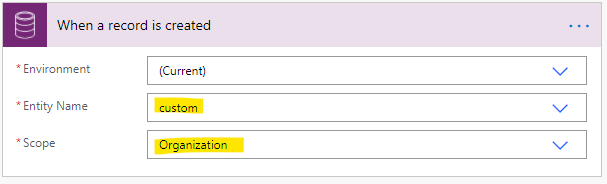
    pastedimage1603162868058v2.png

    2.Add ‘List records’ step, Retrieve one test record with a most recent Created On date value.
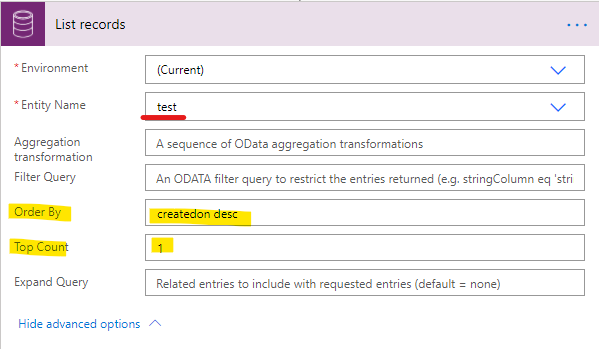
    pastedimage1603162887311v3.png

    3.Add ‘compose’ step to get seqno value from ‘List records’ step.

    Once you do this and fill in the fields, Flow takes care of the Apply to each loop. So don’t get confused by this and look for a Apply to each. You don’t need to do this.
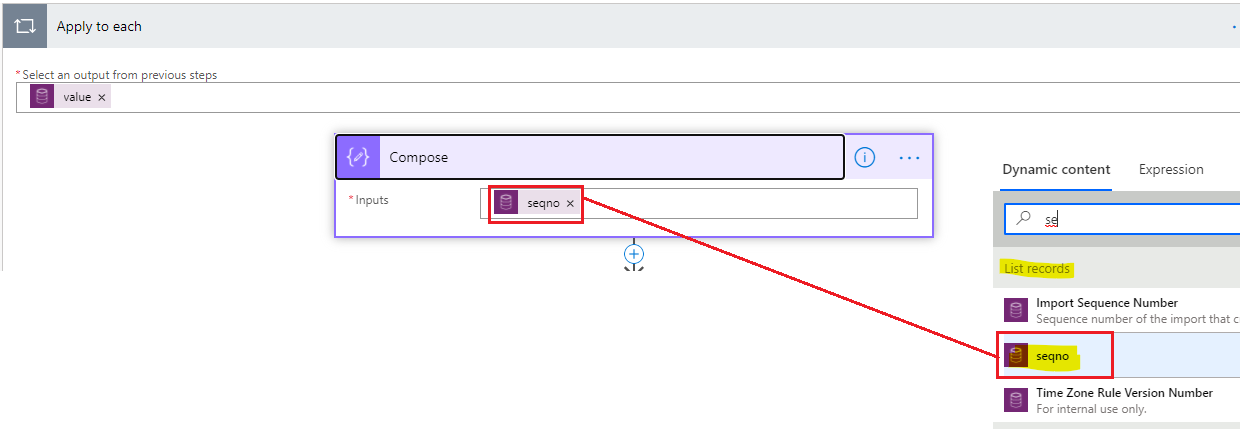
    pastedimage1603162907605v4.png

    4.In ‘Apply to each’ step, add ‘condition’ step to check seqno value is null or not.
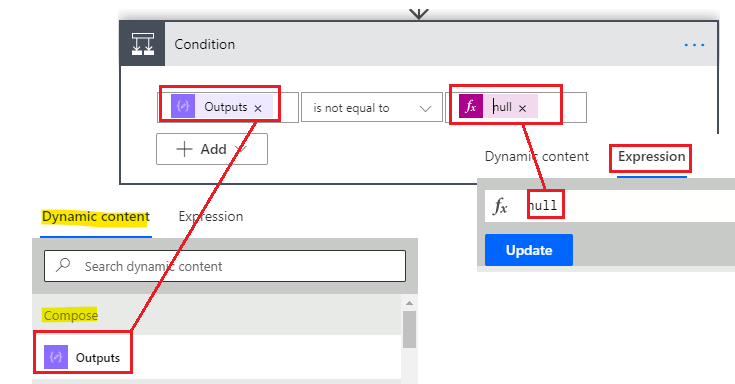
    pastedimage1603163060999v5.png

    (1) In ‘Yes’ branch,

     Add ‘Compose’ step to convert seqno value to int and add 1.
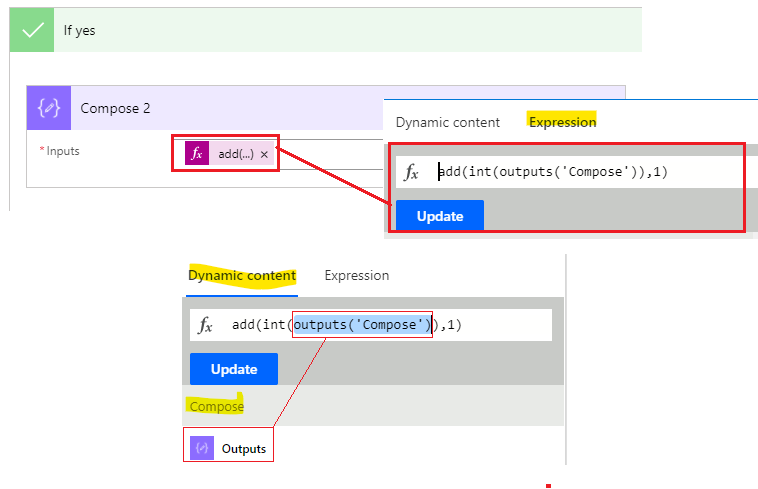
    pastedimage1603163925650v6.png

    Add ‘create a new record’ and fill seqno field with the value of ‘compose2’ step.
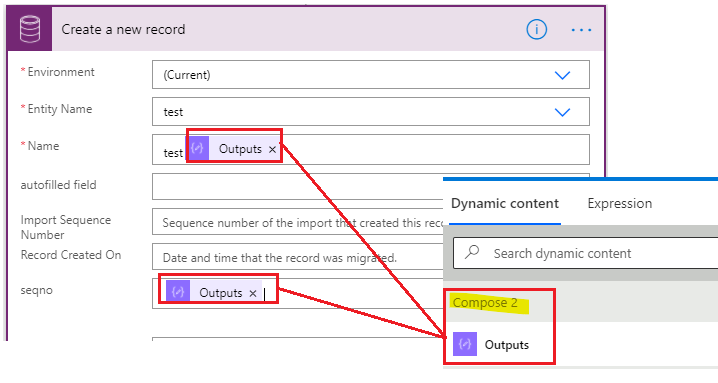
     pastedimage1603164037806v7.png

    (2) In ‘No’ branch, add ‘create a new record’, fill seqno field with the 500000 value.
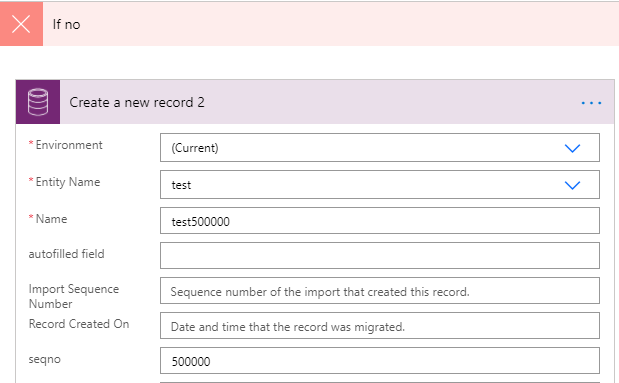
    pastedimage1603164108397v8.png

    5.Save and test the flow.

    The following is the overview of the flow:
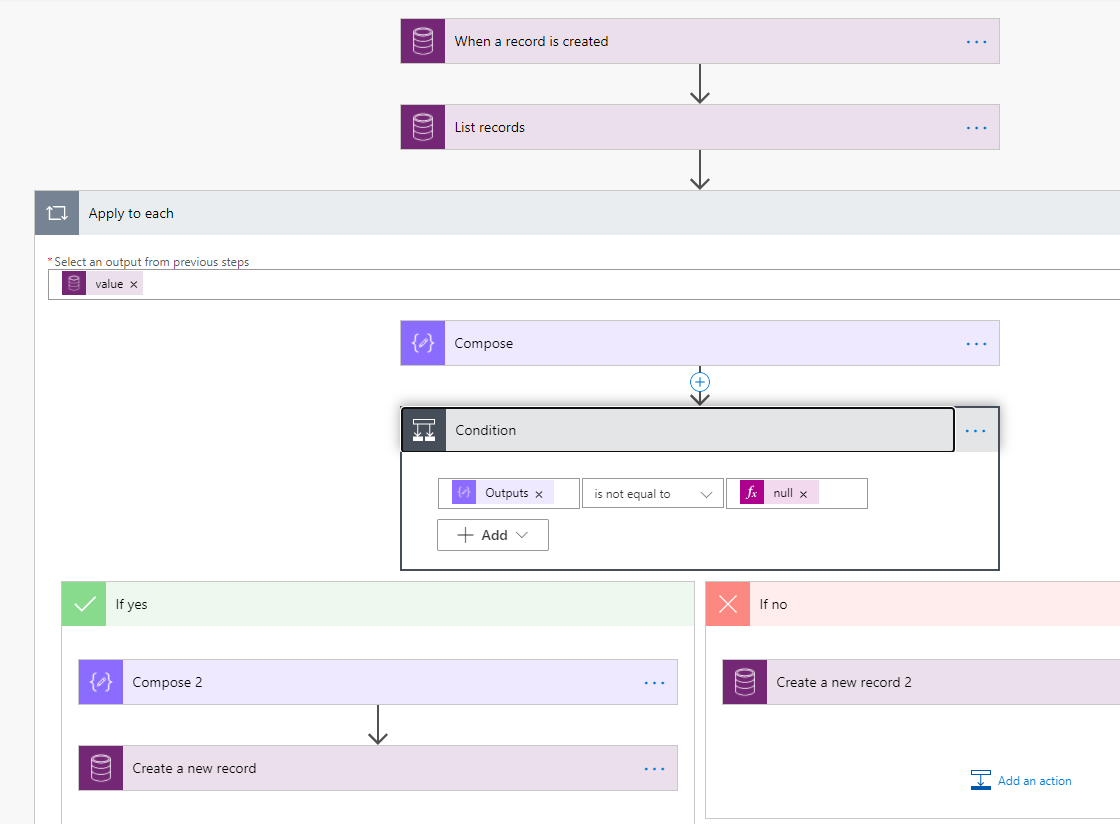
    pastedimage1603164253245v1.png

    Regards,

    Leah Ju

    Please mark as verified if the answer is helpful. Welcome to join hot discussions in Dynamics 365 Forums.

  • Sandy Hello Profile Picture
    342 on at

    Thanks for your response, i am new to flows is there any possible way to achieve this with Javascript

  • Suggested answer
    Community Member Profile Picture
    on at

    Hi Sandy,

    You can refer following js code:


    function number ()
    {
    Xrm.WebApi.online.retrieveMultipleRecords("new_test", "?$select=new_seqno&$orderby=createdon desc&$top=1").then(
        function success(results) {
            for (var i = 0; i < results.entities.length; i  ) {
                var new_seqno = results.entities[i]["new_seqno"];
                var new_seqno_formatted = results.entities[i]["new_seqno@OData.Community.Display.V1.FormattedValue"];
    
                if(new_seqno ==null)//the lastest test(B) record seqno field is null, create a new record with 50000
                {
                    var entity = {};
                    entity.new_name = "test500000";
                    entity.new_seqno = 50000;
                    
                    Xrm.WebApi.online.createRecord("new_test", entity).then(
                        function success(result) {
                            var newEntityId = result.id;
                        },
                        function(error) {
                            Xrm.Utility.alertDialog(error.message);
                        }
                    );
                }
                else // create a new record with seqno 1
                {
                    var seqno = new_seqno  1;
                    var entity = {};
                    entity.new_name = "test"   seqno;
                    entity.new_seqno = seqno;
                    
                    Xrm.WebApi.online.createRecord("new_test", entity).then(
                        function success(result) {
                            var newEntityId = result.id;
                        },
                        function(error) {
                            Xrm.Utility.alertDialog(error.message);
                        }
                    );
                }
            }
        },
        function(error) {
            Xrm.Utility.alertDialog(error.message);
        }
    );
    }

    And Crm Rest Builder is a good tool to build request.

    This is the download page for it: https://github.com/jlattimer/CRMRESTBuilder

    1.retrieve one most recent test record.

     pastedimage1603347260940v1.png

    2.Create test record(B) with specific seqno value.

     pastedimage1603348994798v2.png

    3.Add the js code to OnSave event of the custom (A) entity.

    Regards,

    Leah Ju

    Please mark as verified if the answer is helpful. Welcome to join hot discussions in Dynamics 365 Forums.

Under review

Thank you for your reply! To ensure a great experience for everyone, your content is awaiting approval by our Community Managers. Please check back later.

Helpful resources

Quick Links

Introducing the 2026 Season 1 community Super Users

Congratulations to our 2026 Super Stars!

Meet the Microsoft Dynamics 365 Contact Center Champions

We are thrilled to have these Champions in our Community!

Congratulations to the April Top 10 Community Leaders

These are the community rock stars!

Leaderboard > Customer experience | Sales, Customer Insights, CRM

#1
Muhammad Shahzad Shafique Profile Picture

Muhammad Shahzad Sh... 69 Most Valuable Professional

#2
ManoVerse Profile Picture

ManoVerse 66 Super User 2026 Season 1

#3
11manish Profile Picture

11manish 45

Last 30 days Overall leaderboard

Product updates

Dynamics 365 release plans
