web
You’re offline. This is a read only version of the page.
close
Skip to main content

Announcements

No record found.

News and Announcements icon
Community site session details

Community site session details

Session Id :
Finance | Project Operations, Human Resources, ...
Suggested Answer

Carry-forward leave reporting

(0) ShareShare
ReportReport
Posted on by 55

Hello,

Is there a way where I can quickly report amounts of leave carried forward to next year by individual employees, without using PowerBI?

In the Leave & Absence -> balances screen, the amount is shown correctly:
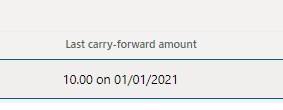
pastedimage1609847007682v1.png

But when I go to the Current balance transactions, the amount is shown as 0 (and it's the same if I open the transactions list in Excel).

pastedimage1609847084764v2.png

Any help would be appreciated, thank you.

Magda 

  • Suggested answer
    Parag Chapre Profile Picture
    12,254 Most Valuable Professional on at

    Hi Magda,

    Did you try with Leave and absence bank transaction V2 entity?

  • Magda Nawiesniak Profile Picture
    55 on at

    Yes, it's not recorded there either

  • Parag Chapre Profile Picture
    12,254 Most Valuable Professional on at

    Can you please give me the Form path current balance transaction?

  • Magda Nawiesniak Profile Picture
    55 on at

    Sorry, I'm not exactly sure what I'm looking for.

    pastedimage1609929082958v1.png

    Would it be this possibly?

    Thank you,

  • Suggested answer
    Parag Chapre Profile Picture
    12,254 Most Valuable Professional on at

    Hi Magda,

    This is the form I was looking for. The correct value should be visible in the Leave and absence Bank transaction entities

    Try two entities. 

    Leave and absence Bank transaction entity.

    Leave and absence Bank transaction V2 entity - You checked already but showing 0 amount.

    Did you try with CDS entities for Leave bank transactions?

  • Magda Nawiesniak Profile Picture
    55 on at

    Hi Parag,

    Both Leave and Absence entities show 0 amount.

    I didn't try the CDS one - could you instruct me on how to do this?

    Thank you,

    Magda

  • Suggested answer
    Parag Chapre Profile Picture
    12,254 Most Valuable Professional on at

    Hi Magda,

    Open web.powerapps.com

    Log in with your credentials

    Select your correct environment

    Go to Data > Table(Left side)

    Search for Leave Bank Transaction

    Export data or Edit data in Excel

  • Magda Nawiesniak Profile Picture
    55 on at

    Hi Parag,

    Thank you for explaining. I tired that and it also shows 0 amount for all carry-forward records.

    pastedimage1610459933215v1.png

    Best wishes,

    Magda 

Under review

Thank you for your reply! To ensure a great experience for everyone, your content is awaiting approval by our Community Managers. Please check back later.

Helpful resources

Quick Links

Season of Sharing Community Challenge Winners!

Congratulations to our community stars!

Women in Power Builds Momentum

Expanding mentorship, skilling, and AI innovation

Congratulations to the July Top 10 Community Leaders

These are the community rock stars!

Leaderboard > Finance | Project Operations, Human Resources, AX, GP, SL

#1
Martin Dráb Profile Picture

Martin Dráb 429 Most Valuable Professional

#2
CU10121822-0 Profile Picture

CU10121822-0 366

#3
André Arnaud de Calavon Profile Picture

André Arnaud de Cal... 360 Super User 2026 Season 2

Last 30 days Overall leaderboard

Product updates

Dynamics 365 release plans



