web
You’re offline. This is a read only version of the page.
close
Skip to main content

Notifications

Announcements

No record found.

Community site session details

Community site session details

Session Id :
Finance | Project Operations, Human Resources, ...
Answered

Form : Hide or show control and field

(0) ShareShare
ReportReport
Posted on by

Hello everyone,

In a custom form, how to show and hide control or field now days ? If lets say I'm using Menu item display parameter, how is the code looks like and where we should put it ?

For example :I created form like below:
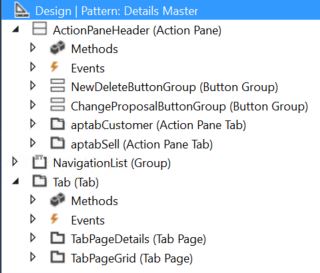
7612.Capture4.JPG

As this form called using menu item. I put enum parameter in its property. Several menuitem calling this 1 form, and I just put enum parameter each. So on certain enum value, some of the action pane above (lets say aptabCustomer) need to be hidden.

Also some field in the detail information (not showing in the image), will need to be hidden as well.

Where I should put the checking and how ? is it in this form or I should create Even Handler class for this ?

Thanks,

I have the same question (0)
  • Suggested answer
    Sergei Minozhenko Profile Picture
    23,093 on at

    Hi WWwong,

    If you are doing this customization for your own form, you don't need to use event handlers, just put code to init method and hide needed controls based on the value from enum parameter set up on menu item.

    Using event handlers for the object (form, table, and so on) in the same model will increase code complexity and make code less understandable and readable.

    If you have a form in one model (standard or custom), but you added controls via an extension in another model in this case you need to use event handlers or CoC methods.

  • Verified answer
    mhdshb1 Profile Picture
    1,250 on at

    Hi WWwong, 

    As Sergei mentioned If you are doing you own form no need to use event handlers. 

    From the properties of aptabCustomer  control change the Auto declaration property to Yes.

    You need to get the Enum value from the menu items that has been called. 

    Check this link for more information 

    https://dynamics.folio3.com/2014/02/23/x-tips-and-tricks-passing-parameters-microsoft-dynamics-ax/

    Then based on your Enum value add this code:

    aptabCustomer.visible(false);


Under review

Thank you for your reply! To ensure a great experience for everyone, your content is awaiting approval by our Community Managers. Please check back later.

Helpful resources

Quick Links

Responsible AI policies

As AI tools become more common, we’re introducing a Responsible AI Use…

Neeraj Kumar – Community Spotlight

We are honored to recognize Neeraj Kumar as our Community Spotlight honoree for…

Leaderboard > Finance | Project Operations, Human Resources, AX, GP, SL

#1
Martin Dráb Profile Picture

Martin Dráb 611 Most Valuable Professional

#2
André Arnaud de Calavon Profile Picture

André Arnaud de Cal... 529 Super User 2025 Season 2

#3
Sohaib Cheema Profile Picture

Sohaib Cheema 285 User Group Leader

Last 30 days Overall leaderboard

Product updates

Dynamics 365 release plans
