web
You’re offline. This is a read only version of the page.
close
Skip to main content

Notifications

Announcements

No record found.

Community site session details

Community site session details

Session Id :
Customer experience | Sales, Customer Insights,...
Answered

Filter value from Look up field in Subgrid

(0) ShareShare
ReportReport
Posted on by 69

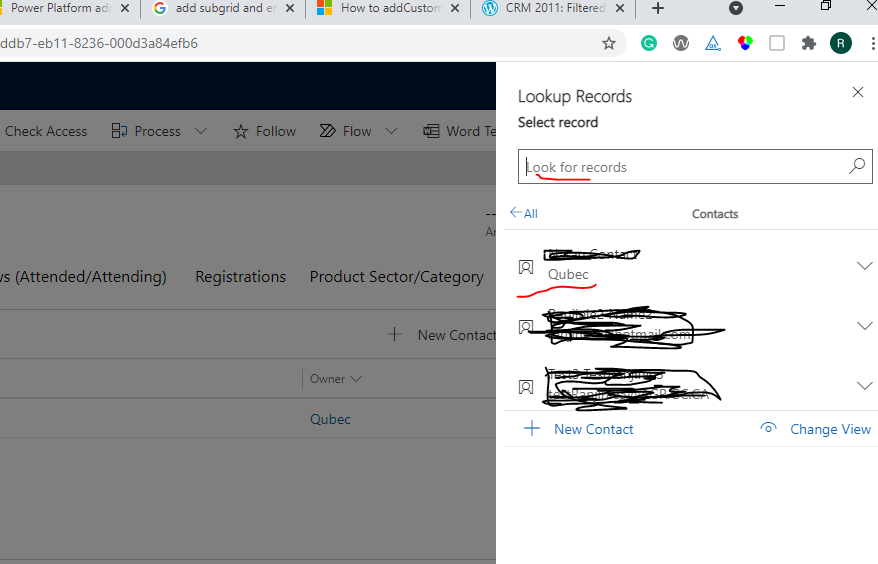
Hi, when i click "Add existing contact" button on a subgrid , that allowed me to select contact from look up which display full name, email, owner fields for each record(refer to image 1). i was able to search on the look up field with full name or email value. However, i need to search with owner (ex: if i enter Quebe, I should be able to see the first record from the image 1 below). How i can enable the field to be visible to search from the look up field.

Another question: I added a subgrid which includes "New contact button" (refer to image 2). when i click the "New Contact " button, it takes me to default Quick create form. Is it anyway i can change the default quick create form to a custom Quick create form? thank you, Siva

image 1.
pastedimage1622686685159v1.png

image 2

pastedimage1622687383791v2.png

I have the same question (0)
  • Verified answer
    a33ik Profile Picture
    84,331 Most Valuable Professional on at

    Hello,

    Answering your first question - you need to add "Owner" field to the list of field used in "Quick Find". You can check this article - powerobjects.com/.../ - I know it is a bit old but it is still relevant.

    Answering your second question - you can have only one Quick Create form per entity per application. You can't conditionally choose which form to use even using the code.

  • SivaR Profile Picture
    69 on at

    Thank you. Your suggestion helped me to resolve the issue. Regards, Siva

Under review

Thank you for your reply! To ensure a great experience for everyone, your content is awaiting approval by our Community Managers. Please check back later.

Helpful resources

Quick Links

Responsible AI policies

As AI tools become more common, we’re introducing a Responsible AI Use…

Neeraj Kumar – Community Spotlight

We are honored to recognize Neeraj Kumar as our Community Spotlight honoree for…

Leaderboard > Customer experience | Sales, Customer Insights, CRM

#1
Tom_Gioielli Profile Picture

Tom_Gioielli 96 Super User 2025 Season 2

#2
Jimmy Passeti Profile Picture

Jimmy Passeti 50 Most Valuable Professional

#3
Gerardo Rentería García Profile Picture

Gerardo Rentería Ga... 49 Most Valuable Professional

Last 30 days Overall leaderboard

Product updates

Dynamics 365 release plans
