web
You’re offline. This is a read only version of the page.
close
Skip to main content

Notifications

Announcements

No record found.

Community site session details

Community site session details

Session Id :
Customer experience | Sales, Customer Insights,...
Suggested Answer

How can we add Entity to Modern Advanced Find in Dynamics 365?

(0) ShareShare
ReportReport
Posted on by 5

We are having an entity which is not showing up in modern advanced find. So I need help in how can we add the entity to the Modern Advanced find in the CRM Home page.

I have the same question (0)
  • Suggested answer
    Abdul Wahab Profile Picture
    12,119 Moderator on at

    Hi Shree Reddy,

    Add the table to your Model-driven app. Publish the app. For more details: https://crmchap.co.uk/adding-missing-tables-modern-advanced-find-model-driven-power-apps/

  • Suggested answer
    Amit Katariya007 Profile Picture
    10,409 Super User 2025 Season 2 on at

    Hello Shree Reddy,

    When we enable model advanced find to CRM, certain entities will not be shown. During this time you can add it on your respective model driven app, so that it will be visible on the Model advanced find also. Please refer below article for your reference which will help you to implement your requirement.

    himbap.com/.../

    Thank you,

    Amit Katariya

  • Suggested answer
    Harikrishnan23 Profile Picture
    32 on at

    Open Power Apps

    Go to Apps---> Select the particular app

    Click the App
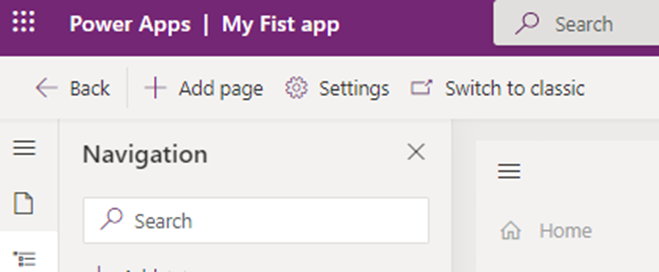
    pastedimage1673143000378v2.png

    Click the Three dot and click Open in App designer

    Click Navigation Option
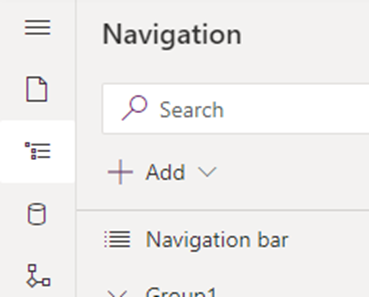
    pastedimage1673143035641v3.png

    Click Add(+)

    Select Subarea to insert entities

    Click the Content type and select TABLE

    Select a Table from dropdown

    Enter Title for the Entity

    Click ADD and Save & Publish

    If this reply is helpful, mark it as verified.

Under review

Thank you for your reply! To ensure a great experience for everyone, your content is awaiting approval by our Community Managers. Please check back later.

Helpful resources

Quick Links

Responsible AI policies

As AI tools become more common, we’re introducing a Responsible AI Use…

Neeraj Kumar – Community Spotlight

We are honored to recognize Neeraj Kumar as our Community Spotlight honoree for…

Leaderboard > Customer experience | Sales, Customer Insights, CRM

#1
Tom_Gioielli Profile Picture

Tom_Gioielli 70 Super User 2025 Season 2

#2
Gerardo Rentería García Profile Picture

Gerardo Rentería Ga... 33 Most Valuable Professional

#3
Daniyal Khaleel Profile Picture

Daniyal Khaleel 32 Most Valuable Professional

Last 30 days Overall leaderboard

Product updates

Dynamics 365 release plans



