web
You’re offline. This is a read only version of the page.
close
Skip to main content

Notifications

Announcements

No record found.

Community site session details

Community site session details

Session Id :
Microsoft Dynamics AX (Archived)

AX V5 Executing flow gives random unknown errors

(0) ShareShare
ReportReport
Posted on by


Hi All,

My AX system has a item import galaxy flow which uses a file to import items into the our AX system.

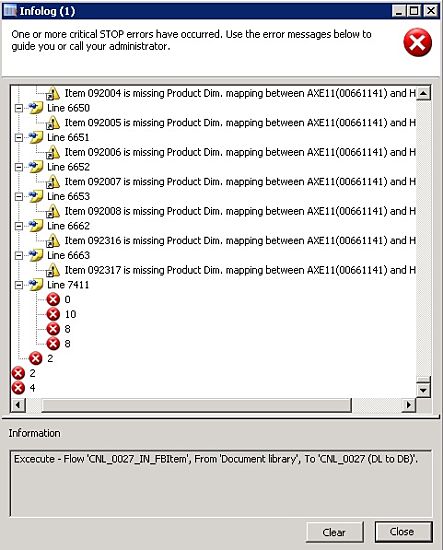
This flow is executing properly for small files but when i try to execute this flow with a 13 MB file i get random error messages as shown below
4505.Flow-executiion-result_5F00_opt.jpg

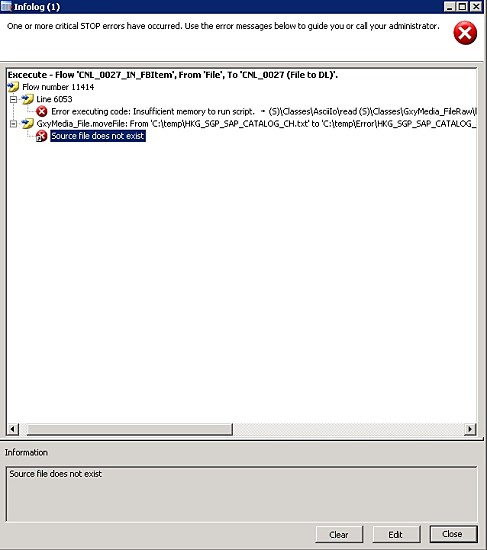
and some times its a different error message
5661.Flow-result2_5F00_opt.jpg

Does anyone know why this happens?

*This post is locked for comments

I have the same question (0)
  • Martin Dráb Profile Picture
    237,831 Most Valuable Professional on at

    Regarding the first screenshot, you'll have to debug your code. We can't tell you what's wrong in code that we've never seen.

    Regarding the other picture, "Insufficient memory to run script" means that you're trying to allocation too large variable. Don't load the whole file to memory; process it in smaller chunks (e.g. line by line).

  • Community Member Profile Picture
    on at

    There is no problem with the code because i have executed the same flow for smaller files and it didnt give any error.

    My assumption is that its a memory problem.

    So you are saying that a file with this much size cannot be imported?.. i-e to make this run we need to split the files into smaller files and then execute the flow?

  • Martin Dráb Profile Picture
    237,831 Most Valuable Professional on at

    Your screenshot very clearly shows an error thrown by your code. That your code works in some situations means nothing when you find a situation when it fails. I think I already told you the some in some other thread, and you obviously ignore it. You can't fix the problem that you pretend not being there.

  • Martin Dráb Profile Picture
    237,831 Most Valuable Professional on at

    Regarding the memory problem, I say you shouldn't load the whole file to memory. Splitting it to smaller files makes sense only if you have to load the whole file for some reason. If you load a single line at time, for example, the total number of lines is irrelevant.

  • Community Member Profile Picture
    on at

    Try to understand what i am saying. The code is working fine in any scenario, but when the file size is increased to a certain point we start to get this error. The file contains around 13000 lines. Each line contains an item detail. The flow is used to import item present in each line. This error message is obtained when the flow has done executing around 7030 lines. i cannot debug this because the same piece of code is getting executed 7030 times.

  • Martin Dráb Profile Picture
    237,831 Most Valuable Professional on at

    Very clearly there is an error. You see it logged in infolog, don't you? That proves that your statement "the code is working fine in any scenario" is false.

    You roughly understand how to reproduce the problem but you haven't debugged it enough to know even which command in your code throws the error. Knowing where it fails is the first step to understanding why and ultimately to a solution. Instead, you claim you can't do it.

    a) Why do you think you can't debug your code?

    b) How do you want to fix the error if you don't even know where it is?

    Seriously, if you don't isolate the problem, you are shooting in the dark and you would need a lot of luck to resolve the problem. A more sophisticated approach would give you a better chance to resolve it. It's up to you.

  • Verified answer
    Douglas Noel Profile Picture
    3,905 on at

    Hi Ajay,

    think the problem is the 10MB limit for such kind of internal variables. And keep in mind unicode (requires 2 bytes per char) and some overhead is used.

    But you can increase this (its a standard problem)

    http://blogs.msdn.com/b/emeadaxsupport/archive/2009/06/15/error-executing-code-insufficient-memory-to-run-script.aspx

    But please: DO NOT SET THIS to ZERO (this means unlimited). Value is in MB. 

    We use some calculation on Max. Characters. If (for example we want to support 20.000.000 characters),

    we (due to internal unicode) multiply this value by two. and use a factor of 1.2.

    20.000.000*2*1.2 = 48.000.000 (In that case I would set this to 48)


    And you have to use the right configuration: Depends on which tier your code is running.

    regards

    Douglas

  • Martin Dráb Profile Picture
    237,831 Most Valuable Professional on at

    Increasing the limit is not a solution - it just means it will need a bigger file to fail (and will consume more memory). Rewriting the program so it doesn't waste memory is a solution.

  • Douglas Noel Profile Picture
    3,905 on at

    Hi Martin,

    if this is NOT a solution, than all official answers to MS requests are not valid. There are so much situations especially 40 2009 (AIF files) where this is this ONLY solution (beside rewriting the aif send or somthing of course) which is STATED by MS. Never seen so much official answers for a problem - issues requests.

    So what the hell (sorry) does your answer mean?

    I have stated that noone should go to unlimited - this 'came' from me personally.

    BUT if you have 40 M Files, why the hell not. If you are told by MS to do this, what should I or anyone do?  Or does MS lie? (Maybe)


    If you have 200M Files I NEVER would do that. 


    Think of (XML ocx) what will you do on exporting huge invoices? Rewrite?


    Say:  This is not a solution? (Ok this is another issue here, which you're able to overcome, but there are a lot of situations whre are you not able to do it in another way (beside rerwriting Axapta/NavAx/Ax/Dax or what ever else - soory the guys from MS have to rewrite - OK). Funny!!!!


    PS:  I know that this CANNOT be a solution :-)  


    It Should only be a hint. Why not. You will be given exactly that answer by MS on that kind problems. That is reality. I am NOT in the position to say MS that this cannot be the solution, even if it is :-)


    regards


    Douglas


  • Martin Dráb Profile Picture
    237,831 Most Valuable Professional on at

    Douglas, I can explain it to you if you calm down, will you? You seem to read something I didn't write.

    You approach is not new for me - you can read my article on this topic, which I wrote three years ago and where I provide some additional information.

    I insist on that merely increasing a limit is not a solution, because it does remove the cause. It just says "it will fail at 50 MB instead of 10 MB", or something like that, instead of "it will work in all cases". Sure, there are situations where you can't easily split the problem to smaller pieces or simply don't want to change the implementation, therefore you resort to the workaround. For example, it would be expensive for Microsoft to rewrite AIF not to load everything to memory, so they tell you to increase the limit. But my answer was about the topic discussed in this thread, not about AIF. Your assumption that I would apply the same solution without considering context is incorrect.

    Despite the fact that there are cases where you rather use the workaround instead of fixing the problem, I don't believe it's wise to put this bug into new code. If he's processing the file line by line, what exactly is the reason for loading the whole file to memory and saving it to an AX variable? Sure, you can ignore bugs and then look for some workarounds, but I deeply believe that removing the bug is a better idea, especially when developing new code. And my point is that implementation can be changed so it never loads huge amount of data to memory, removing both the problem with memory limit and related performance issues.

Under review

Thank you for your reply! To ensure a great experience for everyone, your content is awaiting approval by our Community Managers. Please check back later.

Helpful resources

Quick Links

Responsible AI policies

As AI tools become more common, we’re introducing a Responsible AI Use…

Neeraj Kumar – Community Spotlight

We are honored to recognize Neeraj Kumar as our Community Spotlight honoree for…

Leaderboard > 🔒一 Microsoft Dynamics AX (Archived)

#1
Priya_K Profile Picture

Priya_K 4

#1
Martin Dráb Profile Picture

Martin Dráb 4 Most Valuable Professional

#3
Ali Zaidi Profile Picture

Ali Zaidi 2

Last 30 days Overall leaderboard

Featured topics

Product updates

Dynamics 365 release plans



