web
You’re offline. This is a read only version of the page.
close
Skip to main content

Notifications

Announcements

No record found.

Community site session details

Community site session details

Session Id :
Microsoft Dynamics AX (Archived)

Quarantine Orders - Quarantine Location?

(0) ShareShare
ReportReport
Posted on by 2,459

hi

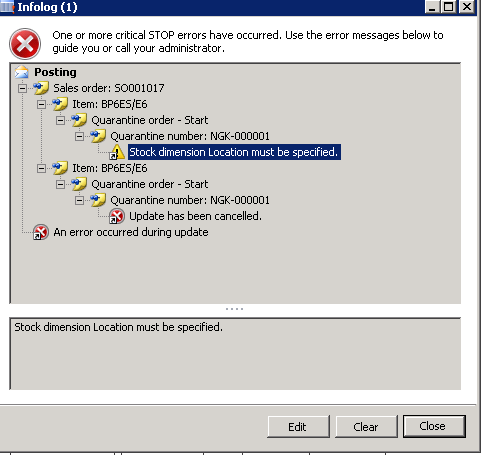
I'm posting a delivery note for a return order, for items that have the disposition codes as 'SCRAP'.. but I am getting the below error.
0827.2017_2D00_07_2D00_04_5F00_1134.png

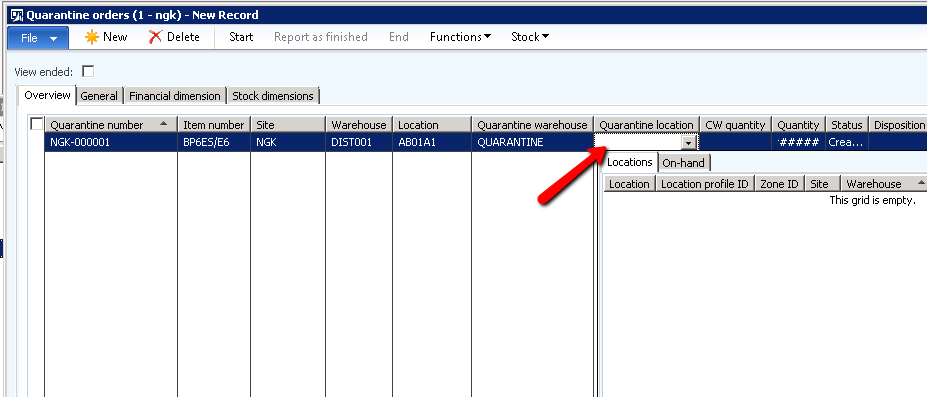
If I try create a quarantine order manually, I cannot setup a quarantine location (for some reason the system wont allow me) - am I doing something wrong?
8360.q.png

s2084.w.png

*This post is locked for comments

I have the same question (0)
  • Verified answer
    Yohann Rolland Axcible Profile Picture
    3,111 on at

    Hi again,

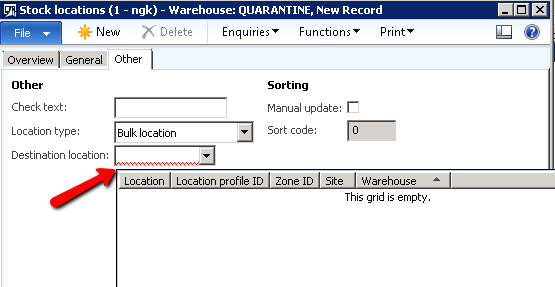
    Try to use the wizard from the quarantaine warehouse. Then by doing next > next ... it will create a location for your quarantaine warehouse.

    From the first screenshot I guess Ax generates this because the item model group you are using for your item should have "quarantaine management" check ? If not, you won't be disturb by quarantaine when using scrap disposition code.

  • Community Member Profile Picture
    on at

    Destination location is mandatory, if you fill a location on General tab then Destination location will be updated automatically.

  • SU-22040800-0 Profile Picture
    2,459 on at

    hi Yohann

    I utilized the Wizard to create some locations, and that seemed to work.

    I am however still getting the first error when posting the delivery note.

    any ideas?

  • Yohann Rolland Axcible Profile Picture
    3,111 on at

    First question, do you want to use the quarantaine management (maybe you don't have the choice), because I can guess the - NGK-00001  is your first quarantaine order created in your company ?

    - On your NGK-00001 you can't specify the location for the QUARANTAINE warehouse ?

    - try to setup a default location (receipt and issue) on your QUARANTAINE warehouse as you now have one available.

    - try to cancel the last step of your return order, and do it again. With a default location setup on your QUARANTAINE warehouse you will not have the issue (I hope).

  • SU-22040800-0 Profile Picture
    2,459 on at

    Hi Yohann

    If I don't need to use Quarantine Management, then I would prefer not to.. Is that an option?

  • Yohann Rolland Axcible Profile Picture
    3,111 on at

    Go to your item model group and disabled the quarantaine management checkbox. (maybe the name is "control management" in Ax 2012).

  • Verified answer
    Sagar Suman Profile Picture
    6,550 Super User 2025 Season 2 on at

    Hi James,

    It seems the item has location as mandatory dimension and the quarantine order created has no location on it as you have not created any thats why there is nothing coming in drop down.

    As per your above screenshot kindly check do you have made locations for the quarantine warehouse and have successfully added them to the warehouse master in default receipt and default issue locations.

    You are getting this error as either you have not created any locations for your quarantine warehouse or you have not selected any location in "default receipt location" on quarantine warehouse.

    I would suggest you not to uncheck the quarantine management check mark as this item model group would also be controlling the quarantine management for other items in the business and to use quarantine is a business decision and should not be unchecked for an error itself.

  • SU-22040800-0 Profile Picture
    2,459 on at

    Firstly - thanks for all the responses guys!

    @Yohann - I'll double check with the WMS/WAX guys to see if we can disable this.

    @Sagar - I set it up as you described, and it the error disappeared! thank you for this. The credit note did not however post the stock the scrap account - it posted it back into stock ? Am I missing something in my setup?

  • Yohann Rolland Axcible Profile Picture
    3,111 on at

    On the on-hand inventory (physical) you should have 2 transactions like + 10 and - 10 if you use a scrap action. Is that ok ?

    On financial view  you cannot setup specific account on the disposition code so it will use what you have setup on item groups / posting profiles.

  • SU-22040800-0 Profile Picture
    2,459 on at

    Hi Yohann

    I checked the transactions (see screen shot below) - not sure if they are correct.

    7534.2.png

    Then - which account in the posting profiles, should I use for the scrap account?

    7534.2.png

    thanks a mil

    James

Under review

Thank you for your reply! To ensure a great experience for everyone, your content is awaiting approval by our Community Managers. Please check back later.

Helpful resources

Quick Links

Responsible AI policies

As AI tools become more common, we’re introducing a Responsible AI Use…

Neeraj Kumar – Community Spotlight

We are honored to recognize Neeraj Kumar as our Community Spotlight honoree for…

Leaderboard > 🔒一 Microsoft Dynamics AX (Archived)

#1
Martin Dráb Profile Picture

Martin Dráb 4 Most Valuable Professional

#1
Priya_K Profile Picture

Priya_K 4

#3
MyDynamicsNAV Profile Picture

MyDynamicsNAV 2

Last 30 days Overall leaderboard

Featured topics

Product updates

Dynamics 365 release plans